
Let's Talk

Author: Orthoplex Solutions

  • Overcoming Safari Privacy Restrictions: Technical Solutions for Enterprise Websites and Web Applications in 2026

    Overcoming Safari Privacy Restrictions: Technical Solutions for Enterprise Websites and Web Applications in 2026

    Safari’s Intelligent Tracking Prevention represents the most aggressive browser privacy implementation affecting enterprise websites and web applications in 2026. Apple’s WebKit engine enforces strict limitations on cookies, localStorage, sessionStorage, and cross-site tracking that create operational challenges for marketing websites, e-commerce platforms, and business-critical web applications. Organizations report form submission failures, analytics tracking loss, session expiration issues, authentication disruptions, and shopping cart abandonment affecting user experience and business operations.

    Safari commands 18.9% global browser market share as of December 2024, with concentration reaching 66% among certain demographics including iOS mobile users and enterprise Mac deployments. Organizations cannot ignore Safari compatibility without excluding substantial user populations. Technical challenges stem from multiple Safari privacy mechanisms including Intelligent Tracking Prevention 2.3, seven-day cookie expiration for JavaScript-set cookies, localStorage deletion after seven days without interaction, CNAME cloaking detection limiting server-side workarounds, and Private Relay IP address masking affecting geolocation and rate limiting.

    These restrictions affect multiple website and application functions. Marketing analytics platforms experience 13-36% data loss in Safari browsers as client identifiers expire prematurely. E-commerce websites lose shopping cart persistence and conversion tracking as cookies expire between browsing sessions. Corporate websites face contact form submission failures when implementations rely on third-party services. Authentication systems encounter session timeout issues when JavaScript-based session management expires after seven days. SaaS web applications struggle with multi-tab workflows as sessionStorage isolation prevents state sharing between browser tabs.

    Organizations require technical solutions respecting user privacy while maintaining website and application functionality. This comprehensive guide provides enterprise-grade approaches for overcoming Safari privacy restrictions through server-side architecture, first-party implementation strategies, and modern web standards adoption. Technical solutions emphasize privacy-compliant methods rather than workarounds that future Safari versions will eliminate.
    Understanding Safari Intelligent Tracking Prevention: Technical Mechanisms and Business Impact

    Safari ITP Evolution and Current State

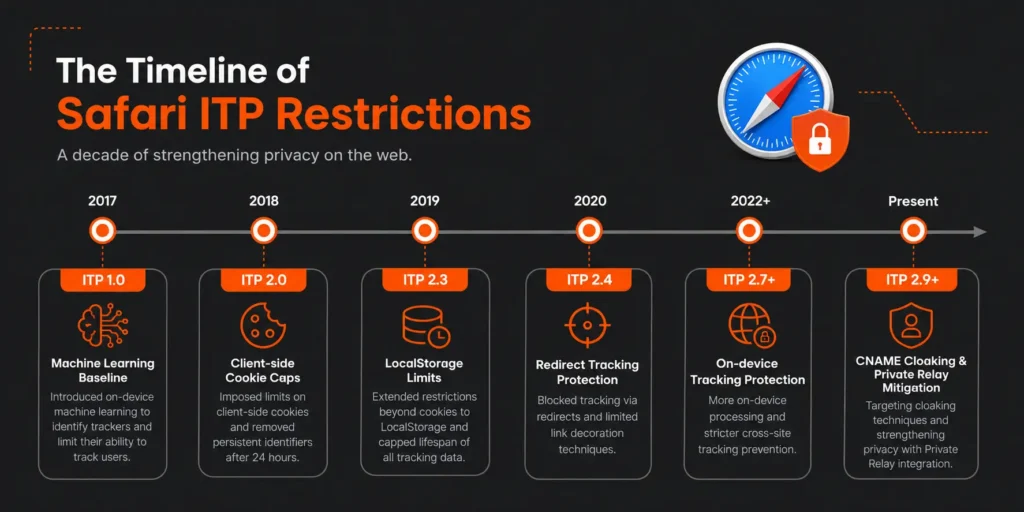
    Apple introduced Intelligent Tracking Prevention in Safari 11 during 2017, establishing WebKit as the first browser engine implementing machine learning-based tracking prevention. ITP has evolved through multiple versions, each introducing stricter privacy protections that progressively eliminate tracking techniques. ITP 2.0 arrived in 2018, introducing the seven-day expiration for all persistent cookies set via JavaScript document.cookie API. ITP 2.1 followed in 2019, limiting first-party cookies to seven days when the top-level domain was classified as having cross-site tracking capability. ITP 2.2 in 2019 reduced the seven-day window to 24 hours for link decoration parameters. ITP 2.3 in 2019 began limiting localStorage and IndexedDB access to seven days without user interaction.

    The current ITP implementation in Safari 17 and Safari 18 enforces multiple restrictions simultaneously. Client-side set cookies through JavaScript document.cookie expire after seven days maximum regardless of explicit expiration dates specified. Server-set cookies through HTTP Set-Cookie headers with explicit expiration dates exceeding seven days receive longer lifetimes only when domains meet specific conditions. LocalStorage and IndexedDB data face deletion after seven days of user inactivity on the domain. CNAME cloaking detection identifies attempts to bypass ITP through DNS aliasing of third-party tracking domains. Private Relay obscures IP addresses for iCloud subscribers, preventing geolocation and device fingerprinting.

    Safari distinguishes between first-party and third-party contexts based on domain relationships and user interaction history. First-party cookies belong to the domain displayed in the address bar and the user is directly interacting with. Third-party cookies belong to domains embedded within first-party pages through iframes, images, scripts, or other resources. ITP classification algorithms analyze browsing patterns identifying domains appearing across multiple unrelated websites, suggesting tracking behavior. Domains classified as trackers face immediate cookie blocking in third-party contexts and accelerated expiration in first-party contexts.

    The business impact varies significantly across website and application types. Marketing websites relying on third-party analytics platforms lose visitor tracking capability as third-party cookies are blocked immediately. E-commerce websites experience shopping cart abandonment increases as seven-day cookie expiration causes cart loss for users not returning within the window. SaaS web applications face authentication timeout complaints as session cookies expire prematurely. Corporate websites with embedded chat widgets, form builders, or content delivery networks encounter functionality degradation as third-party resources lose state persistence.

    Cross-Browser Privacy Landscape Comparison

    Understanding Safari restrictions requires context within the broader browser privacy landscape. Chrome commands 65.7% global market share as of December 2024, Firefox maintains 3.2%, and Edge holds 5.1%. Each browser implements distinct privacy approaches creating a fragmented landscape requiring tailored technical solutions.

    Google Chrome announced third-party cookie deprecation multiple times with implementations repeatedly delayed. The most recent timeline established Q1 2025 for beginning phased deprecation, with complete removal projected for late 2025. Chrome’s Privacy Sandbox initiative provides alternatives to third-party cookies through APIs including Topics for interest-based advertising, Protected Audience for remarketing, Attribution Reporting for conversion measurement, and Private Aggregation for cross-site measurement. Chrome’s approach emphasizes preserving advertising ecosystem functionality while improving privacy, contrasting with Safari’s more aggressive restrictions.

    Mozilla Firefox implements Enhanced Tracking Protection as the default privacy mechanism. Firefox distinguishes between Standard and Strict protection modes, with Standard mode blocking known trackers identified through Disconnect’s blocklist while allowing first-party cookies and cross-site cookies for non-tracking purposes. Strict mode blocks all third-party cookies regardless of tracking classification, approaching Safari’s aggressiveness. Firefox Total Cookie Protection introduced in 2021 implements cookie partitioning confining cookies to the website that created them, preventing cross-site tracking even when third-party cookies are technically allowed.

    Microsoft Edge, built on Chromium, implements tracking prevention with three levels: Basic, Balanced, and Strict. Balanced mode, the default, blocks trackers from sites the user has not engaged with while allowing trackers from visited sites. Strict mode blocks most trackers across all sites similar to Firefox Strict mode. Edge’s approach aligns closely with Chrome given the shared Chromium foundation, with Microsoft committing to Privacy Sandbox support following Chrome’s timeline.

    The fragmentation creates technical challenges for organizations. Solutions working in Chrome may fail in Safari and vice versa. Third-party analytics working in Firefox may break in Safari. Organizations must test across browsers rather than assuming consistent behavior. Safari’s restrictions represent the strictest implementation, making Safari compatibility the most challenging target. Solutions satisfying Safari requirements typically work across other browsers, establishing Safari as the baseline for privacy-compliant development.

    Quantifying Safari Impact on Business Operations

    Safari privacy restrictions create measurable business impacts across multiple dimensions including analytics accuracy, conversion tracking reliability, session management effectiveness, and user experience quality. Organizations must quantify impacts to justify technical solution investments and measure improvement effectiveness.

    Analytics platforms report significant data loss in Safari browsers. Google Analytics studies indicate 13-36% visitor undercounting in Safari compared to other browsers, with variation depending on website characteristics and user behavior patterns. Client-side analytics relying on cookies or localStorage for visitor identification lose tracking when identifiers expire after seven days. Users visiting websites irregularly exceed seven-day windows between visits, appearing as new visitors rather than returning visitors. Behavioral analytics tracking user journeys across multiple sessions fragment as session linkage breaks. Marketing attribution models fail when conversion events cannot connect to originating campaigns due to expired identifiers.

    E-commerce conversion rates decline measurably due to Safari restrictions. Shopping cart abandonment rates in Safari exceed other browsers by 8-15% according to e-commerce analytics platforms. Cart persistence mechanisms using client-side storage lose data after seven days, forcing users to rebuild carts. Checkout flows spanning multiple sessions fail when authentication cookies expire, requiring users to log in repeatedly. Saved payment methods stored in localStorage disappear, increasing checkout friction. Product recommendations based on browsing history lose accuracy as historical data expires, reducing cross-sell and upsell effectiveness.

    SaaS web application user complaints increase regarding session timeouts and data loss. Session management implementations using JavaScript-set cookies encounter unexpected expiration as seven-day limits override explicit session durations. Users returning to applications after weekends find sessions expired despite “remember me” selections. Multi-tab workflows fail when localStorage isolation prevents state sharing between tabs opened from the same domain. Form data temporarily stored in localStorage disappears after seven days, causing data loss for saved drafts. User preference persistence fails as settings stored client-side expire, frustrating users who repeatedly configure the same preferences.

    Corporate website form submissions fail at higher rates in Safari compared to other browsers. Contact forms using third-party form builders like Typeform or JotForm embedded via iframes lose functionality as cross-site cookies and storage get blocked. CAPTCHA implementations relying on third-party services encounter failures as tracking prevention blocks verification mechanisms. Progressive form implementations saving partial progress to localStorage lose data, forcing users to restart lengthy forms. Multi-step forms requiring state persistence between pages fail when cookie-based session tracking expires mid-completion.

    Organizations require measurement frameworks quantifying Safari-specific impacts. Web analytics platforms must segment metrics by browser, identifying Safari performance gaps. E-commerce platforms should track conversion funnels by browser, measuring abandonment rate differences. SaaS applications need user support ticket analysis identifying browser-specific complaints. A/B testing frameworks must account for browser differences when measuring treatment effects. Measurement provides baseline quantification for calculating return on investment for technical solution implementations.

    Safari Privacy Restrictions: Technical Deep Dive and Root Cause Analysis

    Cookie Expiration Mechanics and Classification

    Safari Intelligent Tracking Prevention implements complex cookie expiration logic based on cookie setting methods, domain classification, and user interaction patterns. Understanding these mechanics enables developers to architect solutions maximizing cookie persistence within privacy constraints.

    JavaScript-set cookies using document.cookie API face strict seven-day maximum expiration regardless of explicit expiration dates specified in the cookie string. This restriction applies even when developers specify expiration dates years in the future. Safari ignores the explicit expiration and enforces the seven-day cap. The seven-day counter resets when users interact with the website, defined as navigating to pages, clicking links, submitting forms, or otherwise actively engaging. Passive page loads through background tabs or programmatic navigation do not reset the counter.

    Server-set cookies using HTTP Set-Cookie headers receive preferential treatment compared to JavaScript-set cookies. When web servers send Set-Cookie headers with explicit Max-Age or Expires attributes, Safari allows expiration dates beyond seven days if the domain meets qualification criteria. Safari evaluates whether the domain has been classified as having cross-site tracking capability based on browsing pattern analysis. Domains not classified as trackers maintain their specified cookie expiration. Domains classified as trackers receive accelerated expiration similar to JavaScript-set cookies.

    The qualification criteria for extended cookie expiration remain partially opaque as Apple does not publish explicit classification algorithms. Observed patterns suggest several factors influence classification including domain appearance across unrelated websites within short timeframes, presence of tracking pixels or analytics scripts, participation in advertising networks, cookie setting patterns indicative of third-party tracking, and lack of meaningful user interaction with the domain. Organizations can influence classification by ensuring legitimate first-party relationships with users, avoiding tracking-like behaviors, and implementing proper domain architecture.

    Third-party cookies face immediate blocking regardless of expiration dates or setting methods. Third-party context occurs when resources load from domains different than the top-level domain displayed in the address bar. iFrame embeds, image requests, script loads, stylesheet requests, and XMLHttpRequests to different domains all constitute third-party contexts. Safari blocks cookie setting and reading in these contexts completely, breaking functionality depending on cross-site cookies. Many integration patterns relying on third-party cookies fail entirely in Safari, requiring architectural redesign.

    SameSite cookie attribute provides developers with partial control over cookie behavior across contexts. SameSite=Strict prevents cookie transmission in any third-party context, including navigation from external sites. SameSite=Lax allows cookie transmission during top-level navigation from external sites but blocks transmission in embedded contexts. SameSite=None explicitly allows transmission in third-party contexts but requires Secure attribute indicating HTTPS-only transmission. Safari respects SameSite attributes but combines them with ITP restrictions, meaning SameSite=None cookies still face blocking when ITP classifies the domain as a tracker.

    LocalStorage and SessionStorage Limitations

    Web Storage APIs including localStorage and sessionStorage provide client-side data persistence mechanisms that many websites and applications rely upon for functionality. Safari implements restrictions on both storage mechanisms that create unexpected behavior for developers accustomed to other browsers.

    LocalStorage in Safari faces automatic deletion after seven days without user interaction. The seven-day counter operates independently from cookie expiration, using the same user interaction definition. Applications storing authentication tokens, user preferences, cached data, or application state in localStorage lose this data when users do not interact with the website for seven days. The deletion occurs without warning or error, causing applications to encounter empty localStorage unexpectedly. Developers must implement defensive code checking for data presence and handling missing data gracefully.

    SessionStorage maintains data only for the duration of the page session, consistent across all browsers. However, Safari’s definition of session boundaries differs from other browsers in specific scenarios. Safari creates separate sessionStorage instances for each tab, preventing data sharing between tabs even when opened from the same parent page. Applications implementing multi-tab workflows expecting sessionStorage visibility across tabs fail in Safari. Safari also clears sessionStorage more aggressively during navigation, particularly when users navigate away and return through history traversal.

    The storage quota limits in Safari differ from other browsers. Safari allocates approximately 5-10 MB per domain for localStorage and sessionStorage combined, compared to Chrome’s 10 MB per origin and Firefox’s 10 MB per origin. Applications storing large datasets client-side may exceed Safari’s quota, causing write operations to fail with QuotaExceededError exceptions. Developers must implement quota management checking available space before writes and implementing cleanup strategies when quotas approach limits.

    IndexedDB provides more robust client-side database capabilities for complex data storage needs. Safari implements IndexedDB with similar seven-day expiration restrictions as localStorage. Data stored in IndexedDB faces automatic deletion after seven days without user interaction. Additionally, Safari’s IndexedDB implementation has historically contained bugs and performance issues compared to other browsers. Applications using IndexedDB as primary data storage must account for Safari’s restrictions and implementation differences.

    The Privacy-Preserving Ad Click Attribution API introduced by WebKit provides an alternative mechanism for conversion attribution without relying on cookies or persistent storage. However, this API specifically targets advertising use cases rather than general website or application functionality. Organizations seeking general-purpose persistent storage must architect solutions not relying on client-side storage mechanisms for critical functionality.

    CNAME Cloaking Detection and DNS-Based Workarounds

    Organizations attempted to bypass ITP restrictions by implementing CNAME cloaking, where analytics or tracking domains are aliased through DNS CNAME records to appear as subdomains of the first-party domain. Safari implemented detection mechanisms identifying and blocking CNAME cloaking attempts.

    CNAME cloaking works by creating DNS CNAME records pointing subdomains like analytics.example.com to third-party tracking services like tracking.vendor.com. From the browser’s perspective, requests to analytics.example.com appear first-party because they match the example.com domain. The DNS resolution transparently redirects requests to tracking.vendor.com without browser visibility. This technique allowed third-party services to set first-party cookies and avoid ITP restrictions.

    Safari’s CNAME cloaking detection examines response headers, timing patterns, and server characteristics identifying when apparent first-party subdomains actually resolve to third-party services. Heuristics include discrepancies between HTTP response headers typical of third-party services versus first-party infrastructure, network timing patterns inconsistent with geographic proximity, TLS certificate inspection revealing third-party ownership, and behavioral patterns matching known tracking services. When Safari detects CNAME cloaking, it reclassifies the subdomain as third-party, applying full ITP restrictions including immediate cookie blocking.

    Organizations using Content Delivery Networks face collateral impact from CNAME cloaking detection. CDN configurations commonly use CNAME records pointing domains like cdn.example.com to CDN provider infrastructure. Safari’s detection heuristics may misclassify legitimate CDN usage as cloaking attempts, blocking cookies or applying restrictions incorrectly. CDN vendors have worked with Apple to establish patterns distinguishing legitimate CDN usage from tracking cloaking, but edge cases persist requiring careful configuration.

    The technical solution avoiding CNAME cloaking issues involves implementing true first-party infrastructure rather than aliasing third-party services. Organizations should deploy analytics collection endpoints, authentication services, API gateways, and other critical functionality on infrastructure they directly control using their own domains. Server-side integration with third-party services maintains functionality while preserving first-party classification. This approach requires more technical investment than simple CNAME aliasing but provides Safari compatibility and future-proofing against evolving restrictions.

    Private Relay and IP Address Masking

    iCloud Private Relay introduces additional complexity for websites and applications relying on IP address visibility for functionality. Private Relay, available to iCloud subscribers, routes Safari traffic through proxy servers masking the originating IP address from destination websites. Organizations see proxy server IP addresses rather than actual user IP addresses, affecting geolocation, rate limiting, fraud detection, and analytics.

    Private Relay operates in two hops. The first hop, operated by Apple, receives the user’s request and knows the user’s IP address but cannot see the destination website. The second hop, operated by third-party content delivery networks, receives the proxied request and knows the destination website but cannot see the user’s IP address. This split architecture prevents any single party from correlating user identity with browsing activity.

    The geolocation impact affects websites using IP addresses for location-based content, pricing, or access restrictions. Geolocation services querying IP addresses return proxy server locations rather than user locations. Organizations cannot determine user countries, regions, or cities reliably. Content delivery optimization based on geographic proximity becomes less effective. Regulatory compliance requirements restricting content by jurisdiction become difficult to enforce. Organizations must implement alternative location determination methods including HTML5 Geolocation API with explicit user permission, account profile location settings, or location detection during account registration.

    Rate limiting and DDoS protection systems relying on IP addresses face challenges when multiple users share proxy IP addresses. Traditional rate limiting counts requests per IP address, blocking IP addresses exceeding thresholds. Private Relay causes multiple legitimate users to share proxy IP addresses, causing innocent users to encounter rate limit blocks when other users sharing the same proxy exceed thresholds. Organizations must implement more sophisticated rate limiting using cookies, account identifiers, or device fingerprinting techniques that maintain effectiveness despite IP address masking.

    Fraud detection systems using IP geolocation for risk assessment lose accuracy. Transaction fraud scores typically increase when IP addresses associate with proxies or VPNs due to anonymization correlation with fraudulent activity. Private Relay causes legitimate users to receive elevated fraud scores incorrectly. Organizations must retrain fraud detection models accounting for Private Relay prevalence and implementing alternative risk signals not dependent on IP address characteristics.

    Analytics platforms measuring traffic sources and user demographics lose accuracy when IP addresses are masked. Geographic reporting becomes unreliable as proxy locations replace user locations. Audience demographic estimation based on IP address characteristics becomes impossible. Organizations must implement alternative analytics collection methods including server-side analytics with authenticated user data, first-party cookies for session tracking, and survey-based demographic collection with user consent.

    Technical Solutions for Safari Compatibility: Architecture and Implementation

    Server-Side Cookie Management and Session Handling

    Moving session management from client-side JavaScript to server-side HTTP headers represents the most reliable approach for maintaining Safari compatibility. Server-set cookies through Set-Cookie HTTP headers avoid the seven-day JavaScript-set cookie restriction, allowing extended expiration dates for domains not classified as trackers.

    Organizations should implement session management exclusively through HTTP-only cookies set via server responses. The Set-Cookie header should specify HttpOnly attribute preventing JavaScript access, Secure attribute requiring HTTPS transmission, SameSite=Lax or SameSite=Strict preventing cross-site cookie transmission, appropriate expiration through Max-Age or Expires attributes, and path and domain attributes scoping cookie visibility appropriately. Example implementation sets session cookies with 30-day expiration through server responses, avoiding client-side cookie manipulation entirely.

    Authentication flow design must accommodate server-side cookie management. Organizations should implement authentication through server-rendered pages or API endpoints returning Set-Cookie headers rather than client-side JavaScript setting authentication tokens. Login forms should submit to server endpoints that validate credentials and set session cookies before redirecting. Single-page applications requiring JWT tokens should retrieve tokens from HttpOnly cookies rather than localStorage, using server-side token validation for API requests. Refresh token rotation should occur server-side with new tokens delivered through Set-Cookie headers.

    Session extension mechanisms require user interaction to reset the seven-day counter. Organizations can implement heartbeat requests during active usage, sending periodic requests to the server during active sessions to demonstrate user engagement. These requests should trigger Set-Cookie headers resetting cookie expiration. However, background heartbeats without actual user interaction do not reset ITP counters. Session extension must correspond to genuine user activity like page navigation, form submission, or explicit user actions.

    Organizations must implement graceful session expiration handling for scenarios when seven-day limits expire despite extended cookie expiration dates. Applications should detect expired sessions through failed authentication checks, redirect users to login pages with clear messaging explaining the timeout, preserve application state through URL parameters or server-side storage allowing state restoration after re-authentication, and implement “remember me” functionality through long-lived cookies combined with security controls like device fingerprinting or notification of new device logins.

    Multi-domain session management presents particular challenges under Safari restrictions. Organizations operating multiple domains must implement careful coordination. Single sign-on implementations cannot rely on third-party cookies for session transfer between domains. Organizations should implement OAuth 2.0 or SAML flows for cross-domain authentication, use server-side session federation with centralized authentication services, implement explicit authentication flows when users navigate between domains, or consolidate functionality under single domains where technically feasible. Subdomain isolation for security purposes must account for cookie scope limitations.

    First-Party Analytics Implementation and Server-Side Tracking

    Analytics tracking requires architectural redesign to maintain Safari compatibility. Organizations should implement server-side tracking rather than relying exclusively on client-side JavaScript beacons. Server-side implementations collect analytics events on web servers processing page requests, avoiding client-side storage restrictions and providing more reliable data collection.

    Server-side analytics architectures involve multiple components. Web servers log request details including URLs, user agents, referers, IP addresses, timestamps, and custom event parameters. Log collection pipelines aggregate logs from multiple web servers into centralized data warehouses. Data processing pipelines parse logs, sessionize visits, identify unique users, and generate analytics metrics. Visualization platforms query processed data generating reports, dashboards, and insights. Organizations can implement custom analytics pipelines or use platforms like AWS Cloud Management services for scalable infrastructure.

    Hybrid analytics approaches combine server-side and client-side collection maximizing data capture. Server-side tracking captures all page views, providing baseline traffic visibility unaffected by client-side blocking. Client-side JavaScript captures rich interaction events like scroll depth, click events, form interactions, and engagement metrics unavailable server-side. Data from both sources merges during processing using session identifiers correlating client and server events. This approach provides comprehensive analytics while maintaining Safari compatibility for core metrics.

    First-party cookie-based user identification replaces third-party analytics cookies. Organizations should implement user ID cookies set through server-side Set-Cookie headers on their own domains. These first-party cookies persist longer than JavaScript-set cookies when domains maintain good standing with ITP classification. User ID generation should use cryptographically secure random values avoiding personally identifiable information. Cookie rotation should occur periodically balancing user tracking persistence with privacy considerations. Server-side analytics pipelines consume these cookies for user identification and sessionization.

    Event tracking APIs replace client-side beacon requests to third-party analytics domains. Organizations should implement first-party API endpoints receiving analytics events from client-side JavaScript. These endpoints run on the same domain as the website, avoiding cross-site restrictions. API implementations validate, enrich, and forward events to analytics platforms or data warehouses. Event batching reduces request overhead by collecting multiple events before transmission. Organizations must implement Application Server Monitoring ensuring analytics API reliability.

    Conversion attribution without third-party cookies requires alternative approaches. Organizations should implement server-side attribution models using first-party data. URL parameter tracking captures campaign information through UTM parameters or custom schemes. Server-side session storage links campaign parameters to eventual conversions. Multi-touch attribution models distribute conversion credit across touchpoints using first-party session data. Organizations must implement careful deduplication avoiding overcounting when users engage through multiple channels.

    Form Handling and Third-Party Service Integration

    Form submissions encountering Safari restrictions typically involve third-party form builders, CAPTCHA services, payment processors, or other embedded services requiring cross-site communication. Organizations must redesign integration patterns avoiding third-party cookies and cross-site storage access.

    First-party form hosting eliminates cross-site restrictions by implementing forms directly on the organization’s domain. Organizations should build custom forms using server-side rendering or client-side frameworks hosted on their infrastructure rather than embedding third-party form builders. Form submissions post to server-side endpoints on the same domain processing submissions, validating inputs, and integrating with backend systems. Form state persistence uses server-side session storage rather than client-side localStorage. This approach provides complete control over form functionality and eliminates Safari compatibility issues.

    CAPTCHA implementations require special handling to maintain functionality. Google reCAPTCHA operates as a third-party service setting cookies for bot detection. Safari blocks these cookies breaking verification. Organizations should implement reCAPTCHA Enterprise with score-based assessment rather than checkbox verification, reducing cookie dependence. Server-side reCAPTCHA verification using the reCAPTCHA API validates challenge responses without client-side dependencies. Alternative CAPTCHA services like hCaptcha provide first-party deployment options where organizations self-host CAPTCHA infrastructure on their own domains. Organizations must balance bot protection with user experience, implementing tiered verification where low-risk submissions proceed without CAPTCHA while high-risk attempts trigger verification.

    Payment processing integrations commonly use third-party payment processors requiring cross-site communication for PCI compliance. Organizations cannot process credit cards directly without PCI DSS compliance certification. Solutions include hosted payment pages where users redirect to payment processor domains for transaction completion, returning to merchant domains after completion. Payment processor-hosted forms avoid cross-site restrictions as the entire payment flow occurs on the processor domain. Tokenization services like Stripe Elements provide embeddable payment forms running in iframes but using first-party tokens rather than cookies for session tracking. Organizations should work with payment processors supporting Safari compatibility explicitly, testing payment flows in Safari before production deployment.

    Chat widget integration faces similar third-party challenges. Embedded chat widgets from services like Intercom or Drift set third-party cookies for user identification and conversation threading. Safari blocks these cookies causing conversation fragmentation. Organizations should implement first-party chat widget hosting where chat infrastructure runs on their domains. API-based chat services allow custom frontend implementation while leveraging third-party backend services. Organizations maintain session state in first-party cookies or server-side storage, sending session identifiers to chat APIs for conversation correlation. Custom implementations require more development investment but provide Safari compatibility and better customization options.

    Content delivery network configurations must avoid CNAME cloaking detection. Organizations should use CDN services properly classified as infrastructure rather than tracking. CDN providers like CloudFlare, Akamai, and Fastly work with Apple ensuring their infrastructure patterns receive proper classification. Organizations must configure CDN domains correctly using appropriate DNS records, TLS certificates, and HTTP header configurations. Testing CDN configurations in Safari verifies functionality before production deployment. Organizations should avoid CDN configurations that mimic tracking patterns, such as setting cookies for non-CDN purposes or collecting analytics unrelated to content delivery.

    Application State Management Without Client-Side Storage

    Single-page applications and progressive web applications heavily utilize localStorage and sessionStorage for state management. Safari’s seven-day expiration and storage isolation breaks many common patterns. Organizations must implement alternative state management approaches maintaining functionality across browser restrictions.

    Server-side session storage replaces client-side state persistence. Organizations should store application state in server-side sessions identified through HttpOnly cookies. State mutations occur through API requests to server endpoints that update session storage and return current state. Client-side code maintains transient state in memory during active sessions but retrieves state from servers when pages load or reload. This approach ensures state persistence beyond seven-day client storage limits. Organizations must implement AWS Cloud Management infrastructure supporting session storage scalability for large user populations.

    URL-based state management encodes application state in URL parameters or hash fragments. Organizations can implement state serialization encoding complex state objects into URL parameters. Browser history APIs push new URLs as state changes occur. Page loads parse URL parameters reconstructing application state without client storage dependencies. This approach maintains state across sessions and devices, enabling state sharing through URL copying. However, URL length limits restrict state complexity, and sensitive state should not appear in URLs for security and privacy reasons. URL-based state works well for navigation state, filter selections, and similar user interface configurations.

    Server-side rendering techniques eliminate client-side state bootstrapping requirements. Organizations can implement frameworks like Next.js enabling server-side rendering of React applications or Nuxt.js for Vue.js applications. Initial page loads render complete HTML on servers including current state, avoiding blank pages requiring client-side data fetching. Subsequent navigation can use client-side routing for performance while maintaining server-side rendering as fallback. This approach improves performance, search engine optimization, and Safari compatibility simultaneously. Organizations benefit from CI/CD implementation supporting server-side rendering deployment pipelines.

    Database-backed state persistence stores state directly in backend databases rather than client storage. Each user account links to state records in databases. Application loads retrieve state through API requests authenticated using server-side session cookies. State mutations write to databases through API endpoints. This approach provides reliable persistence, enables state access across devices, and supports complex state structures exceeding client storage limitations. Organizations must implement efficient database queries avoiding performance bottlenecks from frequent state reads and writes. Caching layers can reduce database load for frequently accessed state.

    Progressive enhancement strategies implement core functionality without client storage dependencies, adding enhanced features when storage is available. Organizations should design applications working without localStorage or sessionStorage as baseline, detect storage availability using JavaScript feature detection before attempting to use storage APIs, implement fallback behaviors when storage is unavailable or quota-exceeded errors occur, and provide user messaging when features require storage functionality explaining limitations in Safari. This approach ensures basic functionality across all browsers while taking advantage of capabilities when available.

    Multi-tab communication without sessionStorage requires alternative approaches. BroadcastChannel API enables message passing between tabs and windows on the same origin, working in Safari 15.4 and later. Service Workers provide another communication mechanism, registering workers that receive messages from multiple tabs and coordinate responses. WebSocket connections to backend servers enable server-mediated communication, where tabs send messages to servers that broadcast to other connected tabs. Organizations must implement graceful degradation when multi-tab features are unavailable, such as warning users about opening multiple tabs or limiting functionality to single tabs.

    Cross-Browser Compatibility Testing and Quality Assurance

    Comprehensive Browser Testing Strategy

    Safari compatibility requires systematic testing across browser versions, operating systems, and device types. Organizations must implement testing strategies covering the Safari ecosystem comprehensively rather than spot-checking single configurations.

    Desktop Safari testing should cover macOS versions and Safari versions in combination. Safari 17 on macOS Sonoma represents current stable releases as of early 2025, but organizations must test Safari 16 on earlier macOS versions supporting significant user populations. Organizations should maintain testing infrastructure with virtual machines or cloud-based browser testing services providing access to multiple macOS and Safari combinations. Automated testing frameworks can execute test suites across configurations, while manual testing verifies user experience quality for critical workflows.

    iOS Safari testing requires testing on physical devices spanning iOS versions. Safari on iOS maintains tighter coupling with iOS versions compared to desktop Safari and macOS. iOS 17 and iOS 18 introduce Safari updates independent of macOS Safari. Organizations must test on iPhone models spanning multiple screen sizes, processor generations, and iOS versions. iPad testing covers additional screen sizes and usage patterns. Device farms or cloud testing services provide access to physical devices for organizations unable to maintain extensive device inventories. Organizations should test both mobile-optimized and responsive desktop layouts when applications target iPhone and iPad.

    iPadOS Safari introduces additional considerations compared to iOS. iPadOS enables desktop-class browsing with keyboard and mouse support, multitasking features, and larger display support. Websites may receive desktop user agents rather than mobile user agents depending on content and user preferences. Organizations must test both mobile and desktop experiences on iPadOS, ensuring applications adapt appropriately. Desktop-targeted features should work in iPadOS Safari when enabled, while touch-optimized interfaces should function correctly when users interact with touch input.

    Browser version coverage should span at least the current major version and one prior major version. Safari 17 and Safari 16 represented minimum coverage as of early 2025. Organizations serving users with older devices may need extended coverage including Safari 15 or earlier versions. Usage analytics should guide version coverage decisions, balancing testing effort against user population sizes on specific versions. Organizations must monitor Safari release cycles and beta versions, testing upcoming versions before public release identifying compatibility issues proactively.

    Automated testing integration into CI/CD pipelines ensures consistent browser testing during development. Organizations should configure continuous integration systems executing browser tests automatically when code commits occur. Testing frameworks like Selenium, Playwright, or Cypress support Safari WebDriver enabling automated test execution. Test suites should cover authentication flows, form submissions, critical user workflows, and JavaScript functionality dependent on cookies or storage. Automated screenshot comparison detects visual regressions across browsers. Organizations must maintain test infrastructure reliability ensuring tests produce consistent results.

    Manual testing complements automated testing for user experience validation. Automated tests verify functional correctness, but user experience quality requires human judgment. Organizations should establish manual testing protocols covering critical workflows, subjective quality assessment of animations and interactions, performance perception during real-world usage conditions, and edge case scenarios difficult to automate. Manual testing should occur in realistic environments using actual devices and network conditions rather than simulators or emulators when possible.

    Feature Detection and Progressive Enhancement

    Organizations must implement defensive coding practices accounting for browser feature availability variations. Feature detection determines whether specific APIs are available before attempting to use them, enabling graceful degradation when features are unavailable.

    Cookie availability detection verifies whether cookies can be set and read successfully. Organizations should attempt to set test cookies during application initialization, read the test cookies verifying persistence, and implement fallback authentication or session management when cookies are unavailable. Some Safari configurations or browser extensions may block cookies entirely, requiring applications to handle cookie-free operation. Organizations should provide user messaging explaining reduced functionality when cookies are blocked, guiding users through browser configuration if appropriate.

    Web Storage availability detection checks whether localStorage and sessionStorage APIs exist and function correctly. Organizations should wrap storage access in try-catch blocks handling quota exceeded errors, test storage write and read operations during initialization, and implement fallback state management when storage is unavailable. Safari’s seven-day expiration means storage may appear available but data disappears unexpectedly. Applications must handle missing data gracefully without assuming persistence.

    IndexedDB availability and functionality testing ensures reliable database operations. IndexedDB implementations vary across browsers with different bug characteristics. Organizations should abstract IndexedDB access through wrapper libraries providing consistent interfaces, implement fallback storage mechanisms when IndexedDB is unavailable or malfunctioning, and test IndexedDB operations in Safari specifically rather than assuming cross-browser compatibility based on specification compliance.

    Third-party service availability testing detects when cross-site restrictions block embedded services. Organizations should implement timeout-based detection attempting to load third-party resources with timeout fallbacks when loading fails. Error handling for third-party service failures should provide alternative functionality or messaging explaining limitations. Applications should not fail completely when optional third-party features are unavailable, instead degrading gracefully to core functionality.

    Progressive enhancement principles guide implementation strategies. Organizations should implement baseline functionality working across all browsers without dependencies on optional features, layer enhanced features detected as available at runtime, and provide equivalent functionality through alternative methods when primary methods are unavailable. This approach ensures applications remain functional in Safari while taking advantage of capabilities in less restrictive browsers.

    Polyfills and shims provide missing functionality in older browsers. Organizations should use established polyfill libraries implementing missing APIs rather than custom implementations. Polyfills should load conditionally only when needed, avoiding unnecessary code download for browsers providing native implementations. However, polyfills cannot replicate browser privacy restrictions; organizations cannot polyfill around ITP restrictions, requiring architectural solutions rather than code compatibility layers.

    Performance Optimization for Safari

    Safari performance characteristics differ from other browsers requiring specific optimization approaches. Organizations must optimize for Safari-specific performance considerations ensuring responsive user experiences.

    Safari’s JavaScript engine, JavaScriptCore, exhibits different performance characteristics compared to Chrome’s V8 engine. Code patterns performing well in Chrome may underperform in Safari. Organizations should profile JavaScript performance specifically in Safari using Safari Web Inspector or Instruments on macOS. Performance hotspots identified through profiling inform optimization priorities. Common optimization patterns include reducing DOM manipulation frequency, avoiding layout thrashing through batched reads and writes, optimizing loop performance through appropriate iteration methods, and minimizing closure allocations in performance-critical paths.

    Network performance optimization accounts for Safari’s connection management and caching behaviors. Safari implements aggressive caching reducing repeated resource fetching. Organizations should implement appropriate cache headers leveraging Safari’s caching while ensuring content freshness. HTTP/2 and HTTP/3 support in Safari enables request multiplexing improving page load performance. Organizations should ensure web servers support modern HTTP protocols and configure optimally for Safari clients. Resource hints including preconnect, prefetch, and preload optimize speculative loading behaviors, though Safari implements these hints conservatively compared to Chrome.

    Image loading and rendering performance in Safari benefits from format selection and optimization. Safari supports WebP image format providing superior compression compared to JPEG and PNG. Organizations should implement WebP with JPEG/PNG fallbacks for older browsers. AVIF support offers even greater compression efficiency and higher image quality than WebP, supported in Safari 16 and later. Organizations should prioritize AVIF for modern Safari versions, cascading to WebP and then JPEG/PNG for legacy support.

    Video content delivery requires specific attention to Safari’s codec preferences. While most browsers support VP9, Safari’s hardware acceleration is optimized for HEVC (H.265). delivering HEVC video to Safari clients reduces battery consumption on mobile devices and improves playback smoothness. content delivery logic should detect Safari user agents and serve HEVC manifests (HLS) where possible, while serving VP9/WebM to Chrome and Firefox. Additionally, Safari’s strict autoplay policies require video elements to be muted and contain the playsinline attribute for successful automatic playback on iOS, preventing video blocking that disrupts user experience.

    CSS and layout rendering in Safari often deviate from other browser engines, particularly regarding viewport units on mobile devices. The dynamic address bar on iOS causes 100vh calculations to fluctuate or overlap content. Organizations should adopt Dynamic Viewport Units (dvh, lvh, svh) supported in modern Safari versions to ensure consistent layout sizing regardless of UI chrome visibility. For older Safari versions, CSS implementations should use -webkit-fill-available or JavaScript-based height calculations to prevent layout shifting and inaccessible content areas.

    Conclusion: Embracing the Privacy-First Web

    Overcoming Safari’s privacy restrictions represents a fundamental shift in web architecture rather than a series of temporary patches. The technical challenges imposed by Intelligent Tracking Prevention, storage limitations, and strict privacy defaults compel organizations to move away from fragile client-side dependence toward robust server-side infrastructure.

    The solutions detailed in this guide, ranging from server-side session management and first-party analytics pipelines to progressive enhancement and comprehensive device testing, establish a foundation for “Privacy by Design.” While Safari currently presents the strictest environment, other browsers including Chrome and Edge are moving toward similar privacy models. Investments made today to solve Safari compatibility issues effectively future-proof applications against the broader industry trend of third-party cookie deprecation and enhanced user privacy.

    Organizations that proactively adapt their enterprise architectures to respect Safari’s constraints will not only recover lost data and revenue but will also deliver superior performance and reliability to the most valuable demographic of mobile and enterprise users. The era of unrestricted client-side tracking has ended; the era of privacy-centric, server-driven web application development has arrived.

  • Claude Code vs Codex: Which AI Coding Agent  Development Team Use in 2026?

    Claude Code vs Codex: Which AI Coding Agent Development Team Use in 2026?

    Artificial intelligence has fundamentally altered software development workflows in 2026, progressing from autocomplete suggestions to autonomous agents that write production code, generate test suites, submit pull requests, and debug complex systems with minimal human intervention. This transition from AI-assisted coding to agentic coding represents the most significant productivity shift in software engineering since the introduction of integrated development environments in the 1990s. Development teams now function as orchestrators of AI capabilities rather than writing every function manually, fundamentally changing how organizations structure engineering teams and evaluate developer productivity.

    Two platforms dominate the agentic coding landscape: Anthropic’s Claude Code and OpenAI’s Codex. While both systems generate code from natural language descriptions, their architectural approaches, integration patterns, and suitability for different organizational contexts differ substantially. According to Stack Overflow’s 2026 Developer Survey, 68% of professional developers now use AI coding assistants daily, with Claude Code and Codex representing 73% of reported AI tool usage among respondents. This widespread adoption creates urgency for engineering leadership to evaluate which platform aligns with team composition, project requirements, and development workflows.

    The choice between Claude Code and Codex extends beyond feature comparison to encompass integration complexity, total cost of ownership, organizational learning curves, and alignment with existing development practices. Organizations selecting AI coding platforms based solely on benchmark performance or feature lists risk implementing tools that conflict with established workflows, introduce security vulnerabilities, or require substantial process changes that negate productivity gains. This analysis examines Claude Code and Codex through the lens of organizational context, providing decision frameworks for startups, agencies, SaaS teams, and enterprise engineering organizations evaluating AI coding adoption in 2026.

    Understanding Agentic Coding: Beyond Autocomplete

    Traditional code completion tools including GitHub Copilot, TabNine, and early Codex implementations provided context-aware suggestions that accelerated typing but required developers to maintain cognitive ownership of architecture, logic flow, and implementation details. These autocomplete systems operated within the active file, offering single-line or small block suggestions based on surrounding code context and learned patterns from training data. Developers retained responsibility for overall system design, error handling, edge cases, and integration between components.

    Agentic coding tools represent architectural evolution where AI systems assume responsibility for complete feature implementation from natural language specifications. Rather than suggesting the next line of code, agentic systems analyze requirements, design appropriate data structures, implement business logic, generate comprehensive test coverage, and create pull requests with detailed explanations of implementation decisions. This autonomy shift requires different evaluation criteria focused on architectural coherence, code quality consistency, and alignment with organizational standards rather than keystroke reduction metrics relevant to autocomplete tools.

    According to Anthropic’s Sate of AI Development Report, engineering teams using agentic coding tools reported 40% reduction in time-to-implementation for well-specified features, with productivity gains concentrated in boilerplate code generation, test suite creation, and documentation writing. However, the same research identified that poorly specified requirements or ambiguous acceptance criteria resulted in wasted effort debugging AI-generated code that misunderstood intent, emphasizing the importance of clear requirement specification in agentic workflows.

    The transition to agentic coding requires organizational process changes beyond tool adoption. Development teams must establish patterns for requirement specification that AI agents parse effectively, implement code review processes accounting for AI-generated implementations, and develop testing strategies that validate AI output meets functional and non-functional requirements. Organizations treating agentic coding tools as drop- in replacements for human developers without workflow adaptation encounter quality issues, technical debt accumulation, and team frustration that undermines potential productivity benefits.

    Claude Code: Architecture and Capabilities

    Claude Code operates as a command-line interface that integrates with existing development environments, version control systems, and CI/CD pipelines through terminal-based interactions. The tool maintains conversation context across multiple interactions, allowing developers to iteratively refine implementations through natural language feedback rather than manual code editing. This conversational approach aligns with how senior developers collaborate with junior team members, making the interaction model familiar to experienced engineers accustomed to code review and pair programming workflows.

    The underlying language model powering Claude Code—Claude Sonnet 4.5 as of May 2026—demonstrates particular strength in understanding complex system architectures, maintaining consistency across large codebases, and generating code that adheres to established patterns within the target repository. According to benchmark published by Anthropic, Claude Code achieves 89% correctness on the HumanEval benchmark and 85% on the APPS coding challenge, with notably higher performance on tasks requiring multi-file modifications and system-level reasoning compared to isolated function implementations.

    Claude Code’s context window of 200,000 tokens enables analysis of substantial codebases, including multiple related files, documentation, and historical implementation patterns. This extended context allows the system to maintain architectural consistency when implementing features across frontend components, backend APIs, database schemas, and infrastructure configurations. Development teams report particular value in Claude Code’s ability to understand existing patterns and replicate them in new implementations, reducing the inconsistency common when multiple developers implement similar features using different approaches.

    File system access and modication capabilities allow Claude Code to operate autonomously within project directories, creating new les, modifying existing implementations, and organizing code according to project structure conventions. The tool integrates with Git, automatically creating branches, committing changes with descriptive messages, and generating pull request descriptions that explain implementation decisions and testing considerations. This automation reduces context switching between coding tasks and version control operations, maintaining developer ow state during feature implementation.

    Claude Code implements safety mechanisms including change conrmation prompts before le modications, di display showing proposed changes before application, and rollback capabilities through Git integration. These guardrails prevent unintended code deletion or modication while maintaining development velocity, addressing concerns about autonomous AI agents making destructive changes to production codebases. Organizations can congure safety levels balancing autonomy against risk tolerance, with stricter controls appropriate for production environments and more permissive settings accelerating prototyping workows.

    Codex: Integration and Ecosystem

    OpenAI’s Codex powers multiple development tools including GitHub Copilot, but standalone Codex API access enables custom integrations tailored to organizational workows and toolchains. The Codex API accepts natural language descriptions or code comments and returns code implementations in numerous programming languages, with particular strength in Python, JavaScript, TypeScript, and Go. Unlike Claude Code’s conversational interface, Codex operates primarily through single-turn interactions where developers provide complete specications and receive generated implementations.

    Codex’s integration with GitHub through Copilot provides seamless in-editor experience within Visual Studio Code, JetBrains IDEs, Neovim, and other development environments supporting the Language Server Protocol. This integration model reduces context switching compared to terminal-based tools, allowing developers to remain within familiar editing environments while accessing AI capabilities through keyboard shortcuts and inline suggestions. According to GitHub productivity research, developers using GitHub Copilot complete tasks 55% faster than those without AI assistance, with accuracy remaining consistent between AI-assisted and manual implementations after code review.

    AWS integration announced in early 2026 enables Codex deployment within enterprise cloud environments, addressing data sovereignty and security requirements that prevented adoption by organizations with restrictions on transmitting proprietary code to external APIs. This deployment model allows enterprises to fine-tune Codex on internal codebases, improving suggestion relevance and adherence to organization-specfic patterns while maintaining control over training data and model weights. The AWS integration represents OpenAI’s acknowledgment that enterprise adoption requires exibility beyond public API access.

    Codex supports multiple interaction modes including completion (generating code following a prompt), insertion (filling gaps within existing code), and editing (modifying existing implementations based on instructions). These modes provide exibility for different development scenarios, with completion appropriate for new feature implementation, insertion valuable for adding functionality to existing code, and editing enabling refactoring and optimization tasks. Developers select interaction modes based on task characteristics, though this flexibility introduces learning curve compared to Claude Code’s unied conversational interface.

    Fine-tuning capabilities allow organizations to specialize Codex for domain-specfic languages, internal frameworks, or coding standards unique to the organization. The fine-tuning process requires labeled datasets of code examples demonstrating desired patterns, with training costs and duration scaling with dataset size and model complexity. Organizations with substantial proprietary frameworks or domain-specic requirements realize value from fine-tuning, while those primarily using standard languages and frameworks find pre-trained Codex adequate for most development tasks.

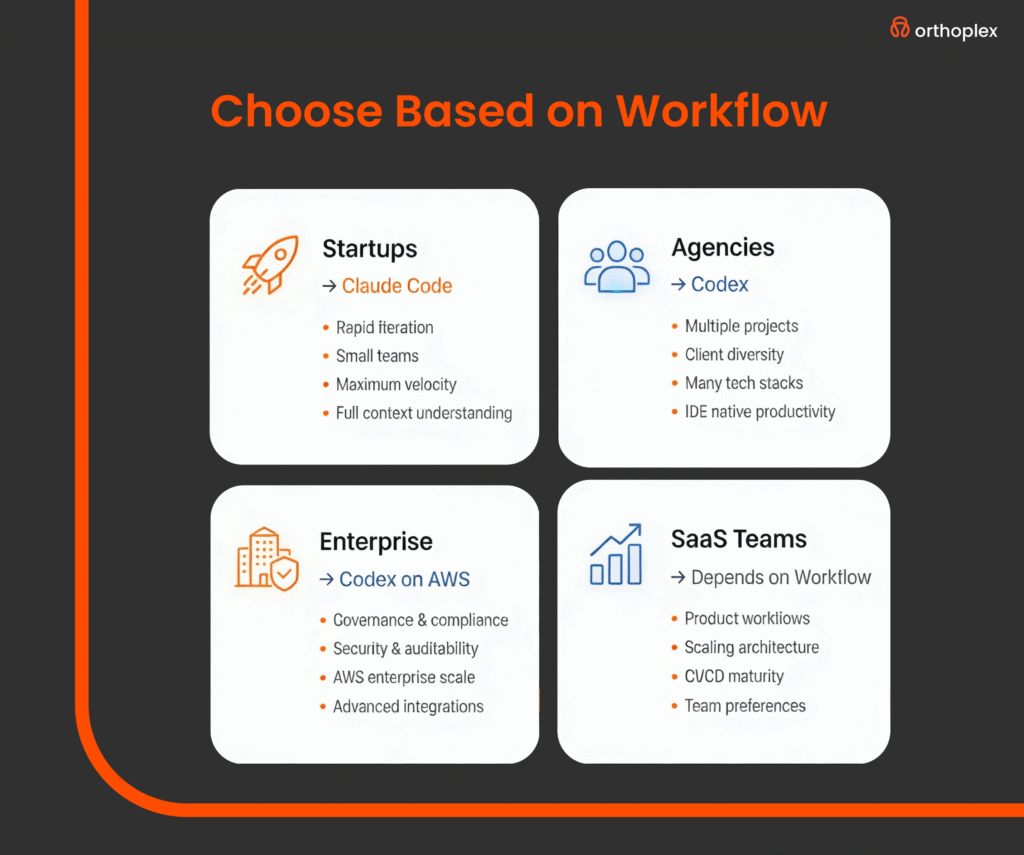
    Claude Code for Startups: Speed and Iteration

    Startup engineering teams prioritize implementation velocity and iteration speed over comprehensive testing and documentation, operating under resource constraints that prevent large engineering teams and extensive code review processes. Claude Code’s conversational interface and autonomous feature implementation align well with startup development patterns where requirements evolve rapidly and technical debt is acceptable tradeoff for market validation speed.

    The ability to specify features in natural language and receive complete implementations including basic tests reduces time from concept to functional prototype. Startup founders without deep technical expertise can articulate product requirements to Claude Code and receive working implementations suitable for customer demos and early user testing. This accessibility democratizes product development, allowing non-technical founders to maintain development momentum during pre-funding periods when hiring experienced engineers is financially prohibitive.

    Claude Code’s extended context window proves particularly valuable for startups where architectural decisions remain uid and substantial refactoring occurs frequently as product direction evolves. The system maintains coherence across changes, updating dependent components when core data structures or API interfaces change. This automatic propagation of architectural changes reduces the manual coordination typically required when refactoring early-stage codebases, allowing small teams to move faster without accumulating inconsistencies that complicate future development.

    Cost considerations favor Claude Code for resource-constrained startups. As of May 2026, Claude Code pricing operates on per-requests basis a tied to token consumption, with typical feature implementations costing $0.15-$0.45 depending on complexity and context requirements. This usage-based pricing allows startups to scale AI coding expenses with development activity, avoiding xed subscription costs that burden early-stage budgets. Compared to hiring additional engineers at $120,000-$180,000 annual salaries, even extensive Claude Code usage represents minimal expense while providing productivity multipliers for existing team members.

    However, startups must implement discipline around requirement specication and code review despite velocity pressures. Deploying AI-generated code directly to production without human review introduces bugs, security vulnerabilities, and architectural decisions that create technical debt requiring expensive remediation. Successful startup implementations establish lightweight review processes where senior engineers validate AIgenerated code for security issues and architectural alignment before merging, balancing velocity against quality.

    Integration with startup-friendly tools including Vercel, Supabase, and serverless platforms proves straightforward, as Claude Code generates implementations using these platforms’ conventions and best practices. Startups building on modern infrastructure-as-code platforms and API-first services find Claude Code produces deployment-ready code with minimal modication, accelerating the path from development to production deployment.

    Codex for Development Agencies: Client Diversity and Standardization

    Development agencies manage multiple concurrent client projects across diverse technology stacks, industries, and requirement specications. This portfolio diversity creates challenges for AI coding tool adoption, as systems optimized for specfic languages or frameworks may provide minimal value across the agency’s full project portfolio. Codex’s broad language support and GitHub Copilot integration provide exibility appropriate for agencies working across React, Vue, Angular, Python, Ruby, PHP, and other technology ecosystems.

    Codex’s in-editor integration through GitHub Copilot maintains developer productivity across project context switches common in agency environments where engineers allocate time across multiple client engagements weekly. The consistent interface regardless of project technology stack reduces cognitive overhead compared to project-specic tooling, allowing developers to leverage AI assistance uniformly across their workload.

    According to agency productivity benchmarks, developers using consistent AI tooling across projects report 30% less context-switching overhead than those adapting to project-specic tools.

    Code standardization benefits agencies managing long-term client relationships where multiple developers contribute to projects over extended timelines. Codex-generated implementations tend toward idiomatic patterns for the target language and framework, reducing the style inconsistencies that accumulate when numerous developers with dierent preferences contribute to codebases. This standardization simplies code review, accelerates onboarding of new developers to existing projects, and reduces maintenance burden for long-term support engagements.

    Client billing models inuence AI coding tool selection for agencies. Fixed-price projects benet from productivity tools that reduce implementation time, allowing agencies to maintain protability while delivering contracted scope. Time-and-materials engagements where clients pay for developer hours create misaligned incentives where productivity tools reduce billable time, though agencies increasingly nd clients value faster delivery over maximizing billable hours. Forward-thinking agencies position AI coding capabilities as client benefits enabling faster iterations and reduced project costs rather than internal cost reduction mechanisms.

    GitHub integration provides client collaboration benets beyond developer productivity. Clients with technical teams reviewing agency deliverables often maintain GitHub presence for issue tracking and code review. Codexgenerated code appearing in pull requests with clear commit messages and implementation explanations facilitates client review processes, reducing the explanation burden on agency developers and improving client confidence in delivered implementations. This transparency becomes particularly valuable for agencies with clients performing acceptance testing and security reviews before deployment.

    Agencies must establish governance frameworks for AI-generated code to prevent client IP concerns and maintain code quality standards. Clear policies regarding when AI assistance is appropriate, what review processes apply to AI-generated implementations, and how AI usage is disclosed to clients prevent misunderstandings and maintain professional standards. Some agencies nd clients specically request or prohibit AI tool usage based on internal policies, requiring exibility in development approaches across engagements.

    Claude Code vs Codex for SaaS Development Teams

    Software-as-a-Service development teams require sustained productivity across feature development, bug fixes, technical debt remediation, and platform scaling initiatives. The choice between Claude Code and Codex for SaaS teams depends heavily on existing development workows, team technical prociency, and the balance between new feature development and maintenance of established codebases.

    Claude Code’s conversational interface excels for SaaS teams implementing substantial new features requiring multiple le modications and architectural decisions. The ability to iterate on implementations through natural language feedback proves valuable when building complex features with evolving requirements or when initial specications prove incomplete during development. SaaS product teams working closely with engineering can collaborate with Claude Code to rene implementations based on product feedback without engineers manually translating every requirement adjustment into code changes.

    Technical debt remediation represents a common SaaS maintenance requirement where Claude Code provides particular value. The extended context window enables analysis of legacy code sections, identication of inconsistencies or anti-patterns, and generation of refactored implementations maintaining functional equivalence while improving code quality. SaaS teams allocate Claude Code to technical debt initiatives, allowing senior engineers to focus on architectural decisions while AI handles mechanical refactoring tasks.

    Codex integration with existing IDE workows proves advantageous for SaaS teams with established development processes and code review practices. Developers remain in familiar environments while accessing AI assistance through keyboard shortcuts, reducing the process disruption inherent in adopting new tools.

    Teams with strict code review requirements and comprehensive testing find Codex’s suggestion model preferable to Claude Code’s autonomous implementation, as developers maintain fine-grained control over what code enters the codebase.

    Database schema migrations, API versioning, and backwards compatibility requirements common in SaaS development benet from Claude Code’s ability to understand system-wide implications of changes. When implementing breaking changes requiring coordinated updates across API endpoints, frontend components, and database schemas, Claude Code maintains consistency across modications that developers implementing changes manually sometimes overlook. This coherence reduces the post-deployment bugs common when complex migrations miss edge cases or fail to update all affected components.

    Performance optimization represents another domain where AI coding tools provide value to SaaS teams. Claude Code can analyze performance bottlenecks, suggest optimizations, and implement caching strategies, database query improvements, or algorithmic enhancements. However, validation of AI-suggested optimizations requires careful benchmarking, as not all algorithmically superior approaches yield performance improvements in production environments with real data distributions and system constraints.

    SaaS teams operating CI/CD piplines find both tools integrate eectively with automated testing and deployment workows. AI-generated code passes through the same test suites, linting rules, and security scans as human-written implementations, ensuring quality standards remain consistent regardless of code origin.

    Teams with comprehensive test coverage benet most from AI coding tools, as tests provide validation mechanisms catching AI mistakes before production deployment.

    Cost analysis for SaaS teams requires comparing AI tool expenses against engineering salary costs and productivity impacts. A SaaS team with 10 engineers at average compensation of $150,000 represents $1.5M in annual personnel costs. If AI coding tools increase productivity by 25% (conservative estimate based on published benchmarks), the effective capacity gain equals 2.5 engineers or $375,000 in annual value. Both Claude Code and Codex pricing remain well below this value threshold, making them economically attractive for SaaS teams of any size.

    Codex for Enterprise Engineering: Scale and Governance

    Enterprise engineering organizations prioritize governance, security, compliance, and standardization over development velocity. The regulatory requirements, security frameworks, and architectural standards common in enterprise environments create constraints that AI coding tools must accommodate without introducing compliance risks or security vulnerabilities. Codex’s AWS deployment model and ne-tuning capabilities address enterprise requirements that public API access cannot satisfy.

    Data sovereignty concerns prevent many enterprises from transmitting proprietary code to external APIs for processing, regardless of vendor security guarantees or contractual protections. Codex deployment on AWS within enterprise cloud environments keeps code and model weights under organizational control, satisfying data classication policies and regulatory requirements prohibiting external data transmission. This deployment model proves essential for nancial services, healthcare, government, and defense contractors with strict data handling requirements.

    Fine-tuning Codex on internal codebases enables adherence to organization-specfic patterns, internal frameworks, and architectural standards that generic models trained on public GitHub repositories cannot learn. Enterprises with substantial proprietary frameworks or domain-specic languages realize signicant value from fine tuned models that generate implementations consistent with internal conventions, reducing code review burden and improving AI suggestion acceptance rates. The ne-tuning process requires data engineering expertise and computational resources, but large enterprises typically possess these capabilities through existing machine learning teams.

    Integration with enterprise identity management systems including Active Directory, Okta, and Ping Identityensures AI coding tool access aligns with organizational access controls and audit requirements. Codex enterprise deployments support SAML and OAuth authentication ows, enabling single sign-on experiences and centralized access management consistent with enterprise security standards. Activity logging and audit trails satisfy compliance requirements for tracking code generation activities, particularly relevant for regulated industries with software development lifecycle documentation obligations.

    Code review automation represents an enterprise use case where Codex provides value beyond code generation. Enterprises can deploy Codex to analyze pull requests, identify potential issues including security vulnerabilities, performance concerns, or deviation from architectural standards, and generate review comments guiding developers toward compliant implementations. This automated review augments human reviewers, improving review coverage and consistency while reducing senior engineer time spent on mechanical review tasks.

    Legacy system modernization projects benet from Codex’s ability to understand outdated languages and frameworks, generating modern equivalent implementations from COBOL, Fortran, or legacy Java codebases. Enterprises with substantial technical debt accumulated over decades can accelerate modernization initiatives by using Codex to translate legacy implementations into contemporary languages and frameworks, reducing the manual effort required for large-scale migrations that often extend across years and cost millions of dollars.

    Enterprise procurement processes, vendor security assessments, and contract negotiations favor established vendors with enterprise sales teams and reference customers in similar industries. OpenAI’s enterprise sales organization and AWS partnership provide the procurement infrastructure enterprises require, including master service agreements, business associate agreements for HIPAA compliance, and security questionnaire responses. These administrative capabilities, while irrelevant to tool technical capabilities, often determine enterprise vendor selection in practice.

    Technical Comparison: Performance and Accuracy

    Objective performance comparison between Claude Code and Codex requires standardized benchmarks measuring code correctness, eciency, and adherence to best practices across programming languages and problem domains. Multiple benchmark suites provide different perspectives on AI coding capability, with no single metric fully capturing real-world development performance across the diverse scenarios developers encounter.

    The HumanEval benchmark measures function-level code generation accuracy using hand-written test suites. As of May 2026, Claude Sonnet 4.5 powering Claude Code achieves 89% pass rate on HumanEval, while Codex scores 85%. This 4-percentage-point dierence represents measurable but modest advantage, with both systems performing substantially better than the 48% pass rate achieved by GPT-3.5 in 2023. For context, human expert programmers achieve 95-98% on HumanEval, indicating both AI systems approach but have not exceeded human performance on this benchmark.

    The APPS benchmark evaluates more complex algorithmic problem-solving requiring multiple functions and data structures. Claude Code achieves 85% correctness on introductory-level problems, 72% on interview-level problems, and 54% on competition-level problems. Codex performance measures 82%, 68%, and 49% respectively across these diculty tiers. Both systems demonstrate degrading performance as problem complexity increases, with the gap between AI and human performance widening for the most challenging problems requiring creative algorithmic insights.

    Multi-file coherence benchmarks measure AI coding agents’ ability to maintain consistency across related files, implement features spanning frontend and backend components, and respect architectural boundaries in modular systems. These benchmarks, while less standardized than single-function tests, provide insight into real world development scenarios where most features involve coordinated changes across multiple components. Internal benchmarks conducted by engineering teams at Anthropic indicate Claude Code maintains architectural coherence across 6-8 related les, while Codex implementations sometimes introduce inconsistencies when modications span more than 4-5 files.

    Code quality metrics including cyclomatic complexity, code duplication, and adherence to language-specfic style guides show minimal difference between Claude Code and Codex outputs. Both systems generate relatively clean implementations that pass standard linting tools and maintain complexity metrics comparable to human-written code. Neither system demonstrates consistent advantage in code quality, suggesting training approaches and model architectures have converged on similar code generation patterns.

    Security vulnerability introduction rates require careful measurement, as AI-generated code potentially contains common vulnerabilities including SQL injection, cross-site scripting, or insecure cryptographic implementations.

    Analysis by security research teams indicates both Claude Code and Codex generate vulnerable code at rates between 12-18% depending on the vulnerability category, comparable to inexperienced human developers but substantially higher than security-conscious senior engineers. This vulnerability rate necessitates security review of AI-generated implementations, particularly for authentication, authorization, data validation, and cryptographic operations.

    Security Implications and Code Review Requirements

    AI-generated code introduces security considerations extending beyond traditional code review processes, as models trained on public code repositories potentially reproduce vulnerabilities present in training data without understanding security implications. Development teams implementing AI coding tools must establish review processes accounting for these risks while maintaining productivity benets that justify tool adoption.

    Static analysis tools including SonarQube, Synk, and Semgrep provide automated vulnerability detection complementing human code review. These tools identify common vulnerability patterns including SQL injection, command injection, path traversal, and insecure deserialization that AI systems sometimes generate when implementing features involving user input processing or file system operations. Integrating static analysis into CI/CD pipelines prevents vulnerable AI-generated code from reaching production environments regardless of human review oversights.

    Dependency management represents another security concern, as AI coding tools may suggest outdated packages with known vulnerabilities or introduce unnecessary dependencies increasing attack surface. Tools like Dependabot and Renovate automate dependency updates, but initial package selection requires human judgment ensuring AI-suggested dependencies align with organizational security policies and licensing requirements.

    Secrets management in AI-generated code requires particular attention, as models occasionally generate example code including API keys, database credentials, or cryptographic keys that developers must remove before committing. Secret scanning tools including GitGuardian and TruffleHog detect committed secrets, but prevention requires education on proper secret management patterns and code review focused specically on credential handling in AI-generated implementations.

    Authentication and authorization logic represents high-risk code where AI assistance requires enhanced scrutiny. Both Claude Code and Codex generate plausible-looking authentication implementations that may contain subtle vulnerabilities including timing attacks, insucient entropy in token generation, or authorization bypass conditions. Security-critical code benets from manual implementation by experienced security engineers or extensive review by security teams rather than accepting AI-generated implementations with cursory review

    HIPAA compliance and other regulatory frameworks require documented development processes and code review evidence. Organizations using AI coding tools in regulated environments must establish policies determining what review processes apply to AI-generated code, what documentation satises audit engineering teams at Anthropic requirements, and how AI tool usage is disclosed in system security documentation. Some regulatory frameworks may require specic review processes for AI-generated code exceeding standard code review, creating additional overhead organizations must account for when evaluating AI tool ROI.

    Integration with Development Workows and Toolchains

    Effective AI coding tool adoption requires integration with existing development workows including version control, issue tracking, CI/CD pipelines, and documentation systems. The integration complexity and workow disruption associated with tool adoption often determines success or failure regardless of underlying AI capabilities.

    Claude Code’s command-line interface integrates naturally with terminal-based development workows common among backend engineers and infrastructure teams. Developers accustomed to Git command-line operations, terminal-based editors, and shell scripting find Claude Code’s interaction model familiar and minimally disruptive. However, frontend developers and those preferring graphical IDEs may nd terminalbased interactions awkward compared to their established workows.

    GitHub Copilot’s in-editor integration provides seamless experience for developers using Visual Studio Code, the dominant IDE with approximately 73% market share among professional developers in 2026. The integration appears as inline suggestions and chat interfaces within the familiar editing environment, reducing context switching and maintaining developer flow state. Support for JetBrains IDEs, Neovim, and other environments ensures broad compatibility across the developer tool ecosystem.

    Issue tracking integration allows AI coding tools to implement features directly from ticket specications in Jira, Linear, or GitHub Issues. Claude Code can read issue descriptions, implementation requirements, and acceptance criteria, then generate implementations addressing specied requirements. This integration reduces manual copying of requirements into AI prompts and ensures traceability between issues and implementations for project management and audit purposes.

    CI/CD pipeline integration subjects AI-generated code to the same automated testing, security scanning, and deployment processes as human-written code. Both Claude Code and Codex integrate effectively with GitHub Actions, GitLab CI, Jenkins, and other pipeline automation tools, as the generated code passes through standard Git workows where CI/CD hooks trigger. Organizations with comprehensive pipeline automation realize AI coding benefits without compromising quality gates or deployment processes.

    Documentation generation represents a valuable secondary capability where AI coding tools excel. Both Claude Code and Codex can generate code comments, API documentation, and README les explaining implementation decisions and usage patterns. This documentation generation addresses a common developer pain point where documentation lags behind code changes, creating information asymmetry that complicates onboarding and maintenance.

    Cost Analysis and Return on Investment

    Financial evaluation of AI coding tools requires comparing subscription or usage costs against productivity improvements, opportunity costs of delayed features, and the alternative cost of hiring additional engineers. The calculation diers substantially across organizational contexts based on team size, average engineer compensation, and project types.

    Claude Code pricing operates on usage-based model tied to API token consumption, with costs varying based on context size and response length. Typical feature implementations cost between $0.15-$0.45 per request, with complex features requiring iterative renement potentially reaching $1-$2 in aggregate API costs. For a development team generating 50 feature implementations monthly, Claude Code costs approximate $75-$100 per month—negligible compared to engineer salaries but requiring usage monitoring to prevent unexpected cost accumulation from inefficient prompt patterns.

    GitHub Copilot pricing for business and enterprise tiers ranges from $19-$39 per user per month depending on seat count and annual commitment. For a 10-person development team, annual Copilot costs reach $2,280-$4,680, representing modest expense against the team’s $1.5M in personnel costs. This xed pricing provides cost predictability valuable for budgeting purposes, though organizations with highly variable development activity may pay for unused capacity.

    Productivity improvement estimation requires controlled measurement comparing feature implementation time with and without AI assistance. Published research indicates productivity gains ranging from 25-55% depending on task characteristics, with greatest improvements for boilerplate code generation, test writing, and documentation creation. Applying conservative 30% productivity estimate to a 10-person engineering team yields effective capacity increase of 3 engineers, valued at approximately $450,000 annually. This productivity gain substantially exceeds tool costs, generating attractive ROI even with signicant implementation overhead and learning curves.

    Opportunity cost considerations account for features delayed or not implemented due to capacity constraints. SaaS companies and startups in competitive markets face revenue impact from delayed feature launches, making productivity tools valuable even without reducing engineering headcount. The ability to implement
    features weeks or months earlier than without AI assistance generates competitive advantages and revenue acceleration difficult to quantify precisely but potentially exceeding direct productivity measurements.

    Quality cost implications require balanced assessment. AI coding tools reduce time spent on mechanical coding tasks but may introduce bugs requiring debugging eort, security vulnerabilities demanding remediation, and technical debt necessitating future refactoring. Organizations with strong code review processes and comprehensive test suites mitigate these quality risks, while those with weak quality gates potentially experience negative ROI through downstream quality costs exceeding upfront productivity gains.

    Making the Selection: Decision Framework

    Organizations evaluating Claude Code vs Codex should apply decision frameworks accounting for team composition, project characteristics, existing tooling, and organizational constraints rather than selecting based on benchmark performance or feature comparisons divorced from operational context.

    For startups with small teams and rapid iteration requirements: Claude Code’s conversational interface and autonomous feature implementation provide maximum velocity with minimal process overhead. The ability to specify features in natural language and receive complete implementations suits fast-paced startup environments where implementation speed outweighs comprehensive testing and documentation. Startups should implement lightweight code review ensuring AI-generated implementations meet security and functional requirements before deployment.

    For development agencies managing diverse client portfolios: Codex integration with GitHub Copilot provides consistent interface across varied technology stacks and client projects. The in-editor experience reduces context switching overhead when developers move between client engagements, while broad language support ensures value across the agency’s project portfolio. Agencies should establish client communication frameworks addressing AI tool usage disclosure and intellectual property considerations.

    For SaaS development teams balancing feature development and maintenance: Tool selection depends on whether teams prioritize new feature velocity (favoring Claude Code) or integration with established workows (favoring Codex). SaaS teams with comprehensive test coverage and strong code review practices realize value from either platform, while those with weaker quality processes should prioritize tools encouraging human oversight. Technical debt remediation initiatives benefit particularly from Claude Code’s extended context and refactoring capabilities.

    For enterprise engineering organizations: Codex’s AWS deployment option and ne-tuning capabilities address data sovereignty and compliance requirements that Claude Code’s public API access cannot satisfy.

    Enterprises should evaluate whether data classication policies permit external code transmission, whether internal frameworks justify fine-tuning investment, and whether procurement processes favor OpenAI’s enterprise sales infrastructure. Security and compliance teams must review AI tool usage against regulatory requirements and establish appropriate governance frameworks

    For solo developers and freelancers: Cost sensitivity and workflow simplicity favor Codex through GitHub Copilot’s fixed monthly pricing and familiar IDE integration. Solo developers benet from avoiding Claude Code’s terminal-based workflow requiring context switches from primary development environment, while GitHub Copilot’s predictable costs prevent budget surprises from variable usage patterns.

    Organizations can implement pilot programs deploying both tools to subset teams, measuring productivity impacts, gathering developer feedback, and assessing workow integration before organization-wide adoption. Pilot programs should span sucient duration (8-12 weeks) allowing developers to develop prociency and workows adapting to AI assistance patterns rather than evaluating based on initial unfamiliarity.

    Future Trajectory: Where AI Coding Is Heading

    The AI coding landscape continues rapid evolution with substantial capabilities improvements expected through 2026 and beyond. Understanding trajectory helps organizations make tool selections accounting for future developments rather than optimizing solely for current capabilities that may become irrelevant within 12-18 months.

    Model capabilities will continue improving through larger training datasets, improved architectures, and finetuning on high-quality code repositories. The performance gap between AI and human expert programmers on standardized benchmarks will continue narrowing, with AI systems potentially achieving human-level performance on complex algorithmic problems by late 2026 or early 2027. This capability progression suggests current tool limitations around complex problem-solving and architectural decisions will diminish, increasing the scope of development tasks suitable for AI implementation.

    Multi-modal capabilities incorporating visual design mockups, database schemas, and system architecture diagrams will enable AI coding tools to implement complete features from heterogeneous specications rather than text-only descriptions. Developers will show UI mockups to AI systems and receive frontend implementations matching designs, or provide database schemas and business logic descriptions receiving complete backend implementations. These multi-modal capabilities reduce the specication eort required from developers, further accelerating development cycles.

    Personalization and learning from individual developer or team patterns will improve suggestion relevance and reduce acceptance friction. AI coding tools will learn organizational coding standards, architectural preferences, and domain-specic patterns through observation of code review feedback and implementation modications, adapting outputs to match team conventions without explicit ne-tuning. This personalization makes AI assistance increasingly valuable over time as systems learn team-specic patterns.

    Debugging and error explanation capabilities will extend AI assistance beyond initial code generation into the full development lifecycle. Developers will provide error messages and stack traces to AI systems receiving explanation of root causes and suggested fixes, reducing debugging time for obscure errors or unfamiliar codebases. This debugging assistance proves particularly valuable for junior developers learning new technologies or senior developers working with unfamiliar legacy systems.

    Automated testing will evolve beyond simple unit test generation to comprehensive test suites including integration tests, end-to-end tests, and property-based tests providing stronger correctness guarantees. AI systems will analyze implementations, identify edge cases and potential failure modes, and generate test scenarios ensuring robust validation coverage. This testing automation addresses current limitations where AIgenerated code lacks comprehensive testing, reducing the human effort required to validate AI implementations.

    The organizational implications of AI coding advancement extend beyond individual developer productivity to potential engineering team structure changes. Teams may evolve toward smaller senior engineer groups orchestrating AI coding agents rather than large teams of mixed-experience developers writing code manually. This structural shift creates workforce implications organizations should anticipate, including changing hiring criteria, modied career progression paths, and different skill emphasis in engineering education.

    Conclusion: Context-Driven Tool Selection

    The choice between Claude Code and Codex reflects organizational context more than inherent tool superiority, as each platform optimizes for different development workows, team structures, and operational requirements. Startups prioritizing velocity benefit from Claude Code’s autonomous feature implementation, while enterprises requiring data sovereignty and fine-tuning capabilities select Codex deployed on AWS infrastructure. Development agencies value Codex’s consistent IDE integration across diverse projects, while SaaS teams choose based on whether conversational iteration or established workow integration better fits their development processes.

    AI coding tools represent the most significant developer productivity advancement since integrated development environments, but realizing potential benefits requires workow adaptation, governance frameworks, and quality processes accounting for AI-generated code characteristics. Organizations implementing AI coding tools as simple drop-in replacements for human developers without process changes encounter quality issues and security vulnerabilities that undermine productivity gains. Successful adoption balances AI autonomy against human oversight, establishing review processes appropriate for organizational risk tolerance and code criticality.

    The rapid capability improvement trajectory suggests current tool limitations around complex problem-solving, architectural coherence, and security awareness will diminish over coming years. Organizations should select tools based on current capabilities while monitoring development roadmaps and capability improvements that may shift optimal tool selection as platforms evolve. Flexibility to switch between platforms or adopt new entrants as capabilities and organizational requirements change prevents premature lock-in to tools becoming suboptimal as technology and organizational context evolve.

    For organizations building web applications or developing complex software systems, AI coding agents represent transformative productivity tools when implemented thoughtfully with appropriate governance. The decision between Claude Code and Codex should emerge from systematic evaluation of development workflows, team technical prociency, data governance requirements, and alignment with existing toolchains rather than benchmark performance or feature lists divorced from operational reality

  • AI Agents for Business Automation: Implementation Guide 2026

    AI Agents for Business Automation: Implementation Guide 2026

    Understanding AI Agents for Business Automation

    AI agents for business automation represent autonomous systems that independently plan, reason, and execute multi-step tasks without continuous human intervention. Unlike traditional rule-based automation or prompt-dependent generative AI, these systems maintain memory, adapt to changing conditions, and make context-aware decisions across complex workflows.

    The distinction between AI agents and conventional automation lies in their cognitive architecture. Traditional automation follows predetermined logic paths. Generative AI responds to individual prompts. AI agents for business automation operate with goal-directed autonomy, using reasoning engines to decompose objectives into executable sub-tasks, invoke appropriate tools, and adjust strategies based on outcomes.

    The global agentic AI market is projected to grow from $5.25 billion in 2024 to $199.05 billion by 2034, representing a compound annual growth rate of 43.84%. This expansion reflects fundamental shifts in how enterprises architect operational systems. Organizations no longer build static workflows. They deploy adaptive intelligence that scales decision-making capacity without proportional increases in human oversight.

    The technical foundation of AI agents for business automation combines large language models with specialized components. Reasoning engines process contextual information and determine optimal action sequences. Memory systems maintain both short-term context and long-term learning. Integration frameworks connect to enterprise systems through APIs. Security protocols enforce access control and maintain audit trails.

    By 2028, 33% of enterprise software applications will incorporate agentic AI, up from less than 1% in 2024, enabling 15% of day-to-day work decisions to be made autonomously. This architectural shift means enterprise systems will evolve from passive data repositories to active decision engines. Software will not simply store information or respond to queries. It will initiate actions, coordinate across applications, and optimize processes without manual orchestration.

    AI agents for business automation comprehensive guide explanation orthoplex solutions Traditional Automation vs AI agents

    Market Adoption and Enterprise Deployment Patterns

    According to a PwC 2025 survey of 1,000 U.S. business leaders, 79% of organizations report some level of AI agent adoption. This penetration rate signals that AI agents for business automation have transitioned from experimental technology to operational necessity. Among non-adopters, competitive pressure is mounting. Organizations that delay deployment face widening capability gaps as early adopters compress cycle times and reduce operational costs.

    Deployment velocity varies by sector. Insurers moved from 8% full AI adoption in 2024 to 34% in 2025, a 325% increase. Finance and insurance lead adoption curves due to high-volume, rule-intensive operations where AI agents for business automation demonstrate immediate impact. Healthcare, manufacturing, and professional services follow similar trajectories as use cases mature and regulatory frameworks clarify.

    52% of executives report their organizations have deployed AI agents in production, with 39% reporting deployment of more than 10 agents across their enterprise. Multi-agent deployments indicate organizations have moved beyond proof-of-concept projects. They are building agent ecosystems where specialized systems collaborate on complex workflows, each handling distinct sub-processes while sharing context and coordinating outputs.

    The progression from pilot to production follows identifiable patterns. Organizations begin with single-function agents addressing well-defined processes. Customer service resolution, document processing, and data validation represent common entry points. Success at this level builds organizational confidence and technical capability.

    65% of respondents said they have progressed from early experimentation into fully-fledged pilot AI agent programs, a significant jump from 37% in the previous quarter. This acceleration reflects maturing implementation methodologies and clearer understanding of technical requirements. Organizations that previously struggled with integration challenges now leverage established frameworks and reference architectures.

    The most successful deployments focus on processes where autonomous decision-making creates immediate value. Inventory optimization, content personalization, and compliance monitoring provide clear ROI metrics. These use cases demonstrate that AI agents for business automation excel when combining judgment, context synthesis, and adaptive decision-making rather than simple repetitive tasks.

    Financial Performance and Return on Investment

    74% of executives report achieving ROI within the first year of AI agent deployment. This rapid payback period reflects the technology’s ability to automate high-value knowledge work rather than simple repetitive tasks. AI agents for business automation handle nuanced processes requiring judgment, context synthesis, and adaptive decision-making.

    U.S. companies expect an average ROI of 192% from agentic AI implementations. These projections stem from proven generative AI returns. Organizations that achieved strong ROI on generative AI projects anticipate higher returns from autonomous agents due to reduced human-in-the-loop requirements and broader application scope.

    Revenue impact extends beyond cost reduction. Among executives who report productivity gains in their organizations, 39% have seen productivity at least double. Growth comes from multiple vectors: accelerated product development cycles, enhanced customer service quality, optimized supply chain operations, and improved compliance adherence.

    The financial impact calculation for AI agents for business automation requires comprehensive analysis. Direct cost savings include reduced manual processing hours. A typical implementation replacing 20 hours of manual processing per week at standard labor rates generates approximately $26,000 in annual savings per process automated.

    Productivity gains manifest through faster cycle times and increased throughput. Organizations measure these improvements through process completion rates, error reduction percentages, and capacity increases without additional headcount. Deloitte’s 2024 AI survey reveals that 79% of companies using AI agents achieved ROI within 12 months, with average productivity gains of 35-50% across automated processes.

    Strategic benefits include improved customer satisfaction, faster time-to-market, and enhanced compliance. These outcomes contribute to long-term business value that extends beyond immediate operational metrics. Organizations implementing AI agents for business automation report competitive advantages in market responsiveness and service quality differentiation.

    The ROI formula for agentic systems accounts for implementation costs, platform fees, integration expenses, and ongoing operational costs. Organizations that measure comprehensive financial metrics achieve 23% higher ROI compared to those focusing only on efficiency metrics. This comprehensive approach captures both quantifiable savings and strategic business value.

    Technical Architecture and System Requirements

    AI agents for business automation require specific technical infrastructure. The architecture combines several critical components that work in concert to enable autonomous operation.

    The reasoning engine serves as the cognitive core. This component processes natural language instructions, decomposes complex objectives into actionable sub-tasks, and determines optimal execution sequences. Advanced implementations use multi-step reasoning that evaluates multiple solution paths before selecting actions.

    Memory systems maintain context across interactions. Short-term memory stores immediate conversation history and current task state. Long-term memory preserves learned behaviors, successful solution patterns, and domain-specific knowledge. This dual-memory architecture enables agents to improve performance through experience while maintaining awareness of immediate context.

    Integration frameworks connect agents to enterprise systems. APIs provide standardized interfaces to databases, business applications, and external services. The Model Context Protocol has emerged as an industry standard for streamlining how agents access tools and data, simplifying integration and enabling rapid deployment.

    Tool access mechanisms allow agents to invoke functions and services. These capabilities extend beyond data retrieval to include actions that modify system state, initiate workflows, and trigger notifications. Proper implementation requires careful security controls to prevent unauthorized system access.

    Organizations implementing AI agents for business automation must ensure existing infrastructure can support autonomous operation. Network capacity, API rate limits, database performance, and authentication systems require evaluation. Many implementations require upgrades to handle increased API call volumes and real-time data access patterns.

    Cloud platforms provide scalable infrastructure for agentic systems. AWS Cloud Management services enable organizations to provision compute resources dynamically, optimize costs, and maintain performance under variable workloads. Proper cloud architecture ensures agents operate reliably during peak demand periods.

    CI/CD and Complete SDLC practices become essential for agent deployment. Continuous integration pipelines test agent behaviors against expected outcomes. Deployment automation enables rapid iteration and rollback capabilities when agents exhibit unintended behaviors.

    AI agents for business automation comprehensive guide explanation orthoplex solutions AI Agent Architecture

    Security Framework for Autonomous AI Systems

    Security requirements for AI agents for business automation differ fundamentally from traditional application security. 80 percent of organizations say they have encountered risky behaviors from AI agents, including improper data exposure and access to systems without authorization.

    The shift from human-mediated to autonomous operations introduces novel threat vectors. AI agents operate as “digital insiders” with varying privilege levels and system access. They can cause harm unintentionally through poor alignment or deliberately if compromised. This reality requires security frameworks specifically designed for autonomous systems.

    Identity and access management forms the foundation. Every agent must be uniquely identifiable, authenticated, and bound to a verifiable trust anchor. Service accounts require cryptographic attestation and hardware-backed key storage. API keys and OAuth tokens must rotate automatically on defined schedules, typically every 24-72 hours.

    Authorization mechanisms must evolve beyond static role-based access control. Context-aware, policy-driven access controls evaluate multiple factors before granting permissions. Agent behavior, requested resource sensitivity, time of day, and environmental conditions all inform authorization decisions.

    File Integrity Monitoring and Vulnerability Monitoring services provide continuous oversight of agent operations. These systems detect anomalous behaviors, track file modifications, and identify potential security vulnerabilities before they can be exploited.

    Behavioral analysis systems monitor agent actions in real-time. These controls detect when agents attempt unauthorized privilege escalation, access sensitive data outside normal patterns, or initiate actions inconsistent with their defined responsibilities. Anomaly detection algorithms flag deviations for immediate review.

    Sandboxing and confinement strategies isolate agent execution environments. When agents process untrusted inputs or perform risky operations, isolation prevents potential compromise from affecting production systems. Formal verification methods provide provable assurances of safety in critical applications.

    Governance processes ensure agents operate within acceptable boundaries. Organizations establish clear policies defining agent capabilities, approval workflows for expanding agent permissions, and escalation procedures when agents encounter situations outside their authority. These frameworks balance autonomy with control.

    The Agentic AI Security Scoping Matrix provides a structured approach for understanding security requirements across different autonomy levels. Organizations assess their current use cases against four scopes: prompted assistance, delegated tasks, supervised autonomy, and full agency. Security controls scale proportionally with autonomy level.

    Active Response capabilities automatically implement restrictions when agents exhibit concerning behaviors. Systems can inject tighter controls, require human approval for specific actions, or disable agents that negatively impact environments. These safety mechanisms prevent uncontrolled operations.

    Implementation Strategy and Deployment Methodology

    Successful implementation of AI agents for business automation follows progressive deployment patterns. Organizations that rush to full autonomy encounter operational challenges and security risks. Methodical approaches build capability while managing risk.

    Initial assessment identifies automation opportunities. Process mapping reveals workflows suitable for agent automation based on task complexity, decision frequency, data availability, and regulatory constraints. High-impact processes with clear success metrics make ideal starting points.

    Technical evaluation ensures infrastructure readiness. Teams assess API availability, data quality, integration requirements, and security controls. This analysis identifies necessary upgrades before agent deployment begins. Organizations working with software consulting experts achieve 40% faster assessment completion through comprehensive technical evaluation.

    Pilot projects demonstrate agent capabilities in controlled environments. Limited-scope implementations validate technical approaches and business benefits before full-scale deployment. These pilots provide learning opportunities and help organizations refine governance frameworks.

    The pilot phase typically focuses on single-function agents addressing well-defined processes. Customer inquiry routing, document classification, and data validation represent common pilot use cases. Success metrics include accuracy rates, processing times, and user satisfaction scores.

    Integration with existing systems requires careful planning. Agents must connect to CRM platforms, ERP systems, and databases through secure APIs. 3rd Party API Integration expertise ensures reliable data exchange and proper error handling.

    Gradual expansion extends successful automation patterns to similar processes. Organizations identify adjacent workflows that benefit from agent capabilities, leveraging lessons learned during pilot phases. This incremental approach maintains organizational confidence while building technical capability.

    Multi-agent architectures emerge as organizations mature. Specialized agents collaborate on complex workflows, each handling distinct sub-processes while sharing context. Coordination mechanisms ensure agents work toward common objectives without conflicting actions.

    Performance monitoring tracks agent effectiveness across multiple dimensions. Accuracy metrics measure how often agents make correct decisions. Efficiency metrics capture processing speed and resource utilization. Quality metrics assess impact on service delivery and customer satisfaction.

    Continuous improvement processes refine agent behaviors based on operational data. Machine learning systems analyze successes and failures to enhance future decision-making. Regular model updates incorporate new insights while maintaining alignment with organizational objectives.

    Application Server Monitoring provides visibility into agent resource consumption and performance characteristics. These insights inform capacity planning and help identify optimization opportunities.

    Industry-Specific Applications and Use Cases

    AI agents for business automation deliver value across diverse sectors, with implementation patterns varying by industry requirements.

    Financial services organizations deploy agents for fraud detection, risk assessment, and customer service. Automated underwriting agents evaluate loan applications by analyzing credit histories, income verification, and risk factors. Customer service agents handle account inquiries, transaction disputes, and product recommendations with minimal human oversight.

    Healthcare providers implement agents for appointment scheduling, patient triage, and clinical documentation. Ambient AI documentation systems reduce clinician burnout by automatically generating medical records from patient conversations. Insurance claims processing agents expedite validation and settlement procedures.

    Manufacturing firms use agents for supply chain optimization, quality control, and predictive maintenance. Procurement agents automatically source materials, negotiate with vendors, and manage inventory levels. Production scheduling agents optimize factory operations based on demand forecasts and resource availability.

    Retail organizations leverage agents for personalized customer engagement, inventory management, and dynamic pricing. Product recommendation agents analyze purchase histories and browsing behaviors to suggest relevant items. Customer support agents handle returns, track shipments, and resolve common issues autonomously.

    Professional services firms deploy agents for document analysis, contract review, and compliance monitoring. Legal research agents analyze case law and regulatory requirements. Financial analysis agents process earnings reports and market data to generate investment recommendations.

    Non-profit organizations benefit from AI agents for business automation through improved donor management and program coordination. Agents automate donation acknowledgments, segment donor databases for targeted outreach, and track program outcomes for reporting purposes.

    Healthcare organizations require agents that comply with HIPAA regulations and maintain strict data privacy controls. Implementations must include comprehensive audit trails and ensure protected health information remains secure.

    Government-regulated industries face unique compliance requirements. Agents operating in these environments require enhanced security controls, detailed logging capabilities, and mechanisms to demonstrate regulatory compliance.

    AI agents for business automation comprehensive guide explanation orthoplex solutions 
Scale Output, Not Headcount

    Challenges and Risk Mitigation Strategies

    Organizations implementing AI agents for business automation encounter several categories of challenges that require proactive mitigation.

    Technical challenges include integration complexity, performance optimization, and reliability assurance. Legacy systems may lack modern APIs required for agent integration. Data quality issues can impair agent decision-making capabilities. Network latency affects real-time processing requirements.

    Mitigation strategies involve thorough technical assessments before deployment, phased integration approaches that address systems incrementally, and comprehensive testing frameworks that validate agent behaviors under various conditions.

    Security challenges span multiple dimensions. Prompt injection attacks manipulate agents into bypassing security controls or leaking sensitive data. Adversarial inputs craft requests designed to compromise agent reasoning. Resource exhaustion attacks overwhelm systems with intensive tasks.

    Defense mechanisms include input validation and sanitization, behavioral monitoring systems that detect anomalous activities, rate limiting to prevent resource exhaustion, and regular security assessments using penetration testing methodologies. Malware Detection services identify compromised agents before they can cause significant damage.

    Organizational challenges involve change management, skills development, and governance establishment. Teams require training on agent capabilities and limitations. Existing workflows need redesign to accommodate autonomous operations. Clear policies must define agent responsibilities and escalation procedures.

    Change management strategies include stakeholder engagement throughout implementation phases, comprehensive training programs that build internal expertise, and communication plans that address concerns about job displacement and role changes.

    Regulatory challenges emerge as autonomous systems make decisions with business consequences. Organizations must demonstrate that agent decisions comply with relevant regulations, maintain audit trails for accountability, and establish processes for addressing errors or unintended outcomes.

    Compliance frameworks document agent decision logic, maintain comprehensive logs of agent actions, implement review processes for high-risk decisions, and establish incident response procedures for regulatory inquiries.

    Ethical considerations require attention as agents take on more autonomous roles. Bias in training data can lead to discriminatory outcomes. Lack of transparency in agent reasoning makes it difficult to explain decisions. Accountability becomes complex when agents operate with minimal human oversight.

    Ethical frameworks address these concerns through diverse training data that reduces bias, explainability mechanisms that clarify decision logic, human oversight for high-stakes decisions, and clear accountability structures that assign responsibility for agent actions.

    The Path Forward for Enterprise AI Automation

    AI agents for business automation represent a fundamental shift in how enterprises architect operational capabilities. The technology has moved from experimental status to operational reality, with clear evidence of business value and established implementation methodologies.

    Organizations that approach deployment methodically, starting with pilot projects, focusing on high-value use cases, building technical infrastructure, and establishing governance frameworks, achieve superior outcomes. Those that rush to broad deployment encounter integration challenges, security vulnerabilities, and organizational resistance.

    The competitive landscape increasingly favors early adopters. Organizations deploying AI agents for business automation compress cycle times, reduce operational costs, and improve service quality. Delayed adoption creates widening capability gaps that become progressively harder to close.

    Technical requirements will continue evolving as agent capabilities advance. Organizations must maintain infrastructure flexibility, update security controls regularly, and invest in ongoing skills development. Partnership with experienced development firms accelerates implementation while reducing technical risk.

    The market trajectory indicates continued rapid growth. Organizations across all sectors will implement agentic systems to remain competitive. The question is not whether to deploy AI agents for business automation, but how to do so effectively while managing associated risks.

    Success requires treating agent deployment as a strategic initiative rather than a technology project. Executive sponsorship, cross-functional collaboration, clear success metrics, and sustained investment all contribute to positive outcomes. Organizations that view agents as collaborative partners rather than simple automation tools realize greater value.

    Conclusion

    AI agents for business automation deliver measurable value through autonomous task execution, adaptive decision-making, and intelligent process optimization. With 74% of executives achieving ROI within the first year and productivity gains reaching 50% or more, the business case for implementation is compelling.

    Technical architecture combining reasoning engines, memory systems, and integration frameworks enables sophisticated autonomous capabilities. Security frameworks specifically designed for autonomous operations mitigate risks while preserving agent effectiveness.

    Implementation strategies emphasizing progressive deployment, pilot validation, and continuous monitoring produce superior outcomes. Organizations that build internal expertise, establish governance frameworks, and partner with experienced implementation teams navigate deployment challenges successfully.

    The rapid market growth, from $5.25 billion in 2024 to projected $199.05 billion by 2034, signals fundamental transformation in enterprise operations. Organizations that embrace AI agents for business automation position themselves at the forefront of this shift, gaining competitive advantages through enhanced operational capabilities.

    For organizations ready to explore agentic AI implementation, contact Orthoplex Solutions to discuss your specific requirements and develop a strategic deployment roadmap.

    About Orthoplex Solutions

    Orthoplex Solutions provides enterprise AI implementation, cloud infrastructure, and cybersecurity for organizations requiring performance, scalability, and data security. Our team delivers comprehensive AI Solutions combined with robust Cloud Solutions and Cybersecurity frameworks that enable safe, effective deployment of autonomous AI systems.

  • Healthcare Cybersecurity Compliance Today: HIPAA Compliance in Practice

    Healthcare Cybersecurity Compliance Today: HIPAA Compliance in Practice

    Introduction

    Healthcare cybersecurity compliance today is defined less by policy alone and more by an organization’s ability to demonstrate HIPAA compliance in practice. Regulatory enforcement consistently evaluates whether safeguards meaningfully reduce risk to electronic protected health information (ePHI), focusing on technical implementation and operational outcomes rather than simple documentation. Covered entities are expected to integrate HIPAA compliance into daily operations, ensuring that every safeguard, from encryption to access control, is actively protecting patient data.

    The Healthcare Cybersecurity Landscape: Persistent, High‑Impact Risk

    Healthcare remains among the most targeted sectors for cyberattacks, and breaches carry substantial financial and operational consequences. According to industry benchmarking, healthcare consistently experiences the highest average breach costs, with recent reports estimating approximately $7.42 million per incident (TechTarget, 2025). These incidents often have extended lifecycles, spanning detection, containment, and recovery periods, which directly impact patient care and operational continuity.

    Large-scale disruptions, particularly those involving shared platforms or vendor services, demonstrate how a single compromise can cascade across multiple stakeholders, reinforcing the need for segmentation, containment, and verified recovery controls.


    The threat environment has evolved beyond basic ransomware or encryption attacks. Modern attackers frequently combine data theft with destructive encryption, often targeting backups or secondary systems, which makes recovery more complex and increases regulatory expectations for demonstrable resilience. Healthcare organizations that cannot show effective containment and recovery procedures are at greater risk during enforcement reviews, highlighting that compliance is evaluated through practical effectiveness, not theoretical policy.

    Interpreting the HIPAA Security Rule Through an Enforcement Lens

    Today, the HIPAA Security Rule is interpreted primarily through the lens of operational effectiveness. Enforcement focuses on whether organizations can provide evidence that safeguards meaningfully protect ePHI under realistic threat scenarios. The Office for Civil Rights (OCR) emphasizes that all implemented controls should have measurable impact, and regulators assess not only the presence of controls but their consistency, completeness, and enforceability.


    Technical safeguards, such as strong encryption, multi-factor authentication, centralized logging, and network segmentation, are considered baseline expectations for healthcare organizations of nearly any size. Alternative approaches can be accepted only if organizations demonstrate equivalent protection and provide clear evidence that risks are mitigated to the same degree as standard safeguards. Subjective interpretations or minimal implementations no longer satisfy enforcement expectations, and failure to operationalize these controls can result in significant compliance risk.

    Healthcare Cybersecurity Compliance Top Healthcare Security Priorities

    Encryption as a Foundational Control

    Regulators now treat encryption as a core safeguard, not a discretionary option. Healthcare organizations are expected to implement encryption for ePHI both at rest and in transit, using widely recognized standards, and maintain exclusive control over cryptographic keys.

    Enforcement attention is particularly strong on cloud-hosted systems and third-party platforms, where organizations must demonstrate that even providers cannot access unencrypted patient data without authorization. Demonstrating operational enforcement includes verifying that encryption covers all systems storing ePHI, cryptographic standards are properly configured, and key management processes, including generation, rotation, and separation of duties, are robust and routinely tested (NIST Guidelines, 2024).

    Access Control and Authentication

    Access control is evaluated based on real-world effectiveness in preventing unauthorized ePHI access. Multi-factor authentication is generally considered a baseline requirement, especially for remote administrative access and accounts with elevated privileges. Regulators also scrutinize emergency access procedures, password management policies, and device configuration standards to ensure they cannot be easily circumvented. The emphasis is on ensuring that access controls are practical, enforced, and auditable, protecting patient data under routine operations as well as during anomalous events.

    Technology Asset Inventory and Network Visibility

    Comprehensive visibility into technology assets and data flows is a cornerstone of modern enforcement. Organizations are expected to know not only where ePHI resides, but also how it moves across systems and networks, and which entities have access. Regulatory investigations have highlighted cases where failure to account for shadow IT systems, legacy platforms without security controls, or unmanaged vendor access contributed to systemic compliance gaps. Accurate and current asset inventories, along with detailed network maps, are considered essential evidence that organizations are actively managing and mitigating risk.

    Risk Analysis as a Continuous Control

    Risk analysis is one of the most scrutinized components of compliance. Regulators expect organizations to perform assessments that are methodical, written, and actionable, connecting findings directly to remediation activities. This includes reviewing all assets and data flows, identifying reasonably anticipated threats, evaluating the sufficiency of security measures, and determining both the likelihood and potential impact of vulnerabilities. Superficial or static risk assessments, even if documented, are insufficient; enforcement evaluates whether the process drives meaningful risk reduction and continuous improvement.

    Business Associate and Ecosystem Accountability

    HIPAA compliance extends beyond the boundaries of individual organizations. Business associates are expected to meet the same technical and operational standards as covered entities. Timely communication during security incidents, proactive monitoring, and evidence of coordinated response actions are key enforcement expectations. Insufficient oversight of vendors or delayed notifications can constitute systemic failures, reinforcing the principle that compliance is ecosystem-wide, not limited to internal operations.

    The Implementation Imperative

    Healthcare organizations cannot treat HIPAA compliance as a one-time initiative. Effective programs integrate cybersecurity into daily operational practice, ensuring that controls are exercised, verified, and continuously updated. Asset inventories, encryption coverage, access management, risk analysis, and business associate oversight must all be operationalized and demonstrable. Organizations that adopt a living, outcome-focused approach are better positioned to withstand audits, recover efficiently from incidents, and maintain patient trust, while those relying on documentation alone risk enforcement actions regardless of stated policies.

    How Orthoplex Solutions Supports Healthcare Cybersecurity Compliance Readiness

    Healthcare Cybersecurity Compliance Orthoplex Solutions provides solutions to support compliance

    Healthcare organizations require specialized technical expertise to implement proposed HIPAA Security Rule requirements and achieve comprehensive cybersecurity posture improvements.
    Orthoplex Solutions provides development, cybersecurity, and cloud infrastructure services specifically designed to prepare healthcare organizations for regulatory compliance and security challenges.

    Infrastructure Development and Compliance Preparation

    Orthoplex Solutions specializes in building secure, scalable infrastructure aligned with healthcare compliance requirements. The company’s development approach incorporates security by design principles, ensuring that applications and systems include appropriate technical safeguards from initial architecture through deployment.

    This proactive approach reduces security gaps and positions organizations for rapid compliance when regulations finalize.

    Web and mobile application development services address healthcare-specific requirements including ePHI handling, encryption implementation, access controls, and audit logging.

    Orthoplex Solutions builds applications supporting clinical workflows while maintaining security standards necessary for HIPAA compliance. Applications include comprehensive audit trails documenting user activities, implement role-based access controls restricting functionality to authorized users, and encrypt data at rest and in transit using standards aligned with proposed HIPAA requirements.

    The development process incorporates compliance documentation from project inception. Orthoplex Solutions maintains detailed system documentation including architecture diagrams, data flow documentation, security control descriptions, and implementation specifications.

    This documentation supports healthcare organizations’ compliance demonstration efforts, providing the evidence necessary to satisfy regulatory audits and assessments.

    Custom e-commerce solutions for healthcare organizations require specialized attention to payment processing security, prescription management, and patient data handling.

    Orthoplex Solutions implements secure payment gateways meeting PCI DSS requirements, integrates prescription verification systems, and ensures that patient portals maintain appropriate security controls. These implementations enable healthcare organizations to offer digital services while maintaining regulatory compliance.

    Cybersecurity Services and Continuous Monitoring

    Orthoplex Solutions provides comprehensive cybersecurity services addressing proposed HIPAA Security Rule requirements. File Integrity Monitoring detects unauthorized modifications to critical system files, configurations, and ePHI repositories.

    This capability identifies potential security incidents early, enabling rapid response before attackers can cause significant damage. File integrity monitoring supports compliance with proposed requirements for incident detection and response capabilities.

    Vulnerability Monitoring and Patching services identify security weaknesses in organizational systems and applications. Regular vulnerability scanning detects known vulnerabilities in operating systems, applications, and network devices.

    Orthoplex Solutions prioritizes vulnerabilities based on severity and exploitability, develops patching plans, and implements updates minimizing organizational risk while maintaining system stability. This service directly addresses proposed requirements for vulnerability management and risk mitigation.

    Malware Detection capabilities identify malicious software attempting to compromise organizational systems. Advanced detection tools identify both known malware signatures and anomalous behaviors indicating potential zero-day attacks.

    Rapid malware detection prevents ransomware encryption, data exfiltration, and other malicious activities that threaten ePHI confidentiality, integrity, and availability.

    Active Response services implement automated and manual responses to detected security incidents. Automated responses quarantine compromised systems, block malicious network traffic, and disable compromised user accounts.

    Manual response capabilities include incident investigation, forensic analysis, and remediation planning. These services ensure that organizations can respond effectively to security incidents, meeting proposed requirements for incident response capabilities and business associate notification timelines.

    Cloud Infrastructure and DevOps Implementation for Healthcare Cybersecurity Compliance

    AWS Cloud Management services optimize healthcare organizations’ cloud environments for security, compliance, and performance. Orthoplex Solutions implements cloud architectures incorporating encryption for data at rest and in transit, identity and access management controls, network segmentation, and comprehensive logging and monitoring.

    Cloud configurations align with AWS best practices for healthcare, implementing services such as AWS Key Management Service for encryption key management and AWS CloudTrail for comprehensive audit logging.

    CI/CD and Complete SDLC services establish secure development pipelines incorporating security testing throughout the software development lifecycle. Automated security scanning identifies vulnerabilities in application code, dependency libraries, and infrastructure configurations before deployment.
    This approach prevents security weaknesses from reaching production environments, reducing organizational risk and compliance gaps.

    Hosting and Maintenance services ensure that healthcare applications remain secure, available, and performant. Orthoplex Solutions implements redundant hosting architectures supporting business continuity requirements, maintains security patches and updates, monitors application and infrastructure performance, and provides 24/7 incident response capabilities. These services support proposed HIPAA requirements for system availability, integrity, and security.

    Application and Server Monitoring provides visibility into system health, performance, and security events. Comprehensive monitoring detects anomalies indicating potential security incidents, identifies performance degradation affecting clinical workflows, and provides metrics supporting capacity planning.
    Monitoring capabilities enable proactive problem identification and resolution before issues impact patient care delivery or create security incidents.

    Integration and System Interconnectivity

    Healthcare organizations operate complex technology ecosystems requiring secure integration between electronic health records, practice management systems, laboratory information systems, imaging systems, and countless other applications.
    Orthoplex Solutions provides integration services ensuring that data flows securely between systems while maintaining appropriate access controls and audit trails.

    EDI via AS2 implementation enables secure electronic data interchange for healthcare transactions including claims submission, eligibility verification, and remittance advice. AS2 protocol implementation incorporates encryption and digital signatures ensuring transaction confidentiality and integrity.
    This capability supports secure business associate communications while maintaining compliance with transaction security requirements.

    ERP and CRM integration connects healthcare business systems with clinical applications. Orthoplex Solutions implements integration architectures maintaining data consistency across systems, implements appropriate access controls restricting ePHI visibility to authorized applications and users, and ensures that integration points include comprehensive logging supporting audit activities. These integrations improve operational efficiency while maintaining security and compliance.

    Third-party API integration enables healthcare organizations to leverage external services including laboratory result delivery, prescription routing, and patient engagement platforms.

    Orthoplex Solutions implements secure API connections incorporating authentication, encryption, and rate limiting. API integrations include error handling and failover capabilities ensuring system resilience when external services experience disruptions.

    Data migration and manipulation services support healthcare organizations transitioning between systems or consolidating data from multiple sources. Orthoplex Solutions implements secure migration processes maintaining data confidentiality during transition, validates data integrity after migration, and provides comprehensive documentation supporting compliance requirements.
    These services enable technology modernization initiatives while maintaining regulatory compliance throughout transition periods.

    Healthcare Cybersecurity Compliance HIPAA Technical Checklist

    The Orthoplex Approach to Healthcare Cybersecurity Compliance Support

    Orthoplex Solutions recognizes that healthcare compliance represents a shared responsibility between development teams and healthcare organizations. Technical infrastructure, development processes, and documentation provided by Orthoplex Solutions prepare the foundation for compliance.

    However, healthcare organizations retain ultimate responsibility for content management, clinical workflows, and business processes that fall outside technical implementation scope.

    The Orthoplex compliance preparation approach focuses on controllable technical elements including secure application architecture, encryption implementation, access controls, audit logging, vulnerability management, and infrastructure security.

    These elements create compliance-ready platforms that healthcare organizations can leverage for regulatory purposes. Orthoplex Solutions provides comprehensive technical documentation describing implemented security controls, supporting healthcare organizations’ compliance demonstration efforts.

    Healthcare organizations remain responsible for elements outside technical implementation including clinical content accuracy, workflow appropriateness, business process compliance, organizational policies and procedures, and workforce training and awareness.

    Orthoplex Solutions collaborates with healthcare organizations to ensure that technical implementations support organizational compliance requirements while recognizing the distinct responsibilities each party maintains.

    This collaborative approach enables healthcare organizations to leverage specialized technical expertise for infrastructure and application development while maintaining appropriate oversight and control over clinical and business processes.

    The partnership model ensures that organizations receive compliance-ready technical solutions without creating inappropriate dependencies or delegating responsibilities that must remain with covered entities under regulatory requirements.

    Preparing Your Organization for Audit Success

    Healthcare organizations face increasing regulatory scrutiny as breach rates and costs escalate. Organizations must prepare comprehensively for potential audits, ensuring that security programs include not only technical controls but also documentation, policies, procedures, and workforce training supporting compliance demonstration.

    Documentation Requirements and Evidence Collection

    Comprehensive documentation forms the foundation of successful audit outcomes. Organizations must maintain evidence demonstrating security program implementation including technology asset inventories, network maps, risk analysis documentation, security policies and procedures, business associate agreements, incident response plans and procedures, disaster recovery and business continuity plans, and workforce training records.

    This documentation should be readily accessible, current, and complete.

    Technology asset inventories must include all devices, applications, and services that handle ePHI. Documentation should specify asset locations, responsible parties, operating systems and software versions, network addresses, and security control implementations.

    Organizations should maintain inventory update records demonstrating compliance with annual review requirements and updates following environmental changes.

    Risk analysis documentation represents one of the most scrutinized elements during audits. Organizations must demonstrate systematic risk identification, vulnerability assessment, threat evaluation, and mitigation planning.

    Risk analyses should include specific findings regarding identified risks, evaluated likelihood and impact, implemented or planned mitigation measures, and residual risk acceptance decisions. Documentation should demonstrate that risk analyses inform security investment decisions rather than serving merely as compliance exercises.

    Security policies and procedures must comprehensively address administrative, physical, and technical safeguards. Policies should establish organizational security requirements, define roles and responsibilities, and specify compliance expectations.

    Procedures should provide detailed implementation guidance enabling workforce members to perform security activities consistently. Organizations should maintain records demonstrating periodic policy review and updates addressing environmental changes, technology evolution, and regulatory modifications.

    Workforce Training and Awareness Programs

    Workforce training represents both a regulatory requirement and a practical necessity for security program effectiveness. Human error remains the leading cause of security incidents, with 42% of healthcare ransomware attacks traced to insufficient staffing and 41% to known security gaps that organizations failed to address.

    Comprehensive training programs reduce these risks by ensuring that workforce members understand security requirements, recognize potential threats, and respond appropriately to security incidents.

    Training programs should address role-specific security responsibilities including general security awareness for all workforce members, technical security training for IT personnel, privacy training for workforce members handling ePHI, incident response training for security team members, and leadership training for executives and board members.

    Training should occur upon hire, annually, and following significant security incidents or policy modifications.
    Security awareness programs should address common attack vectors including phishing recognition and reporting, password security and management, mobile device security, social engineering tactics, and physical security requirements.

    Healthcare organizations should implement simulated phishing campaigns testing workforce recognition and response, providing additional training for individuals demonstrating vulnerability to these attacks.

    Organizations should maintain comprehensive training records documenting completion dates, training content, and assessment results. These records demonstrate compliance with regulatory requirements and support corrective action when workforce members fail to meet security expectations.

    Training programs should evolve continuously, incorporating lessons learned from security incidents and addressing emerging threats.

    Continuous Compliance Monitoring and Improvement

    Healthcare cybersecurity compliance represents an ongoing process rather than a one-time achievement. Organizations must implement continuous monitoring capabilities identifying compliance gaps, security weaknesses, and control failures requiring corrective action.

    Monitoring programs should include periodic self-assessments evaluating security control effectiveness, vulnerability scanning identifying technical weaknesses, security metric collection and analysis, and regular leadership reporting.

    Self-assessment programs should follow structured methodologies evaluating compliance across all regulatory requirements. Organizations can leverage HIPAA Security Rule checklists, NIST Cybersecurity Framework assessments, or similar tools ensuring comprehensive evaluation.

    Self-assessments should occur at least annually, with more frequent assessments in high-risk areas or following significant environmental changes.

    Security metrics provide objective evidence of program effectiveness and identify trends requiring attention. Organizations should collect and analyze metrics including vulnerability remediation timelines, incident response times, security training completion rates, unsuccessful authentication attempts, malware detection and remediation, and patch compliance rates.

    Metrics should be reported regularly to leadership, enabling informed decision-making regarding security investments and priorities.

    Continuous improvement processes incorporate lessons learned from security incidents, assessment findings, and industry developments. Organizations should conduct after-action reviews following security incidents, identifying root causes and implementing corrective actions preventing recurrence.

    Assessment findings should translate into action plans addressing identified gaps within defined timelines. Industry developments including new threats, attack techniques, and regulatory changes should prompt security program updates ensuring continued effectiveness.

    Conclusion: Taking Action for Healthcare Cybersecurity Compliance Today

    The proposed HIPAA Security Rule modifications represent the most significant regulatory changes in over a decade, fundamentally reshaping healthcare cybersecurity expectations. Organizations must recognize that healthcare cybersecurity compliance preparation cannot wait for rule finalization.

    The escalating threat environment and mounting breach costs demand immediate action regardless of regulatory mandates. The proposed 180-day implementation timeline following finalization leaves minimal margin for delay.

    Healthcare organizations should initiate gap assessments immediately, evaluating current security postures against proposed requirements. Technology asset inventories and network mapping exercises provide foundational visibility necessary for comprehensive risk analysis and security planning.

    Encryption capability assessments identify systems requiring implementation or upgrade to meet mandatory standards. Access control reviews determine multi-factor authentication deployment requirements and network segmentation needs.

    Leadership commitment remains essential for successful implementation. Executive teams must allocate sufficient resources, establish clear accountability, and communicate implementation priorities throughout organizations.
    Board-level oversight ensures that security investments receive appropriate attention and that risk decisions align with organizational risk tolerance. Security program success requires organizational commitment extending far beyond IT departments to encompass clinical, operational, and administrative leadership.

    The proposed HIPAA Security Rule modifications align with cybersecurity best practices that organizations should implement regardless of regulatory requirements. Enhanced encryption, comprehensive access controls, systematic risk analysis, and continuous monitoring represent fundamental security capabilities necessary to protect ePHI in current threat environments.

    Organizations implementing these capabilities position themselves not only for regulatory compliance but also for operational resilience and patient trust preservation.

    Healthcare cybersecurity compliance readiness requires ongoing commitment rather than one-time project completion. Threat landscapes evolve continuously, technology environments change, and regulatory expectations increase over time.

    Organizations must establish programs supporting continuous assessment, improvement, and adaptation. Regular self-assessments identify emerging gaps, security metrics provide objective performance evidence, and continuous improvement processes incorporate lessons learned from incidents and industry developments.

    Organizations seeking specialized expertise for healthcare cybersecurity compliance implementation can leverage Orthoplex Solutions’ comprehensive service portfolio, including development, cybersecurity, cloud management, and integration capabilities.

    Technical infrastructure preparation positions healthcare organizations for audit success while maintaining focus on patient care delivery and clinical excellence. The partnership between specialized technology providers and healthcare organizations enables effective security program implementation without diverting clinical resources from essential patient care activities.

    The time to act is now. Healthcare organizations that begin implementation immediately position themselves for successful compliance, reduced breach risk, and enhanced patient trust. Those that delay face compressed timelines, resource constraints, and increased vulnerability to attacks that threaten both regulatory compliance and patient safety.

    Healthcare cybersecurity compliance represents not merely a regulatory obligation but a fundamental responsibility to patients who entrust organizations with their most sensitive information.

  • Serverless Architecture & Edge Computing: The Complete 2026 Guide to Building Faster, Scalable Applications

    Serverless Architecture & Edge Computing: The Complete 2026 Guide to Building Faster, Scalable Applications

    Introduction

    To understand serverless architecture & edge computing, picture this: A mid-sized e-commerce company in Chicago braces for Black Friday. Traffic surges from 10,000 to 500,000 concurrent users in minutes. Payment processing happens in under 50 milliseconds from Tokyo to Toronto. The infrastructure scales automatically, handles the spike flawlessly, and costs only what’s used. No servers to provision. No capacity planning nightmares. No 3 AM emergency calls.

    This isn’t a futuristic scenario. It’s happening right now across North America through the convergence of serverless architecture and edge computing.

    The numbers reveal a massive shift in how applications are built and deployed. According to SkyQuest Technology, the global serverless architecture market reached $17.78 billion in 2025 and is forecasted to reach $124.52 billion by 2034, accelerating at a CAGR of 24.23%. Meanwhile, research from Grand View Research shows the global edge computing market is estimated at $168.40 billion in 2025 and is expected to reach $248.96 billion by 2030, growing at a CAGR of 8.1%.

    For businesses from Seattle startups to Boston enterprises, these aren’t just impressive statistics. They represent fundamental changes in development speed, operational costs, and competitive advantage. Analysis by Forrester Research indicates that banks and insurers using serverless functions have trimmed development cycles by 35-40% and shaved 28.3% off infrastructure spend. Retailers are processing millions of transactions during flash sales without infrastructure teams scrambling to keep systems online.

    Whether you’re a technical decision-maker evaluating architecture options, a developer building the next generation of applications, or a business leader trying to understand why your competitors are shipping faster, this guide cuts through the marketing noise. We’ll explore what serverless architecture and edge computing actually deliver in 2025, when they make financial and technical sense, what they genuinely cost beyond advertised rates, and how to implement them without the common pitfalls that trip up first-time adopters.

    From AWS Lambda to Cloudflare Workers, from cost optimization to performance tuning, from theory to production deployment, this is the comprehensive resource for understanding and leveraging these technologies in the North American market.

    What Serverless Architecture Actually Means

    If you’ve encountered serverless computing in vendor pitches or conference talks, you’ve likely heard it described as revolutionary, transformative, or the future of cloud computing. Strip away the marketing language and you’re left with something more practical and more interesting.

    The term “serverless” is misleading. Servers absolutely exist. They’re running in data centers owned by AWS, Microsoft, or Google. The difference is you don’t see them, configure them, or maintain them. As IBM explains in their cloud architecture documentation, in serverless models, your application exists purely as storage until needed, at which point a container spins up, runs the required process, and disappears again. You write code, define triggers, and the cloud provider handles everything else: provisioning, scaling, patching, monitoring.

    This represents a fundamental shift from traditional infrastructure management. In the conventional model, you estimate capacity, provision servers, configure load balancers, set up monitoring, apply security patches, and pay for everything 24/7 regardless of actual usage. A server sitting idle at 3 AM still costs money. A suddenly popular feature that overwhelms your capacity causes outages.

    Serverless flips this model. Your code executes in response to events: an HTTP request, a file upload, a database change, a scheduled task. Each execution runs independently in an isolated environment. The infrastructure scales automatically from zero to thousands of concurrent executions. You pay only for the compute time you actually consume, measured in milliseconds.

    The adoption numbers reflect this appeal. According to Statista’s cloud computing research, more than 50% of AWS, Google Cloud, and Azure customers depend on serverless solutions. The serverless architecture market is intensely competitive with major cloud players dominating, but the technology has moved far beyond early adopter status into mainstream production use.

    Modern serverless platforms offer two primary service models. Function as a Service (FaaS) represents the core serverless offering: small, single-purpose functions that execute in response to events. AWS Lambda, Azure Functions, and Google Cloud Functions all fall into this category. Backend as a Service (BaaS) provides managed services for common backend needs like authentication, databases, and file storage, allowing developers to build complete applications without managing any infrastructure.
    The industries leading this adoption reveal where the value proposition resonates most strongly.

    Research from Markets and Markets shows that the BFSI segment accounted for the largest revenue share of the global industry in 2023, with modern banking and financial services increasingly adopting serverless infrastructures to shift their focus toward consumer requirements rather than infrastructure management. Healthcare providers are leveraging serverless for HIPAA-compliant data processing. Retailers are using it to handle unpredictable traffic spikes. Media companies are automating content processing pipelines.

    But serverless isn’t just about cost savings or automatic scaling. It fundamentally changes how development teams work. Instead of spending time on infrastructure concerns, developers focus on business logic. Instead of lengthy deployment cycles, code ships in minutes. Instead of capacity planning meetings, scaling happens automatically. For many organizations, this productivity shift delivers more value than the direct cost savings.

    Edge Computing Explained: Processing Power Where It Matters

    Traditional cloud computing follows a centralized model. Your application runs in data centers located in specific regions: us-east-1, eu-west-2, ap-southeast-1. When a user in Sydney requests data, it travels thousands of miles to a server in Virginia, gets processed, and returns. The round trip takes hundreds of milliseconds. For many applications, that latency is acceptable. For others, it’s a dealbreaker.

    Edge computing fundamentally changes this architecture by processing data closer to where it’s generated, at the “edge” of the network. Instead of routing everything to centralized data centers, computation happens on servers distributed globally, often within a few miles of end users.

    The driver for this shift is straightforward: modern applications demand low latency and high speed to provide superior customer experiences, and centralized cloud computing cannot meet every need. Grand View Research notes that 5G rollout and IoT proliferation are creating massive data volumes that make sending everything to centralized clouds impractical and expensive. A factory floor with thousands of sensors generates terabytes of data daily. A self-driving car can’t wait 200 milliseconds for cloud processing to avoid an obstacle. A mobile game needs to respond to player actions instantly.

    Edge computing represents a distributed computing framework designed to bring computational tasks and data storage closer to their point of use. The technical architecture involves deploying smaller data centers or computing nodes in numerous locations, creating a mesh network that can process data locally while still connecting to centralized cloud resources when needed.

    The market structure reflects different implementation approaches. According to Grand View Research, by component, the hardware segment held the dominant position in the market and accounted for a major revenue share of over 42% in 2024, covering edge servers, gateways, and specialized devices. By application, the industrial internet of things (IIoT) segment held the largest revenue share in 2024, with manufacturing facilities processing sensor data locally for real-time decision-making. By organization size, the large enterprise segment accounted for a major revenue share of the market in 2024, though mid-market adoption is accelerating rapidly.

    Performance improvements from edge computing are substantial. Research indicates that by adopting edge computing, latency can be reduced by up to 90%, making it ideal for real-time applications like video streaming, online gaming, financial trading, and industrial automation. This isn’t theoretical improvement. A content delivery network serving video from edge locations delivers smooth playback. The same content served from a distant data center buffers and stutters.

    Regional deployment patterns show where edge computing is advancing fastest. Fortune Business Insights reports that North America is expected to lead the global edge computing market through its advanced digital infrastructure, widespread 5G availability, and high adoption of distributed technologies. The U.S. edge computing market size is anticipated to reach $7.2 billion in 2025, exhibiting a CAGR of 23.7% from 2025-2033.

    Beyond reducing latency, edge computing offers several operational advantages. Processing data locally reduces bandwidth costs by avoiding the need to transmit everything to centralized clouds. It improves reliability because local processing continues even if connectivity to the central cloud is interrupted. It enhances privacy and compliance by keeping sensitive data within specific geographic boundaries. For healthcare providers handling patient data or financial institutions processing transactions, these benefits matter as much as raw performance.

    The edge isn’t replacing the cloud. It’s extending it. Most architectures blend edge and cloud, processing time-sensitive operations at the edge while using centralized clouds for heavy computation, long-term storage, and complex analytics. A retail application might process payment authorization at the edge for speed but send transaction data to the cloud for fraud analysis and reporting.

    Serverless Edge Computing: The Convergence

    The most compelling development in modern application architecture isn’t serverless or edge computing in isolation. It’s the combination of both: serverless functions deployed at edge locations globally, delivering the benefits of both paradigms simultaneously.

    According to CloudZero‘s analysis, serverless edge computing combines the benefits that serverless and edge computing individually bring to the table and delivers greater value than either approach alone. The architecture works by deploying serverless functions to distributed edge locations rather than centralized data centers. When a user makes a request, the nearest edge location executes the function, processes the data, and returns a response, all within milliseconds.

    This solves multiple problems that plague traditional architectures. Serverless edge computing addresses latency and performance gap challenges for use cases cost-effectively by bringing computing directly to the location where it is needed and close to the end user. A user in Tokyo gets their request processed in Tokyo. A user in São Paulo gets processed in São Paulo. No trans-Pacific round trips. No waiting for distant data centers.

    The practical benefits extend across several dimensions. First, development velocity improves dramatically. Serverless edge gives developers the capacity to release faster since they do not need to worry about heavy backend configurations, server provisioning, or geographic distribution strategies. Deploy code once and it distributes globally automatically. Second, latency drops to single-digit milliseconds for many operations. Third, the architecture scales automatically both in terms of request volume and geographic reach.

    Security and resilience improve as well. The distributed processing, storage, and use of applications across devices and data centers improve security and make it harder to disrupt the network. A DDoS attack targeting one edge location doesn’t affect others. A regional outage doesn’t bring down the entire application. Additionally, serverless edge computing uses data centers close to the end user, lowering the risk of network outages affecting the application.

    The adoption trajectory suggests this isn’t a niche solution. Market research indicates that 75% of IoT solutions are expected to incorporate edge computing by 2025, and many of those will use serverless models for the compute layer.

    Studies show that integrating serverless and edge solutions can improve application performance by up to 60% compared to traditional centralized architectures.

    Real-world implementations span industries. E-commerce platforms use serverless edge functions to personalize product recommendations in real-time based on user location and behavior. Financial services companies run fraud detection at the edge, analyzing transactions locally before they reach backend systems.

    Media streaming services process video transcoding and adaptive bitrate logic at the edge. Gaming companies reduce lag by running game logic as close to players as possible.

    The cost model also shifts favorably. Instead of paying for idle servers in multiple regions, you pay only for actual execution time across the edge network. Instead of complex capacity planning for global distribution, you deploy once and let the platform handle geographic scaling. For many organizations, this represents a 30-40% reduction in infrastructure costs compared to traditional multi-region deployments.

    The convergence of serverless and edge computing represents the natural evolution of cloud architecture: fast, scalable, cost-effective, and global by default.

    Serverless Architecture & Edge guide 2026 Computing thumbnail Orthoplex solutions Comparison between traditional architecture and serverless development architecture

    AWS Lambda vs Azure Functions vs Google Cloud Functions: The Platform Showdown

    Choosing a serverless platform involves more than comparing feature lists. It’s about understanding how each provider’s approach aligns with your existing infrastructure, team skills, and application requirements. Let’s examine the three major players and what they actually deliver in production.

    AWS Lambda: The Market Leader

    Amazon Web Services pioneered serverless computing with Lambda’s launch in 2014, and that head start shows in maturity and breadth. Lambda supports a broad range of programming languages, including Python, Node.js, Java, Go, Ruby, and C#, with custom runtime support for virtually any language through containers. Lambda integrates smoothly with other AWS services, including S3, DynamoDB, SNS, and API Gateway, creating a comprehensive ecosystem for building complete applications.
    The scaling story is where Lambda truly excels. AWS Lambda documentation highlights its dynamic scalability, enabling you to link new features and add unique serverless functions as minimal latency. The platform can scale from zero to tens of thousands of concurrent executions automatically. Companies like Coca-Cola handle billions of transactions monthly through Lambda without manual intervention.

    Pricing follows a straightforward model. With Lambda pricing, a million requests cost $0.20, the first 400,000 GB seconds are free, and GB seconds cost $0.00001667. Billing occurs in 1-millisecond increments for execution time, meaning you pay for what you actually use.

    For a function that executes in 200ms with 512MB of memory, you’re paying fractions of a penny per invocation.

    Performance characteristics matter for user-facing applications. Cold start times, the delay when a function executes for the first time after being idle, are typically no more than 1-2 seconds on AWS Lambda for most runtimes.

    Subsequent invocations, when the function is already warm, respond in single-digit milliseconds. Lambda scales to millions of requests seamlessly without degradation.

    The limitations become apparent in specific scenarios. Lambda functions have a maximum execution time of 15 minutes, which rules out long-running batch processes. Memory allocation maxes out at 10GB, which may be insufficient for memory-intensive operations. Deployment package size can’t exceed 250MB uncompressed, requiring careful dependency management for large applications

    Azure Functions: The Enterprise Integration Play

    Microsoft launched Azure Functions in 2016, positioning it as the natural serverless choice for organizations already invested in the Microsoft ecosystem. That strategy resonates strongly with enterprise customers who appreciate the tight integration.

    According to Microsoft Azure documentation, Azure Functions allows you to implement your system’s logic as event-driven, readily available blocks of code, designing serverless apps and agents in the language of your choice. Like Lambda, it supports multiple languages and provides extensive integration with Azure services: Cosmos DB, Event Hubs, Storage, and more.

    Where Azure Functions differentiates is in Durable Functions, an extension that enables stateful serverless workflows. This feature allows you to chain functions together, maintain state across executions, and build complex orchestrations without external state management systems. For enterprise workflow automation, this capability is genuinely valuable.

    The pricing model closely mirrors AWS. In the case of Azure, you pay $0.20 per million executions plus $0.000016 every GB second, with the first million executions and 400,000 GB seconds entirely free. Azure also offers Premium Plans with additional features like VNet integration, unlimited execution duration, and reduced cold starts, but these come with higher fixed monthly costs.

    Performance considerations require attention. Pure Serverless Azure Functions using the Consumption plan have cold start times that might be measured in tens of seconds for some runtimes, requiring a cold start after 20 minutes of inactivity. This makes Azure Functions less suitable for latency-sensitive applications without upgrading to Premium plans that keep instances warm.

    Azure Functions excels for organizations with significant Microsoft infrastructure investments. The integration with Active Directory for authentication, seamless connections to SQL Server and Dynamics 365, and unified monitoring through Azure Monitor create a cohesive experience that reduces operational complexity.

    Google Cloud Functions: The Developer-Friendly Option


    Google Cloud Functions, launched in 2017, may be the youngest of the three major platforms, but it brings Google’s developer experience sensibilities and data processing capabilities to serverless computing.

    The appeal starts with generous free tiers. Google Cloud documentation shows the platform processes 2 million free requests each month, double what AWS Lambda offers. Pricing thereafter follows a simpler model with automatic sustained-use discounts that don’t require upfront commitment or reserved capacity planning. This makes cost management more predictable for variable workloads.

    Google Cloud Functions integrates excellently with Google’s data and AI services. If you’re using BigQuery for analytics, Cloud Storage for data lakes, or TensorFlow for machine learning, Cloud Functions provides natural glue for building data processing pipelines. The platform also supports running functions in response to Pub/Sub messages, Cloud Storage events, HTTP requests, and other Google Cloud triggers.

    The platform architecture uses a different approach than AWS or Azure. Google Cloud Run, which evolved from Cloud Functions, allows deploying containerized applications with the same serverless model, giving developers more flexibility in how they package and deploy code.
    Limitations exist primarily in ecosystem maturity. While Google Cloud’s service catalog has expanded significantly, it still offers fewer services than AWS, which matters if you need niche capabilities. Enterprise support, while improving, doesn’t match the depth and responsiveness of AWS at equivalent support tiers. Some highly specialized compliance certifications that AWS offers aren’t yet available across all Google Cloud services.

    Making the Choice

    The decision comes down to your specific context. AWS Lambda leads for organizations needing maximum flexibility, the broadest service ecosystem, and production-proven scalability. If you’re building complex, distributed applications with diverse requirements or need extensive compliance certifications, Lambda typically delivers the most complete solution.

    Azure Functions wins for Microsoft-centric enterprises. If your team already works in Visual Studio, uses Active Directory for identity management, runs SQL Server databases, and has Microsoft Enterprise Agreements, Azure provides the path of least resistance with immediate integration benefits.

    Google Cloud Functions suits startups, data-heavy workloads, and teams prioritizing developer experience over enterprise features. The generous free tier, simpler pricing, and excellent data processing tools make it attractive for experimentation and applications focused on analytics or machine learning.

    Many organizations use multiple platforms, running different workloads where they fit best. A company might use AWS Lambda for their main application backend, Google Cloud Functions for data processing pipelines, and Azure Functions for integrating with Microsoft 365. The key is matching platform strengths to specific use cases rather than seeking one platform to rule them all.

    Edge Computing Platforms: Cloudflare Workers, AWS Lambda@Edge, and Beyond

    While serverless functions solve compute scalability, edge platforms tackle the latency problem by distributing that compute globally. The platform you choose for edge computing significantly impacts performance, cost, and developer experience.

    Serverless Architecture & Edge guide 2026 Computing thumbnail Orthoplex solutions edge platforms 2026

    Cloudflare Workers: The Speed Champion

    Cloudflare Workers represents a fundamentally different approach to edge computing, and the architectural decisions produce measurably better performance for many use cases.
    Unlike AWS Lambda that relies on containers or virtual machines, Cloudflare Workers documentation explains that the platform runs on V8 isolates, lightweight execution contexts that start in under 5 milliseconds. This architectural choice eliminates cold starts as a practical concern. Cloudflare Workers achieves 0ms cold starts globally compared to AWS Lambda’s 200-1000ms typical cold start times.
    Real-world performance benchmarks tell a compelling story. Response time comparisons at the 95th percentile show Workers delivering 40ms globally, while Lambda@Edge requires 216ms for equivalent operations. For user-facing applications where every millisecond affects conversion rates and user experience, this difference is substantial.

    The global reach is impressive. Cloudflare has data centers in 200 cities around the world, with edge nodes deployed across 300+ locations. Deploy once and your code runs everywhere automatically, routing each request to the nearest location.

    Pricing favors smaller workloads and experimentation. The free tier provides 100,000 requests daily, ten times more than AWS Lambda, and 10ms of CPU time per invocation. The paid tier costs $5 monthly and includes 10 million requests with 30 million CPU milliseconds, plus $0.30 per million requests and $0.02 per million CPU milliseconds thereafter. For many applications, particularly those with spiky traffic patterns, this model proves more economical than competitors.

    The platform does have constraints. Each isolate has a 128MB memory limit, a 30-second CPU time limit that’s configurable up to 5 minutes on paid plans, and a 10MB compressed code size limit for paid accounts. These limitations make Workers unsuitable for memory-intensive operations or long-running computations, but ideal for API endpoints, middleware, and request/response transformations.

    AWS Lambda@Edge

    Lambda@Edge brings AWS’s serverless model to Amazon CloudFront’s global content delivery network, enabling code execution at AWS edge locations worldwide.

    The key advantage is deeper integration with the AWS ecosystem. Lambda@Edge functions can intercept CloudFront requests and responses at four different points: after CloudFront receives a request from a viewer, before CloudFront forwards a request to the origin, after CloudFront receives a response from the origin, and before CloudFront returns the response to the viewer. This flexibility enables sophisticated request routing, authentication, header manipulation, and content transformation.

    Lambda@Edge offers more compute resources than Cloudflare Workers. Functions can use up to 3,008 MB of memory and execute for up to 30 seconds, making it suitable for more complex operations like image processing, server-side rendering, or API aggregation.

    The trade-offs come in performance and cost. Lambda@Edge uses VM-based architecture, which means cold starts are slower than Cloudflare’s isolate model. Response times vary more based on the complexity of the operation and whether the function is warm. Data transfer costs can add up quickly since you pay for both Lambda execution and CloudFront data transfer.

    Lambda@Edge makes sense when you’re heavily invested in AWS, need tight CloudFront integration, or require more compute power than lighter-weight edge platforms provide. For simpler use cases prioritizing raw speed, the platform feels overengineered.

    Vercel Edge Functions

    Vercel Edge Functions target a specific niche: developers building with Next.js and React. The platform is tightly coupled to Next.js App Router with web-standard APIs, offering around 128MB memory and approximately 15-second execution time limits.

    For teams already using Vercel for frontend hosting, Edge Functions provide a natural extension for adding server-side logic without managing separate infrastructure. The developer experience is streamlined, with automatic deployment on git push and seamless integration with Vercel’s preview environments.

    The limitation is scope. Vercel Edge Functions work best for Next.js applications and don’t position themselves as general-purpose edge computing platforms. If your stack centers around Next.js, they’re an excellent choice. If you need flexibility across frameworks or more control over edge deployment, other platforms offer broader capabilities.

    Choosing Your Edge Platform

    The decision factors differ from choosing a serverless platform. Latency requirements should drive the conversation. If every millisecond matters and your workload fits within resource constraints, Cloudflare Workers typically deliver the best performance. If you need more compute power or deep AWS integration, Lambda@Edge makes sense despite slower cold starts. If you’re building Next.js applications on Vercel, their Edge Functions offer the simplest path.

    Cost considerations matter differently at the edge. For high-traffic applications serving global users, edge computing reduces bandwidth costs by serving cached content and processing requests locally. The compute costs are often dwarfed by savings from reduced data transfer. Run the numbers for your specific traffic patterns rather than comparing posted pricing.

    Many architectures use multiple edge platforms. A company might use Cloudflare Workers for authentication and rate limiting, Lambda@Edge for image optimization, and their origin servers for complex business logic. Edge platforms complement rather than replace backend infrastructure, handling operations that benefit most from proximity to users.

    Real-World Use Cases: When Serverless & Edge Computing Shine

    Theory matters less than proven applications. Let’s examine how organizations across industries are deploying serverless and edge computing to solve real business problems.

    E-Commerce and Retail

    Online retail demands handling massive traffic spikes without degraded performance. Traditional infrastructure either overprovisions for peak capacity, wasting money 99% of the time, or underprovisions and crashes during critical sales events.

    An e-commerce company utilized AWS Lambda to handle millions of concurrent requests during a flash sale event, automatically scaling from baseline traffic to 50x load in under a minute. The serverless architecture processed inventory checks, payment authorization, and order creation without manual intervention. Response times stayed under 100ms throughout the event.

    Edge computing enhances the customer experience further. Product recommendation engines run at the edge, personalizing suggestions based on user location, browsing history, and real-time inventory without backend calls. Dynamic pricing adjusts by region, serving location-specific pricing instantly. Image optimization happens at the edge, delivering appropriately sized product photos based on device type and network conditions.

    The financial impact is measurable. Companies report 30-40% reduction in infrastructure costs compared to maintaining always-on capacity for peak loads. More importantly, conversion rates improve when performance stays consistent during high-traffic periods. A 100ms reduction in page load time can increase conversion by 1%, translating to millions in revenue for large retailers.

    Financial Services and FinTech

    Banks and insurers are replacing monolithic applications with granular services that react to card swipes, loan quotes, and fraud signals in near real-time. The requirements are demanding: sub-50ms response times, absolute reliability, strict compliance, and costs that scale with transaction volume rather than peak capacity.

    Fraud detection represents an ideal serverless edge workload. Each transaction triggers a function that evaluates hundreds of risk factors, compares against historical patterns, and approves or flags the transaction in milliseconds. Processing happens at the edge near the point of sale, minimizing latency. The system scales automatically from thousands to millions of transactions during peak shopping periods without manual intervention.

    Real-time transaction validation benefits from similar architecture. Payment authorization needs to happen fast enough that users don’t notice the delay but thoroughly enough to prevent fraud. Edge functions evaluate card details, check account balances, apply risk scoring, and return authorization decisions faster than centralized processing.

    The business impact extends beyond performance. Development cycles shorten by 35-40% when teams can deploy services independently without coordinating infrastructure changes. Infrastructure costs drop 28.3% through efficient resource utilization and elimination of idle capacity. Compliance improves through localized data processing that keeps sensitive information within required geographic boundaries.

    Media and Entertainment

    Streaming platforms face unique challenges: unpredictable traffic patterns, massive files, global audiences, and zero tolerance for buffering or outages. Traditional infrastructure struggles with all of these simultaneously.

    Netflix famously uses AWS Lambda to manage operational tasks and orchestrate resources during peak loads, maintaining top-notch performance during critical usage periods when millions stream simultaneously. The serverless architecture handles video encoding pipeline automation, metadata processing, content recommendation generation, and A/B testing infrastructure.

    Edge computing transforms content delivery. Instead of streaming from centralized data centers, videos are distributed across edge locations globally. Adaptive bitrate logic runs at the edge, selecting appropriate video quality based on user bandwidth in real-time. Subtitle and audio track selection happens locally. Thumbnail generation processes at the edge for instant preview images.

    The architecture also enables sophisticated personalization. Edge functions customize the user interface based on viewing history, location, language preferences, and device capabilities without backend calls. Recommendations update in real-time based on current viewing behavior. All of this happens with sub-50ms latency globally.

    For media companies, the combination of serverless and edge computing solves the impossible challenge of serving billions of requests daily with consistent performance worldwide while keeping costs proportional to actual usage rather than theoretical peak capacity.

    IoT and Industrial Applications

    Manufacturing facilities generate terabytes of data daily from thousands of sensors monitoring equipment health, production metrics, and environmental conditions. Sending all of this to centralized clouds is impractical, expensive, and too slow for real-time decision-making.

    Edge computing enables processing sensor data on the factory floor in real-time, enhancing predictive maintenance, quality control, and machine automation. When a sensor detects an anomaly like unusual vibration or temperature, edge processing identifies the issue immediately and can trigger automated responses: slowing production, alerting operators, ordering replacement parts.

    The latency reduction matters operationally. A production line running at full speed can’t wait 200ms for cloud processing to detect a defect. Edge processing responds in single-digit milliseconds, preventing defective products and reducing waste. The cost savings from fewer defects and reduced downtime typically exceed the technology investment within months.

    Serverless functions complement edge computing in industrial scenarios by handling event-driven workflows. When edge devices detect issues, serverless functions orchestrate responses: creating support tickets, notifying relevant personnel, updating inventory systems, triggering preventive maintenance schedules.

    Healthcare and Telemedicine

    Healthcare applications demand low latency, absolute reliability, and strict compliance with regulations like HIPAA. Using IoT and edge computing can reduce the time to respond to, identify, and resolve a medical emergency faster, such as a diabetes monitoring device that pushes medicine automatically when blood sugar levels reach dangerous thresholds.

    Remote patient monitoring generates continuous data streams from wearable devices and home medical equipment. Processing this data at the edge enables immediate responses to concerning trends without waiting for cloud processing. Alert systems can notify healthcare providers within seconds of detecting dangerous vital signs.

    HIPAA compliance becomes simpler with edge processing. Patient data can be analyzed locally, extracting insights and metrics while keeping sensitive information on-premise or within specific geographic regions. Only anonymized aggregate data moves to centralized systems for broader analysis.

    Telemedicine consultations benefit from edge computing through reduced latency for video and real-time data sharing. Edge servers close to patients and doctors minimize lag, creating better consultation experiences. Serverless functions handle appointment scheduling, billing, prescription management, and medical record updates, scaling automatically with patient volume.

    Serverless Architecture & Edge guide 2026 Computing thumbnail Orthoplex solutions main cloud providers 2026

    Cost Analysis: What You’ll Actually Pay

    Advertised pricing for serverless and edge platforms looks simple: pay only for what you use. The reality involves more nuance, and understanding the full cost picture helps you budget accurately and optimize spending.

    Serverless Pricing Models Decoded

    AWS Lambda uses two components for billing. Request-based pricing charges $0.20 per million requests. Duration-based pricing charges $0.00001667 per GB-second, meaning a function using 1GB of memory running for one second costs that amount. The free tier provides 1 million requests monthly and 400,000 GB-seconds, enough for experimentation and small workloads.

    For a practical example, consider an API processing 10 million requests monthly. Each request executes in 200ms with 512MB of memory allocation. The math works out to: 10 million requests cost $2.00. Compute time is 10,000,000 requests × 0.2 seconds × 0.5GB equals 1,000,000 GB-seconds, costing $16.67. Total monthly cost: $18.67 for 10 million API calls.

    Azure Functions mirrors this model closely. In the case of Azure, you pay $0.20 per million executions plus $0.000016 per GB-second, with the first million executions and 400,000 GB-seconds entirely free. The numbers work out nearly identically to AWS for equivalent workloads.

    Google Cloud Functions provides 2 million free requests monthly, making it more generous for smaller workloads. Beyond the free tier, pricing uses automatic sustained-use discounts that reduce costs for consistent usage patterns without requiring upfront commitments or reserved capacity.

    The appeal is clear: costs scale directly with usage. During slow periods, you pay almost nothing. During traffic spikes, costs increase proportionally but remain far below what you’d pay for always-on infrastructure sized for peak capacity.

    Edge Computing Costs

    Cloudflare Workers pricing differs structurally. The free tier provides 100,000 requests daily, suitable for testing and small projects. The paid tier costs $5 monthly base plus usage-based charges: $0.30 per million requests and $0.02 per million CPU milliseconds. For an application serving 50 million requests monthly with 10ms average execution time, the cost would be $5 base plus $15 for requests plus $10 for compute time, totaling $30.

    AWS Lambda@Edge pricing is more complex because it combines Lambda execution costs with CloudFront data transfer charges. Function execution costs vary by region from $0.60 to $2.00 per million requests. Data transfer adds $0.085 per GB for the first 10TB monthly. For high-traffic applications, data transfer costs can exceed function execution costs significantly.

    The cost advantage of edge computing comes from reduced bandwidth usage. By processing requests at the edge and caching aggressively, you minimize data transfer to origin servers. For content-heavy applications like media streaming or large file downloads, these savings can be substantial.

    Hidden Costs to Watch For

    Several cost factors aren’t immediately obvious from pricing pages. Data transfer between services within the same cloud provider is often free or heavily discounted, but data transfer to the internet costs $0.09 to $0.12 per GB across all major providers. For applications serving large files or high-volume APIs, these charges add up quickly.

    Storage costs matter for serverless applications that process files or maintain state. S3 storage costs $0.023 per GB monthly. If your functions process uploaded images or videos, factor in storage costs for raw and processed files.

    Monitoring and logging generate costs based on ingestion volume and retention. CloudWatch Logs charges for data ingestion and storage. For high-traffic applications generating detailed logs, this can be hundreds of dollars monthly.

    Database costs vary enormously based on your choice. DynamoDB charges for read/write capacity and storage. RDS charges for instance hours even if serverless functions only run occasionally. Choose databases that match your usage patterns to avoid paying for capacity you don’t need.

    Cost Optimization Strategies

    The biggest savings come from right-sizing function memory allocation. Lambda pricing scales with memory, but CPU allocation scales with memory too. A function with 1024MB often runs twice as fast as one with 512MB but costs exactly twice as much. If the faster execution completes in half the time, the total cost is identical but performance improves.

    Implement caching aggressively. Store frequently accessed data in fast, cheap storage like Redis or even function execution context for data that doesn’t change often. Every request you can serve from cache avoids function execution costs entirely.

    Use reserved capacity for predictable workloads. While serverless pricing is primarily pay-per-use, AWS offers Provisioned Concurrency for Lambda, ensuring functions stay warm and eliminating cold starts. If you have baseline traffic that’s predictable, reserved capacity costs less than on-demand invocations.

    Monitor and eliminate zombie functions. Functions that run accidentally, are no longer needed, or execute more frequently than intended waste money. Regular audits of function execution logs identify opportunities to reduce costs.

    Leverage free tiers aggressively. All major platforms provide generous free tiers. For small workloads, multiple applications can run entirely within free tier limits, making serverless genuinely free for development and testing environments.

    Total Cost of Ownership Beyond Infrastructure

    The real value proposition extends beyond direct infrastructure costs. By adopting serverless computing, companies can reduce their infrastructure costs by up to 30% through efficient resource utilization and elimination of idle capacity. But the larger savings often come from reduced operational overhead.

    Traditional infrastructure requires DevOps engineers to provision servers, apply patches, configure monitoring, manage deployments, and respond to incidents. These labor costs typically exceed infrastructure costs. Serverless platforms handle much of this automatically, allowing smaller teams to manage larger applications.

    Development velocity improvements translate to business value. When teams can deploy features in minutes rather than weeks, they ship faster and respond to market changes more quickly. This competitive advantage is harder to quantify than infrastructure costs but often more valuable.

    Factor in reduced risk of outages. Serverless platforms handle scaling automatically, eliminating the most common cause of downtime for growing applications. The cost of a major outage, in lost revenue, damaged reputation, and emergency response, can exceed an entire year’s infrastructure budget.

    Performance Optimization and Best Practices

    Deploying serverless functions is straightforward. Making them performant, reliable, and cost-effective requires understanding the platform’s characteristics and optimizing accordingly.

    Conquering Cold Starts

    Cold start remains the most discussed challenge in serverless computing. Cold start is the time taken for a serverless application’s environment to get up and running when it is engaged for the first time after being idle. This initialization delay can add 200ms to 2 seconds of latency on first invocation, which is unacceptable for user-facing applications.

    Several strategies mitigate cold starts effectively. Keep functions warm with scheduled invocations by triggering them at dedicated times, ensuring they never fully idle. A simple CloudWatch Events rule can ping functions every few minutes to maintain warm instances. This works well for applications with predictable traffic patterns but adds costs for applications that should scale to zero during idle periods.

    Use provisioned concurrency on AWS or Premium plans on Azure for critical functions where cold starts are unacceptable. These options keep function instances initialized and ready, eliminating cold starts entirely. The trade-off is paying for capacity even during idle periods, shifting from pure pay-per-execution to a hybrid model.

    Optimize code size and dependencies to reduce initialization time. Smaller deployment packages initialize faster. Remove unnecessary dependencies, use language-specific bundlers to eliminate dead code, and consider breaking large functions into smaller ones that load only what they need.
    Deploy to edge platforms for operations that benefit most from low latency. Cloudflare Workers and similar platforms eliminate cold starts as a practical concern through lightweight V8 isolates, making them ideal for user-facing APIs and middleware.

    Architectural Patterns for Serverless Success

    Event-driven design forms the foundation of effective serverless architectures. Structure applications around events rather than traditional request-response patterns. A file upload triggers processing functions. A database change triggers synchronization functions. A scheduled event triggers batch processing.
    This approach enables loose coupling between components. Services communicate through events rather than direct calls, making systems more resilient and easier to scale. When one component fails, it doesn’t cascade through the entire system.

    Implement asynchronous processing wherever possible. For operations that don’t require immediate responses like sending emails, generating reports, or processing large files, use message queues or event streams to decouple request handling from actual work. Users get instant responses while heavy lifting happens in background functions.

    Caching strategies dramatically improve performance and reduce costs. Caching mechanisms and content delivery networks provide extra edge for improved responsiveness. Implement caching at multiple levels: in-memory caching within function execution contexts for data that’s expensive to retrieve, distributed caching in Redis or similar for data shared across function instances, and CDN caching for static content and cacheable API responses.

    Design for statelessness. Serverless functions should not maintain state between invocations. Store state externally in databases, object storage, or distributed caches. This constraint forces good architectural practices and ensures functions can scale horizontally without coordination.

    Error Handling and Resilience

    Production serverless applications need robust error handling. Implement retry logic with exponential backoff for transient failures. Most platforms support automatic retries, but custom retry logic gives you more control over behavior.

    Use dead letter queues for failed executions. When a function fails repeatedly, send the event to a dead letter queue for later inspection and reprocessing. This prevents data loss and provides visibility into systematic failures.

    Implement circuit breakers for external dependencies. When a downstream service is failing, circuit breakers prevent cascading failures by failing fast rather than repeatedly attempting doomed requests. This protects both your functions and the failing service.

    Set appropriate timeouts and resource limits. Functions should fail fast if they can’t complete within expected timeframes rather than consuming resources indefinitely. Configure memory and timeout settings based on actual function behavior observed in production.

    Monitoring and Observability

    You can’t improve what you don’t measure. Essential metrics for serverless applications include execution duration showing how long functions run, memory usage revealing whether allocations are appropriate, cold start frequency indicating optimization opportunities, error rates highlighting reliability issues, throttling events signaling capacity problems, and cost per function exposing optimization targets.

    Modern observability tools have improved significantly. Observability has improved significantly with Infrastructure as Code tools such as AWS CDK, Serverless Framework, Terraform, and Pulumi, making it easier to instrument applications comprehensively. These tools automate the setup of logging, metrics, and tracing across your serverless infrastructure.

    Distributed tracing becomes crucial for serverless applications with multiple functions. Tools like AWS X-Ray, OpenTelemetry, or Datadog APM show request flows across function boundaries, helping identify bottlenecks and failures in complex systems.

    Log aggregation centralizes logs from distributed functions. CloudWatch Logs, Google Cloud Logging, or third-party services like Datadog or New Relic collect logs from all function executions, making debugging and analysis practical.

    Set up alerting for anomalies. Monitor error rates, execution duration, and costs. Alert when metrics deviate from normal patterns so you can address issues before they impact users significantly.

    Security Best Practices

    Security in serverless environments requires different thinking than traditional infrastructure. Apply the principle of least privilege ruthlessly. Each function should have only the permissions it absolutely needs. Use IAM roles that grant specific access to specific resources rather than broad permissions that open security holes.

    Encrypt environment variables containing secrets. All major platforms support encrypted environment variables, preventing credential exposure in logs or configuration files. Better yet, use secret management services like AWS Secrets Manager or Azure Key Vault for dynamic secret retrieval.
    Implement VPC integration for functions accessing sensitive data. While serverless functions typically run in provider-managed networks, you can configure them to access resources in your VPC for added security and compliance.

    Keep dependencies updated. Vulnerable packages in your function code create security risks. Automate dependency scanning and updates through your CI/CD pipeline to address vulnerabilities quickly.

    Validate and sanitize all inputs. Never trust data from users or external systems. Functions handling user input should validate formats, sanitize content, and reject malicious payloads before processing.

    Common Challenges and How to Overcome Them

    Real-world serverless implementations face predictable challenges. Understanding them upfront and planning mitigation strategies separates successful deployments from frustrating ones.

    Challenge 1: Vendor Lock-In

    The concern is legitimate. When you build applications using AWS Lambda with DynamoDB, API Gateway, and S3, migrating to another platform requires significant rework. Platform-specific APIs, deployment tooling, and operational practices create switching costs.

    Mitigation starts with abstraction. Design application logic independently of platform-specific features where possible. Use dependency injection to isolate cloud service interactions behind interfaces that could theoretically be implemented for different platforms.

    Containers can mitigate some lock-in concerns by providing greater portability across environments. Platforms increasingly support containerized functions, allowing you to package your code in ways that transfer more easily between providers.

    Infrastructure as code tools like Terraform or Pulumi support multiple cloud providers, making infrastructure more portable than platform-specific deployment tools. Investing in these tools upfront reduces migration friction later.

    The pragmatic reality is that some lock-in is the price of using managed services effectively. Trying to avoid all platform-specific features means giving up the advantages that make serverless valuable. Balance portability concerns against the velocity and cost benefits of embracing platform features.

    Challenge 2: Debugging Distributed Systems

    Serverless applications are inherently distributed. A single user request might trigger a dozen function executions across multiple services. Traditional debugging approaches like setting breakpoints and stepping through code don’t work well in this environment.

    Line-by-line debugging is limited in serverless environments, and it is challenging to track various functions and services running on different cloud platforms. Invest heavily in observability instead. Comprehensive logging, distributed tracing, and metrics collection become your primary debugging tools.

    Local development environments help catch issues before deployment. Tools like the Serverless Framework, AWS SAM, or Localstack let you run functions locally, test integrations, and iterate quickly without constant deployment to cloud environments.

    Advanced development modes are emerging. New dev mode allows events from live architecture to be routed to local code, enabling fast changes without deployment. This bridges the gap between local development and production testing.

    Structured logging makes debugging easier. Log relevant context with every message: request IDs, user IDs, function versions, and timestamps. When troubleshooting issues, you can follow a request’s path through the system by correlating log entries.

    Challenge 3: Managing State

    Serverless functions are inherently stateless, executing independently without memory of previous invocations. Many applications require state management like user sessions, shopping carts, or processing workflows.

    External state stores solve this challenge. DynamoDB, Redis, or Aurora Serverless provide fast, scalable storage for application state. Functions read and write state to these services as needed, maintaining consistency across executions.

    Azure Durable Functions and AWS Step Functions provide stateful serverless workflows. These services orchestrate multiple function executions, maintain state between steps, and handle error recovery automatically. They’re ideal for complex business processes that span multiple operations.

    Cloudflare Durable Objects offer a unique approach to state at the edge. They provide strongly consistent, coordinated state for applications running on edge networks, solving problems that traditionally required complex distributed systems.

    Consider whether you truly need state. Many use cases traditionally handled with stateful sessions can be redesigned as stateless operations. JWT tokens can carry session information. Client-side storage can maintain user preferences. Rethinking architecture often eliminates state management complexity entirely.

    Challenge 4: Testing and CI/CD

    Testing serverless applications requires different approaches than traditional applications. Unit testing business logic works normally. Integration testing gets complicated when functions interact with managed services, other functions, and external APIs.

    Mock external dependencies for fast, deterministic unit tests. Test business logic independently from cloud service interactions. This gives you rapid feedback during development without cloud API costs or rate limits.

    Integration tests should run against actual cloud services. Create separate development or testing environments where integration tests can exercise real function executions, database operations, and service interactions. This catches issues that unit tests miss.

    Implement canary deployments for gradual rollouts. Deploy new function versions to a small percentage of traffic first. Monitor error rates and performance. Roll back automatically if problems appear. Gradually shift traffic to the new version only after validation.

    Automated rollback saves you when deployments go wrong. Configure deployments to automatically revert to previous versions if error rates spike or key metrics degrade. This minimizes the impact of bugs that slip past testing.

    Challenge 5: Cost Unpredictability

    While serverless promises costs that scale with usage, bills can still surprise you. A coding bug that triggers infinite recursion can rack up thousands of function executions in minutes. An unexpected traffic spike can multiply costs dramatically.

    Set billing alarms for early warning. All major platforms let you configure alerts when spending exceeds thresholds. Get notified before small overruns become major budget problems.

    Implement rate limiting and quotas. Cap the maximum execution rate for functions, especially those triggered by external events you don’t fully control. This prevents runaway costs from bugs or abuse.
    Monitor unusual patterns in execution metrics. Sudden spikes in invocation count, duration, or error rates often signal problems that are also costing money. Catching and addressing these quickly protects both your application and your budget.

    Use cost allocation tags to understand where money goes. Tag functions, databases, and other resources by application, environment, or team. This visibility helps identify optimization opportunities and makes cost discussions more precise.

    Serverless Architecture & Edge guide 2026 Computing thumbnail Orthoplex solutions Infrastructure tools

    Getting Started with Serverless Architecture & Edge Computing: Implementation Roadmap

    Moving from traditional infrastructure to serverless and edge computing requires planning, but you don’t need to migrate everything at once. A phased approach reduces risk while delivering quick wins.

    Phase 1: Assessment and Planning (Week 1-2)

    Start by auditing your current infrastructure and understanding baseline costs. What are you spending on servers, load balancers, databases, and operational overhead? Document current application architecture, traffic patterns, and performance characteristics.

    Identify workloads suitable for serverless and edge deployment. Ideal candidates include APIs with variable traffic, background job processing, scheduled tasks, webhook handlers, and data processing pipelines.

    These workloads benefit most from serverless characteristics while avoiding its limitations.
    Evaluate your team’s skills and identify training needs. Serverless development requires different thinking than traditional server management. Assess whether your team understands event-driven architecture, asynchronous processing, and cloud platform services. Plan training to fill gaps.

    Choose platforms based on your ecosystem fit. If you’re already using AWS, starting with Lambda makes sense. If you’re Microsoft-centric, Azure Functions integrates naturally. If you’re building data-heavy applications, Google Cloud Functions might fit best. Your existing infrastructure investments should influence platform selection.

    Phase 2: Pilot Project (Week 3-6)

    Select a non-critical workload for your first serverless deployment. A good choice might be a new feature, a background processing task, or an internal tool. Starting with something non-critical lets you learn without risking production systems.

    Implement a single function or microservice completely. Don’t just deploy code; set up monitoring, logging, error handling, and CI/CD pipelines. Build the full operational stack even for a simple application. The lessons learned here apply to larger deployments.

    Test thoroughly in a development environment before production. Verify that functions perform as expected, scale correctly, and stay within budget. Conduct load testing to understand performance characteristics and identify bottlenecks.

    Measure and document results. Compare costs, performance, and development velocity against your traditional infrastructure baseline. Quantify improvements and challenges. This data justifies broader adoption and helps refine your approach.

    Phase 3: Production Deployment (Week 7-10)

    Take your pilot project to production with proper preparation. Implement comprehensive error handling that gracefully manages failures and provides clear error messages. Configure retry logic and dead letter queues to ensure reliability.

    Set up CI/CD pipelines for automated deployments. Functions should deploy automatically on code commits after passing tests. Use staging environments to validate changes before production. Implement rollback mechanisms for quick recovery from problems.

    Configure auto-scaling policies appropriate to your workload. Set maximum concurrency limits to control costs. Define metric thresholds that trigger scaling events. Monitor scaling behavior and adjust policies based on observed patterns.

    Establish observability dashboards showing key metrics: invocation count, duration, error rate, cost, and cold start frequency. Make these visible to the entire team. Use them for ongoing optimization and troubleshooting.

    Phase 4: Optimization and Expansion (Ongoing)

    After initial deployment, begin optimization work. Analyze cost patterns monthly to identify expensive functions or wasteful resource allocation. Review execution duration and memory usage to right-size allocations. Look for caching opportunities to reduce execution frequency.

    Optimize cold start performance for latency-sensitive functions. Reduce code package size, minimize dependencies, or use provisioned concurrency where justified. Consider migrating critical path operations to edge platforms.

    Refactor based on real usage patterns. Early architecture decisions may not align with actual behavior. Reorganize function boundaries, adjust trigger mechanisms, or redesign data flows based on production experience.

    Scale to additional workloads gradually. As confidence grows, migrate more services to serverless architecture. Target workloads that benefit most from serverless characteristics rather than forcing every application into the model.

    Team Preparation

    Success requires more than technical implementation. Invest in training on serverless design patterns like event-driven architecture, asynchronous processing, and stateless design. Help your team understand how serverless applications differ from traditional ones.

    Ensure everyone understands platform pricing models. Developers should know how their code choices affect costs. Enable them to make informed trade-offs between performance, complexity, and expenses.

    Adapt DevOps processes for serverless deployments. Traditional change management, deployment windows, and capacity planning processes may not fit. Update procedures to match serverless operational characteristics.

    Review security and compliance requirements. Serverless platforms provide security features, but you must configure them correctly. Ensure your team understands shared responsibility models and implements appropriate controls.

    The Future of Serverless Architecture & Edge Computing: What’s Coming in 2026 and Beyond

    Serverless and edge computing continue evolving rapidly. Several trends will shape how these technologies develop and expand in the coming years.

    Longer Execution Windows and More Power

    Early serverless platforms imposed strict limits: 5-minute maximum execution times, limited memory, restricted CPU. These constraints are loosening. Serverless has become easier to manage thanks to mature Infrastructure as Code tools, with longer execution durations up to 60 minutes or more allowing for more complex operations.

    This expansion makes serverless viable for workloads previously excluded. Video transcoding, machine learning model training, complex data transformations, and batch processing operations that exceeded early limits now fit comfortably within serverless models.

    The boundary between serverless and traditional computing blurs. Platforms like AWS Fargate offer serverless characteristics for containerized applications without typical function constraints. This gives you serverless benefits without architectural restrictions.

    AI at the Edge Becomes Real

    Edge computing platforms are adding built-in machine learning capabilities. Workers AI brings machine learning to the edge with over 20 models, with 4,000% year-over-year growth in inference requests. This enables real-time AI inference without backend calls, reducing latency and costs for AI-powered features.

    Applications can now analyze images, process natural language, generate content, and make predictions at the network edge. A content moderation system can screen uploads in milliseconds. A chatbot can respond instantly without cloud round trips. A recommendation engine can personalize content regionally.

    The implications extend to privacy and compliance. Processing sensitive data at the edge with AI models means less information needs to transit networks or reach centralized systems. For healthcare, financial services, and other regulated industries, this simplifies compliance while improving performance.

    WebAssembly Expands Edge Capabilities

    WebAssembly is becoming a major player in edge computing. Deeper integration of Node.js with WebAssembly enables even more efficient execution at the edge. The technology allows running code written in any language at near-native speeds in sandboxed environments.

    This portability is powerful. Write code once in Rust, Go, C++, or other languages and run it across edge platforms without modification. Performance approaches compiled native code rather than interpreted languages. Security improves through WebAssembly’s sandboxing model.

    Edge platforms are standardizing on WebAssembly for multi-language support. This reduces vendor lock-in since WebAssembly modules are portable across providers. It also allows using specialized languages where they excel rather than limiting developers to JavaScript or Python.

    Developer Experience Continues Improving

    Early serverless development was painful: slow feedback loops, difficult debugging, poor local development tools. The ecosystem has matured significantly, with better local development environments, enhanced debugging capabilities, and more mature frameworks.

    Hot reload and live development modes let developers test changes instantly without deploying to the cloud. Distributed tracing and observability tools provide visibility into complex serverless applications. Infrastructure as code tools automate setup and configuration.

    The next wave focuses on further abstraction. Higher-level frameworks will handle more boilerplate, letting developers focus on business logic. AI-assisted development tools will suggest optimizations and catch common mistakes. The goal is making serverless development as productive as traditional development.

    Hybrid and Multi-Cloud Becomes Standard

    Many startups in 2025 are adopting a hybrid approach: serverless for core logic, edge for global delivery. This pattern will become the default rather than the exception. Applications will naturally span multiple execution environments, using each where it fits best.

    Multi-cloud deployments will grow not for redundancy but for capability. Use AWS for its comprehensive service catalog, Google Cloud for data processing and ML, and Cloudflare for edge computing. Orchestration tools will make managing this complexity practical.

    This doesn’t mean managing multiple copies of the same application across clouds. It means decomposing applications into components and running each where it performs best and costs least.

    Cost Optimization Gets Smarter

    Cloud providers will introduce more sophisticated pricing models. Spot pricing for serverless functions will let you bid on spare capacity for non-critical workloads. More granular billing will charge for actual resource consumption rather than round-up increments. Better cost prediction tools will help budget accurately.

    Third-party tools will provide automated cost optimization, analyzing usage patterns and recommending configuration changes. AI-driven optimization will adjust memory allocation, timeout settings, and deployment topology automatically to minimize costs while meeting performance targets.

    The focus will shift from manual optimization to automated efficiency. Teams will set performance and budget targets and let platforms handle the details of achieving them.

    Conclusion

    Serverless architecture and edge computing represent more than incremental improvements in cloud technology. They’re fundamental shifts in how modern applications are built, deployed, and operated. The market growth tells part of the story, a serverless market expanding to $124.52 billion by 2034 and edge computing reaching $248.96 billion by 2030, but the numbers don’t capture the full transformation.

    The real value shows up in specific, measurable ways. Development teams shipping features 35-40% faster because they’re writing business logic instead of managing infrastructure. Companies reducing infrastructure costs by 30% through efficient resource utilization and elimination of idle capacity. Applications scaling from zero to millions of requests without manual intervention or capacity planning. Global users experiencing sub-50ms response times because computation happens near them rather than in distant data centers.

    These benefits aren’t universal or automatic. Serverless and edge computing excel for certain workloads and struggle with others. Understanding where they fit separates successful implementations from frustrating ones.

    When to Adopt

    Choose serverless and edge computing when you’re building event-driven applications or APIs where requests are sporadic or unpredictable. When your traffic patterns are variable or bursty, with significant differences between peak and average load. When you want development teams focused on features rather than infrastructure. When low latency matters for user experience and competitive advantage. When you need global reach without operating data centers worldwide.

    When to Proceed Carefully

    Proceed carefully when your workloads run continuously with predictable resource needs that make reserved capacity more economical. When highly stateful applications would require complex workarounds for serverless constraints. When vendor lock-in creates unacceptable business risk. When your team lacks cloud-native experience and can’t invest in developing it.

    The Hybrid Reality

    The hybrid reality is that most successful architectures blend approaches. Serverless functions handle backend logic and API endpoints. Edge computing delivers content and processes requests globally. Traditional infrastructure runs databases and long-running processes. Container orchestration platforms manage complex stateful applications. The art is matching each technology to appropriate workloads rather than forcing everything into one model.

    For North American businesses evaluating these technologies in 2025, several things are clear. The platforms have matured past early-adopter status into production-ready tools. The ecosystems provide comprehensive tooling, monitoring, and support. The pricing models are well-understood and predictable. The skills are available in the job market. The question isn’t whether serverless and edge computing work, it’s whether they fit your specific needs and constraints.

    Taking Action

    Start small and focused. Choose one workload that aligns well with serverless characteristics. Implement it completely with proper monitoring, logging, and operations. Measure the results against traditional alternatives. Learn what works and what doesn’t in your specific context. Expand based on evidence rather than faith.

    The learning curve is real. Serverless development requires different architectural thinking than traditional applications. Debugging distributed systems challenges even experienced developers. Cost optimization isn’t automatic and requires attention. Security models differ from traditional infrastructure. Teams need time and support to adapt.

    But the benefits, when achieved, are substantial. Reduced operational burden lets smaller teams manage larger systems. Automatic scaling eliminates entire categories of operational challenges. Pay-per-use pricing aligns costs with value delivered. Global distribution becomes default rather than complex. Development velocity increases when infrastructure concerns fade into the background.

    The future trends point toward these technologies becoming more capable and easier to use. Longer execution times and more powerful compute options expand viable use cases. AI at the edge enables new categories of real-time applications. Improved developer tooling reduces friction. Smarter cost optimization automates efficiency. The platforms will handle more of the complexity, letting developers focus on what makes their applications valuable rather than how to keep them running.

    If you’re ready to explore how serverless architecture and edge computing can transform your application infrastructure, Orthoplex Solutions specializes in helping North American companies design and implement cloud-native solutions. Our team has hands-on experience with AWS, Azure, Google Cloud, and leading edge platforms, delivering scalable architectures that reduce costs while improving performance. We’ve helped companies across industries migrate from traditional infrastructure, optimize existing serverless deployments, and build new applications with modern cloud-native approaches. Schedule a consultation to discuss your specific requirements and create a practical roadmap for your serverless and edge computing journey.

  • AWS vs Azure vs Google Cloud: The Ultimate Cloud Platform Comparison for 2026

    AWS vs Azure vs Google Cloud: The Ultimate Cloud Platform Comparison for 2026

    If you’ve spent any time comparing cloud providers, AWS vs Azure vs Google Cloud, you know the drill. AWS has the most services. Azure plays nice with Microsoft. Google Cloud has great data tools. But what does that actually mean for your specific use case?

    The reality is messier than the marketing materials suggest. AWS offers incredible breadth but comes with real complexity. Azure integrates seamlessly with Microsoft products but feels clunky outside that ecosystem. Google Cloud excels at data analytics but lags in some enterprise features.

    This guide focuses on what actually matters when choosing a cloud provider: real costs beyond advertised rates, performance under actual load, support quality when you need it, and the small details that only become apparent after you’ve committed.

    Whether you’re building a startup MVP, migrating enterprise systems, or evaluating options for your next project, your cloud choice affects development speed and operating costs. According to Synergy Research Group’s Q2 2025 data, AWS holds 30% of the cloud market, with Azure at 20% and Google Cloud at 13%. But market share alone doesn’t determine the right fit for your situation.

    What Cloud Hosting Actually Means

    Before comparing platforms, let’s establish what you’re actually buying.

    At the basic level, you’re renting computing resources, servers, storage, networking, from someone else’s data centers. You don’t own the hardware. You access it through APIs, web consoles, or CLI tools. You pay based on usage: compute hours, data stored, and network traffic.

    The appeal is straightforward: no hardware procurement, no data center maintenance, no capacity planning years in advance. Need more servers? Spin them up in minutes. Traffic drops? Scale down and stop paying for unused capacity.

    But “cloud hosting” spans a wide spectrum. At one end, you get basic VMs where you still manage the OS, security patches, and deployment. At the other end, you get fully managed services where the provider handles infrastructure and you focus on application code.
    This is where platforms differentiate themselves. Security updates, backup management, high availability, monitoring, these can all be automated to varying degrees depending on which services you use and how you configure them.

    Here’s the trade-off: abstraction gives you convenience but reduces control. Debugging becomes harder when you can’t access underlying infrastructure. Costs become less predictable with dozens of interconnected services. And switching providers later gets complicated when your application depends on platform-specific features.

    Choosing a cloud provider isn’t just comparing feature lists. It’s understanding how their approach aligns with your team’s skills, your application’s architecture, and your budget constraints.

    AWS vs Azure vs Google Cloud, how to select the best platform for my business?

    AWS: The Established Leader

    Amazon Web Services launched in 2006 and essentially created the modern cloud computing market. Today it offers over 200 services spanning compute, storage, databases, machine learning, IoT, and more.

    What AWS Does Well

    Service breadth: If you need it, AWS probably has it. Quantum computing through Amazon Braket. Satellite data processing with AWS Ground Station. Robotics development using AWS RoboMaker. Most teams won’t need these niche offerings, but the comprehensive catalog means you’re unlikely to outgrow AWS’s capabilities.

    Global infrastructure: AWS operates in 33 geographic regions with 105 availability zones. For applications serving global users, this reach matters. You can deploy close to customers to minimize latency.

    Maturity: Nearly two decades of development means AWS services are battle-tested. Major outages still happen, but the platform handles enormous scale reliably. Netflix completed its cloud migration to AWS in 2016, shutting down its last data centers. Airbnb and NASA also run critical workloads on AWS.

    Compliance certifications: AWS supports 143 security standards and compliance certifications including HIPAA, FedRAMP, PCI-DSS, and GDPR. If you’re in a regulated industry, AWS likely has what you need.

    Core Services

    EC2 (Elastic Compute Cloud): Virtual machines with extensive customization. Choose from dozens of instance types optimized for compute, memory, storage, or GPU workloads. Pay on-demand, reserve capacity for discounts, or bid on spare capacity through spot instances.

    S3 (Simple Storage Service): Object storage that scales to petabytes. Companies like Dropbox and Pinterest use it for user files, backups, and application assets. Highly durable with automatic replication across multiple data centers.

    RDS (Relational Database Service): Managed databases for PostgreSQL, MySQL, Oracle, and SQL Server. AWS handles backups, patching, and replication. You focus on queries and schema design.

    Lambda: Serverless compute that runs code in response to events. No server management, just upload code and AWS handles the rest. You pay only for actual execution time.

    Where AWS Gets Difficult

    Learning curve: The breadth of services creates real confusion. Which database makes sense for your use case? How do you properly configure networking? IAM (Identity and Access Management) alone can take weeks to understand properly.

    Cost management: Pricing gets complex fast. A t3.medium EC2 instance costs different amounts in different regions. Data transfer between services incurs charges. Unused resources accumulate costs silently. Many companies overspend significantly because they don’t fully understand the pricing model.

    Console complexity: The web interface tries to accommodate 200+ services, making it cluttered. Finding what you need often requires knowing exactly what you’re looking for.

    Support tiers: Basic support is included but limited. Faster response times or architectural guidance cost 10-29% of your monthly AWS spend for higher support tiers.

    When AWS Makes Sense

    AWS works best when you need maximum flexibility and can invest time learning the platform. Large applications with diverse requirements benefit from the extensive service catalog. Global applications need the worldwide infrastructure. Regulated industries appreciate the compliance certifications.

    If you’re a small team without dedicated DevOps expertise, AWS’s complexity might slow you down. The platform rewards investment in learning but punishes teams that don’t understand it.

    Azure: The Microsoft Integration Play

    Microsoft launched Azure in 2010, positioning it as the natural choice for organizations already using Microsoft technologies. That strategy worked, Azure now holds about 20% of the cloud market.

    What Azure Does Well

    Microsoft ecosystem integration: If your company uses Windows Server, Active Directory, SQL Server, or Office 365, Azure feels familiar. Single sign-on works seamlessly. Licensing can transfer from on-premise to cloud. Management tools integrate across your entire Microsoft stack.

    Hybrid cloud capabilities: Azure Stack lets you run Azure services in your own data center, creating a true hybrid environment. This matters for companies with regulatory requirements preventing full cloud migration or those with significant existing infrastructure investments.

    Enterprise focus: Azure caters to large organizations with complex needs. Features like Azure Policy enforce governance at scale. Azure Blueprints automate compliant environment deployment. These tools matter more as organizations grow.

    Strong compliance: Azure matches AWS with extensive certifications including HIPAA, FedRAMP, and SOC. The compliance story is particularly strong for government and healthcare.

    Core Services

    Azure Virtual Machines: Equivalent to AWS EC2. Supports both Windows and Linux workloads with flexible sizing and pricing options.

    Azure Blob Storage: Object storage comparable to S3. Offers different tiers for hot, cool, and archive data with automatic lifecycle management.

    Azure SQL Database: Fully managed SQL Server in the cloud. Familiar for teams already using Microsoft’s database, with automatic tuning and threat detection.

    Azure Functions: Serverless compute similar to AWS Lambda. Supports multiple languages and integrates tightly with other Azure services.

    Where Azure Gets Difficult

    Portal usability: The Azure portal reorganizes frequently, moving features around. There’s a real learning curve even for experienced developers. Documentation is improving but still lags behind AWS in comprehensiveness.

    Regional performance gaps: Azure’s network isn’t as dense as AWS’s in some regions. Teams have reported latency issues in parts of Southeast Asia, Latin America, and Africa.

    Service maturity varies: Some Azure services feel polished while others seem like they’re still in beta. You need to evaluate each service individually rather than assuming consistent quality.

    When Azure Makes Sense

    Choose Azure when you’re already invested in Microsoft technologies. Companies using Active Directory for authentication, Office 365 for productivity, and .NET for development get immediate value. Hybrid cloud requirements also favor Azure, the Stack products genuinely work well for bridging on-premise and cloud.
    If you’re not in the Microsoft ecosystem, Azure’s appeal diminishes. The platform works, but you won’t get the integration benefits that make it attractive to Microsoft shops.

    Google Cloud: The Data and Developer Platform

    Google Cloud Platform launched in 2011, turning Google’s internal infrastructure into products for external customers. GCP holds about 13% of the cloud market, but that number understates its influence in specific areas like data analytics and machine learning.

    What Google Cloud Does Well

    Developer experience: GCP’s console is cleaner than AWS or Azure. Documentation is clear. The CLI is intuitive. Small details like these add up to faster development velocity.

    Data and analytics: BigQuery processes terabytes of data in seconds. Dataflow handles streaming data pipelines. Looker provides business intelligence. These tools are genuinely best-in-class for data-heavy workloads.

    Machine learning tools: TensorFlow originated at Google. Vertex AI provides a complete ML platform. Google’s AI APIs for vision, language, and speech recognition are industry-leading. If you’re building AI features, GCP provides superior tools.

    Network performance: Google’s private fiber network delivers consistent low latency. Data moving between GCP services stays on Google’s network, avoiding the public internet. This matters for globally distributed applications.

    Pricing simplicity: Per-second billing and sustained-use discounts happen automatically. You don’t need to buy reserved instances or analyze spending patterns, GCP applies discounts as you use resources.

    Core Services

    Compute Engine: Virtual machines with custom machine types. Instead of choosing from preset sizes, you specify exactly how much CPU and memory you need.

    Cloud Storage: Object storage with strong consistency and automatic redundancy. Lifecycle policies automatically move data between storage tiers based on access patterns.

    Cloud SQL and Cloud Spanner: Managed databases. Cloud SQL handles PostgreSQL and MySQL for regional deployments. Cloud Spanner provides globally distributed SQL with strong consistency, unique among cloud providers.

    Cloud Functions and Cloud Run: Serverless compute. Functions handles event-driven code. Run deploys containerized applications without managing infrastructure.

    Where Google Cloud Gets Difficult

    Smaller service catalogue: GCP offers fewer services than AWS. If you need something niche, it might not exist yet. This gap is closing but still noticeable.

    Enterprise adoption: Fewer Fortune 500 companies use GCP as their primary cloud compared to AWS or Azure. This means less mature enterprise tooling and smaller consulting ecosystems.

    Support limitations
    : While improving, Google’s enterprise support doesn’t match AWS’s premium tiers in responsiveness or depth. This matters for large organizations requiring guaranteed response times.

    Compliance gaps
    : GCP supports major frameworks like HIPAA and GDPR, but some high-security certifications that AWS offers aren’t available yet. This can be a dealbreaker for government contractors.

    When Google Cloud Makes Sense

    Choose GCP when developer productivity matters and your workload involves data or machine learning. Startups appreciate the generous free tier ($300 in credits) and simple pricing. Companies building analytics platforms or AI features benefit from superior tools.

    If you need the broadest possible service catalog or maximum enterprise features, GCP isn’t there yet. But for focused use cases, it often provides the best experience.

    AWS vs Azure vs Google Cloud, how to choose the best platform for my business?

    AWS vs Azure vs Google Cloud: Comparing Real-World Scenarios

    Let’s look at how these platforms handle specific situations you might actually face.

    Example 1: High-Traffic E-commerce Site

    You’re running an online store expecting 100,000 concurrent users during a flash sale. You need automatic scaling, global content delivery, and zero downtime.

    AWS handles this scenario well. Auto Scaling groups adjust capacity automatically. CloudFront has over 400 edge locations worldwide for content delivery. Elastic Load Balancing distributes traffic across multiple availability zones. Companies like Shopify trust AWS for exactly this use case.

    The complexity comes in configuration. Setting up proper auto-scaling requires understanding multiple services: EC2, Load Balancers, CloudWatch metrics, scaling policies. Get it wrong and you either overspend or crash during the sale.

    Azure can handle the load but requires more setup for global distribution. Azure CDN works well but has fewer edge locations than CloudFront. Virtual Machine Scale Sets provide auto-scaling with similar capabilities to AWS, though the configuration feels less polished.

    For global e-commerce, Azure’s regional coverage gaps matter. If you have customers in Southeast Asia or South America, they might experience slower load times compared to AWS.

    Google Cloud excels at raw performance. Google’s network provides excellent speed for compute-intensive workloads. Cloud Load Balancing and Managed Instance Groups handle auto-scaling smoothly.

    The limitation is global reach. With fewer edge locations than AWS, content delivery to some regions is slower. For primarily regional e-commerce (North America, Europe), GCP works great. For truly global operations, the infrastructure gaps show.

    Verdict: AWS leads for global, high-traffic e-commerce due to infrastructure breadth and maturity. Azure works for Microsoft-centric stacks. GCP suits regional operations prioritizing performance.

    Example 2: Small Business or Startup

    You’re building an MVP with limited budget and a small team. You need low costs and simple management without dedicated DevOps staff.

    Google Cloud shines here. The $300 free tier credit lasts months for small workloads. Per-second billing means you’re not paying for unused minutes. Cloud Run deploys containerized apps without server management. Firebase provides backend services for mobile apps with minimal configuration.

    The documentation is clear enough for developers wearing multiple hats. You can get an application running in hours rather than days.

    AWS Lightsail targets this exact scenario. Starting at $3.50/month, it provides simple virtual servers with predictable pricing. One-click installations for common applications like WordPress. Lightsail hides AWS’s complexity while still offering a path to graduate to full AWS services later.

    The free tier also provides 12 months of limited EC2, S3, and RDS usage, enough for experimentation.

    Azure is less startup-friendly unless you’re already using Microsoft products. The $200 free tier credit helps, but Azure’s interface and pricing feel oriented toward enterprises. Small teams often struggle with the complexity.

    Verdict: Google Cloud wins for startups with its generous credits and developer-friendly tools. AWS Lightsail is a strong alternative for basic hosting. Azure makes sense only if you’re building on Microsoft technologies.

    Example 3: Enterprise with Compliance Needs

    You’re a healthcare company handling patient data. You need HIPAA compliance, audit logs, encryption, and certifications for regulatory audits.

    AWS provides comprehensive compliance support. Over 100 compliance programs are certified. CloudTrail logs every API call for audit purposes. KMS (Key Management Service) handles encryption key management. AWS Artifact provides on-demand access to compliance reports.

    The tooling exists for every regulatory requirement, though you still need expertise to configure everything correctly. AWS’s long history means consultants and compliance specialists understand the platform well.

    Azure matches AWS on compliance breadth. Azure Policy enforces governance rules automatically. Security Center provides threat detection and compliance scoring. Integration with Active Directory simplifies user access management and audit trails.

    For enterprises already using Microsoft for identity management, Azure reduces complexity by centralizing security across cloud and on-premise systems.

    Google Cloud handles major compliance frameworks including HIPAA and GDPR. Encryption happens by default. Cloud Armor provides DDoS protection. Security Command Center gives visibility across your environment.

    The gap appears in specialized certifications. Some government contracts require FedRAMP High or DoD Impact Level 5, certifications that AWS has but GCP doesn’t offer for all services yet.

    Verdict: AWS and Azure both work well for highly regulated industries, with AWS having broader certification coverage and Azure providing better integration with Microsoft’s security tools. Google Cloud handles common compliance needs but falls short for specialized requirements.

    AWS vs Azure vs Google Cloud, how to choose the best cloud platform for my business?

    Pricing: What You Actually Pay

    All three platforms advertise pay-as-you-go pricing, but the reality is more complicated.

    Compute Costs (Virtual Machines)

    Costs for a standard virtual machine running 24/7 are similar across the board, but the best way to save depends on your workload:

    AWS and Azure reward commitment. If you have a steady, predictable workload and are willing to sign up for a 1-year reservation, you’ll see the lowest monthly rates (saving around 30-40% off the on-demand price). This is ideal for fixed, consistent applications.

    Google Cloud (GCP) automatically applies savings through Sustained-Use Discounts without requiring you to buy a reservation up front. This makes GCP a better fit for workloads that are variable, intermittent, or less predictable, as you benefit from discounts simply by using the service longer in a month.

    Storage and Data Transfer (The Hidden Cost)

    Storage

    Storing 1 terabyte of standard data is roughly the same price everywhere, about $20-$23 per month. This is rarely where the major cost differences appear.

    Data Transfer (Egress)

    This is the cost for data leaving the cloud (e.g., serving content, video, or large files directly to your end-users). – This is often the biggest unexpected fee.
    AWS and Azure are generally the more cost-effective choice for heavy egress, charging around $87–$90 per 1 TB moved out.
    Google Cloud (GCP) is noticeably more expensive, charging around $120 per 1 TB moved out.
    Crucial Warning: If your application serves lots of video or large files, your data transfer charges can quickly exceed your compute and storage costs combined.

    Strategic Takeaway

    Don’t base your decision solely on the basic advertised VM or storage rates. To truly control your bill, consider:
    1. Workload Consistency: If your usage is steady, focus on AWS/Azure reservations. If it’s variable, lean toward GCP’s automatic discounts.
    2. Egress Volume: If you anticipate serving a lot of data to users, carefully factor in the lower egress costs offered by AWS and Azure.
    3. Optimization: Regardless of your choice, the biggest savings (up to 50%) come from proper
    4. management: utilizing reservations or auto-scaling, moving older data to cheaper archival tiers, and eliminating unused resources.

    Security Considerations

    All three platforms provide robust security features, but you still need to configure them correctly.

    Shared Responsibility Model

    Cloud providers secure the infrastructure, physical data centers, networking hardware, hypervisors. You secure your applications, data, and access controls. This split means security breaches often result from customer misconfiguration, not provider failures.

    Key Security Features

    Encryption: All three platforms encrypt data at rest and in transit by default for most services. You can bring your own encryption keys if regulations require it.
    Identity and access management: AWS IAM, Azure Active Directory, and Google Cloud IAM all provide granular access controls. The challenge is configuring them correctly, overly permissive access creates vulnerabilities.
    Network isolation: Virtual Private Clouds (VPCs) isolate your resources from other customers. Properly configured network rules prevent unauthorized access.
    Monitoring and logging: CloudTrail (AWS), Azure Monitor, and Google Cloud Logging track every action in your environment. The logs are only useful if you actually review them or set up alerts for suspicious activity.

    Compliance Certifications

    AWS leads in breadth of compliance certifications, with over 100 programs certified. Azure follows closely, particularly strong in government and healthcare. Google Cloud supports major frameworks but has gaps in specialized certifications.
    Your regulatory requirements should drive this decision. If you need FedRAMP High for government work, verify that your chosen provider (and specific services) hold that certification.

    AWS vs Azure vs Google Cloud: Support Quality

    Support quality varies significantly based on how much you pay and what tier you choose.

    AWS Support

    • Basic (free): Access to documentation, forums, and billing support. No technical support for application issues.
    • Developer ($29/month): Email support during business hours, 12-24 hour response times. Suitable for testing and development.
    • Business ($100/month or 10% of monthly spend): 24/7 phone and chat support, 1-hour response for urgent issues. Includes architectural guidance.
    • Enterprise ($15,000/month or 10% of spend): Dedicated Technical Account Manager, 15-minute response for critical issues, proactive guidance.

    AWS support quality is generally good if you pay for higher tiers. The TAM (Technical Account Manager) at Enterprise level provides real value for large deployments.

    Azure Support

    Azure’s support tiers are similar to AWS with comparable pricing. Support quality varies, some teams report excellent experiences, others frustration with slower responses or less depth than AWS provides.
    Microsoft Premier Support (now Unified Support) is improving but historically lagged behind AWS’s Enterprise support in responsiveness.

    Google Cloud Support

    • Basic (free): Documentation and community forums only.
    • Standard, Enhanced, and Premium: Similar tiered structure to AWS/Azure, though with less history supporting large enterprise customers.

    Google’s support is improving but still the weakest of the three for complex enterprise needs. Response times are reasonable, but the depth of architectural guidance doesn’t match AWS or Azure at equivalent support tiers.

    Now, how to make your decision? Choose based on your specific situation, not general rankings.

    When to choose AWS?

    • You need the broadest service catalog and maximum flexibility
    • You’re building a complex application with diverse requirements
    • You need global infrastructure with lowest latency worldwide
    • You have or can hire cloud expertise to manage the complexity
    • You’re in a highly regulated industry requiring extensive compliance certifications

    When to choose Azure?

    • Your organization uses Microsoft technologies extensively
    • You need hybrid cloud capabilities bridging on-premise and cloud
    • You have existing Microsoft licensing agreements
    • Active Directory integration simplifies your authentication needs
    • You’re an enterprise prioritizing compliance and governance

    When to choose Google Cloud?

    • You’re a startup or small team prioritizing developer experience
    • Your application involves significant data processing or analytics
    • You’re building machine learning features into your product
    • You value pricing simplicity and automatic discounts
    • You need excellent network performance in regions GCP serves well

    How about a Multi-Cloud Approach?

    Using multiple cloud providers sounds appealing in theory, avoid vendor lock-in, use each platform’s strengths, ensure redundancy.
    The reality is more complex. Multi-cloud increases operational overhead significantly. You need expertise in multiple platforms. Networking between clouds adds latency and complexity. Data transfer between providers costs money. Monitoring and security become harder to manage.
    Multi-cloud makes sense for specific scenarios: using GCP’s data tools while running applications on AWS, disaster recovery across providers, or when acquired companies use different clouds. But starting with multi-cloud from the beginning usually creates more problems than it solves.

    AWS vs Azure vs Google Cloud, how to choose the best cloud platform for my business? A comprehensive and detailed guide

    Getting Started

    When thinking about AWS vs Azure vs Google Cloud, whichever platform you choose, start small and expand gradually.

    Use Free Tiers

    All three platforms offer free tiers. Use them to experiment without cost:

    • AWS: 12 months of limited services (EC2, S3, RDS)
    • Azure: $200 credit for 30 days plus some always-free services
    • Google Cloud: $300 credit for 90 days

    Build a small version of your application on each platform. See which feels more natural for your team. Compare actual costs, not just advertised rates.

    Start with Managed Services

    Don’t manage servers if you don’t have to. Use managed databases, serverless functions, and platform-as-a-service options when possible. They cost more per unit but reduce operational overhead significantly.
    As you gain expertise and scale, you can optimize by moving to lower-level services where it makes financial sense.

    Get Expert Help When Needed

    Cloud platforms are complex. If you’re migrating critical workloads or building at scale, expert guidance can save time and money.
    At Orthoplex Solutions, we help businesses across North America choose and implement the right cloud infrastructure. Our team has hands-on experience with AWS, Azure, and Google Cloud across industries from healthcare to financial services. We provide objective recommendations based on your specific requirements, not commission-based platform preferences.
    Whether you’re planning a cloud migration, optimizing existing infrastructure, or building new applications, schedule a consultation to discuss your situation. We’ll provide an honest assessment of which platform fits your needs and how to avoid common pitfalls.

    Final Thoughts on AWS vs Azure vs Google Cloud

    AWS, Azure, and Google Cloud are all capable platforms, but your selection should be a strategic decision guided by your team’s expertise, application requirements, and business constraints.

    While AWS holds the largest market share at roughly 30% (followed by Azure at 20% and Google Cloud at 13%), market dominance alone isn’t the deciding factor. A startup focused on data-heavy AI might find Google Cloud’s specific tools a better fit, and an enterprise heavily invested in Microsoft licensing often leverages Azure for easier integration and potential cost savings.

    However, at Orthoplex Solutions, we have standardized our core development on AWS. We find that its unmatched breadth of services, deeper feature set, and mature ecosystem provide the most flexibility and robustness for handling the complex, high-stakes environments our clients require.

    We advocate for AWS because it offers the most extensive toolbox for developers, ensuring that whatever bespoke requirement your project demands, from advanced serverless functions to specialized machine learning infrastructure, AWS already has the most proven, enterprise-ready service available.

    The worst decision is paralysis. Pick a platform, start building, and adjust as you learn. Cloud migrations are becoming easier, so you’re not locked in forever. Focus on solving your business problems. The cloud provider is infrastructure, not your product.

    We recommend choosing AWS to leverage its market leadership and comprehensive services, allowing your team to ship faster and more reliably.

    To ensure your AWS deployment achieves maximum efficiency and security, explore our specialized AWS Cloud Management services.

  • The Complete Guide to Effortless and Secure Data Migration and Manipulation

    The Complete Guide to Effortless and Secure Data Migration and Manipulation

    Introduction

    At some point, every company needs to move its data from one system to another. Maybe you’re switching CRMs. Maybe you’re finally getting off that old database that IT keeps patching together. Maybe two companies merged and now you’ve got duplicate customer records everywhere. It sounds simple: take data from System A, put it in System B. But it rarely works that way. According to Bettercloud, the average company now uses 110 different software applications. Each one stores data differently. Each one has its own rules about formats, field lengths, and what counts as valid information. Getting them to work together or successfully moving data between them takes planning and expertise. This guide explains when you need help with data migration and manipulation, which approach makes sense for your situation, what tools work best, and how to keep your data secure throughout the process.

    Why This Matters More Now

    Ten years ago, most companies ran on a few core systems. Now data lives everywhere. Customer information in one place, financial records in another, inventory in a third system, marketing data in a fourth.

    Old software makes this worse. Many businesses still depend on programs built 15 or 20 years ago. These systems weren’t built for cloud computing, real-time reporting, or modern security requirements. They work fine, until something forces a change.

    Regulations have gotten stricter too. Laws like GDPR, HIPAA, and Canada’s PIPEDA have specific rules about handling data. If you do business in both the US and Canada, you’re following both sets of rules. Getting this wrong creates legal problems, not just technical ones.

    Then there’s the analytics piece. Everyone wants better forecasting, customer insights, and operational efficiency. But AI and machine learning tools only work if your data is clean and properly organized. Messy data means messy results.

    Which Businesses Need This Most

    Healthcare

    Hospitals deal with patient records where mistakes aren’t acceptable. When a hospital switches software, merges with another facility, or adds telehealth, every piece of patient data needs to transfer correctly. A wrong patient ID isn’t just annoying, it’s dangerous.

    HIPAA makes this harder. Every step must be documented, encrypted, and auditable. Patient consent, access logs, data handling, everything needs to meet strict standards.

    Financial Services

    Banks, investment firms, and insurance companies have zero tolerance for data errors. Transaction histories, account balances, compliance documentation, all of it must transfer with perfect accuracy. SOX and anti-money laundering regulations mean every change needs an audit trail.

    Financial institutions also carry decades of historical data that must remain accessible and accurate for regulatory purposes. You can’t just move recent transactions and call it done. The full history matters, which makes these migrations complex and time-consuming.

    Manufacturing

    Manufacturing data is all about relationships. Bills of materials connect to suppliers, which connect to inventory, which connects to production schedules and quality control. Break one link in that chain and you’ve got production problems.
    When manufacturers upgrade ERP systems or consolidate operations after an acquisition, maintaining these relationships is critical. A component specification that loses its connection to supplier data can halt an entire production line.

    Retail and E-commerce

    Retailers manage massive product catalogs, customer profiles across multiple channels, transaction histories, and inventory data. The rise of omnichannel retail means customers expect their online cart to work in-store, their purchase history to follow them everywhere, and their preferences to be remembered regardless of how they shop.
    Platform migrations in retail are complicated because everything is interconnected. Product data feeds e-commerce sites, in-store systems, mobile apps, and marketplaces. Customer data powers personalization, marketing automation, and loyalty programs. When one system changes, the ripple effects touch everything.

    Professional Services

    Law firms, consulting companies, and SaaS providers handle client data across project management tools, CRMs, billing systems, and document management platforms. When you’re managing hundreds or thousands of client relationships, maintaining that history through a platform change is non-negotiable.

    Data sovereignty adds complexity here. If you serve clients in multiple countries, their data may be subject to different regulations about where it can be stored and who can access it.

    Migration Approaches: Picking the Right One

    There’s no one-size-fits-all approach to data migration. The right method depends on your data volume, business requirements, and risk tolerance.

    Big Bang Migration

    Big bang migration means doing everything at once. The old system goes offline, data moves to the new system, and you flip the switch.

    The upside: It’s clean. No need to maintain two systems or worry about data synchronization. You pick a date, execute the plan, and it’s done.
    The downside: If something goes wrong, it goes very wrong. You’re committed once you start, and rolling back isn’t always possible. It also requires downtime, which some businesses can’t afford.
    When it makes sense: Smaller datasets, less critical systems, or situations where running two systems in parallel isn’t feasible.

    Phased Migration

    Phased migration breaks the project into chunks, by department, location, or data type. You migrate one piece, validate it, fix any issues, then move on to the next.
    The upside: Lower risk. Problems get caught early and fixed before they affect everything. Business disruption is limited to whatever segment you’re migrating at the time.
    The downside: It takes longer. You’re managing two systems simultaneously, which adds complexity. Data needs to sync between systems during the transition.
    When it makes sense: Large organizations with multiple business units, complex data environments, or when you need to learn as you go.

    Parallel Run Migration

    Both systems run at the same time for a period. New data flows to both places, giving you time to validate everything before committing to the new system.
    The upside: This is the safest approach. You have a fallback option if problems emerge. Users can get comfortable with the new system while still having access to the old one.
    The downside: It’s expensive. Running two systems means double the infrastructure costs and maintenance. You also need robust synchronization to keep both systems aligned.
    When it makes sense: Mission-critical systems where downtime isn’t an option, highly complex migrations, or when users need significant training time.

    Trickle (Incremental) Migration

    Trickle migration continuously syncs small batches of data over time. Historical data migrates first, then ongoing changes get captured and moved in near-real-time.
    The upside: Minimal downtime at cutover. You can validate data continuously during the process. If you need to pause, you’re not starting over.
    The downside: Technically complex. You need sophisticated tools to capture changes and keep systems in sync. Projects take longer overall.
    When it makes sense: Massive datasets, 24/7 operations, or when you absolutely can’t have extended downtime.

    The Tools That Actually Work

    Choosing migration software matters. Here’s what the major tools do well and where they fall short.

    Informatica PowerCenter

    TInformatica is the enterprise heavyweight. It handles complex transformations, massive datasets, and has pre-built connectors for most major business systems.
    Strengths: Robust data quality features. Strong audit capabilities for regulated industries. Proven at enterprise scale.
    Weaknesses: Expensive. Steep learning curve. Overkill for simpler migrations.
    Best for: Large enterprises with complex transformation needs, particularly in healthcare or financial services where audit trails matter.

    Talend Data Fabric

    Talend balances capability with usability. It’s got an open-source foundation but offers enterprise features for organizations that need them.
    Strengths: Visual interface makes it easier to learn. Good cloud support. Active community providing reusable components.
    Weaknesses: Can struggle with extremely high-volume datasets. Some advanced features require paid licensing.
    Best for: Mid-size to large companies that want enterprise capability without enterprise complexity, especially if you’re moving to the cloud.

    Microsoft Azure Data Factory

    Azure Data Factory is Microsoft’s cloud-native migration tool. It integrates seamlessly with the Azure ecosystem and uses a pay-as-you-go pricing model.
    Strengths: No infrastructure to manage. Natural fit if you’re already using Microsoft products. Cost-effective for cloud migrations.
    Weaknesses: Limited outside the Azure world. Less mature than dedicated ETL tools for complex transformations.
    Best for: Organizations using Microsoft technology, particularly if you’re migrating to Azure.

    AWS Database Migration Service

    AWS built DMS specifically for database migrations to their cloud. It includes automatic schema conversion and supports continuous replication.
    Strengths: Purpose-built for database work. Supports moving from commercial databases (Oracle, SQL Server) to open-source alternatives. Cost-effective for AWS destinations.
    Weaknesses: AWS-only. Limited for complex data transformations. Better for database-to-database moves than broader migrations.
    Best for: Database migrations to AWS, especially when trying to reduce licensing costs by switching to PostgreSQL or MySQL.

    Fivetran

    Fivetran takes a different approach: fully automated connectors that require minimal configuration. It’s built for continuously syncing data to modern data warehouses.
    Strengths: Fastest time to value. Pre-built connectors for 150+ sources. Handles schema changes automatically.
    Weaknesses: Limited transformation capability. Higher costs for high-volume sources. Less control over the process.
    Best for: Companies building modern analytics stacks who value speed of implementation over custom transformation logic.

    Effortless and Secure Data Migration and Manipulation Thumbnail 1

    Security: What You Actually Need to Worry About

    Data security during migration isn’t optional. IBM’s research shows the average data breach costs $4.45 million, and compromised credentials are the most common entry point.

    Encryption Basics

    Everything needs encryption, data moving between systems and data sitting in temporary storage during migration.
    In transit: Use TLS 1.3 or better. If you’re moving data across public internet, add VPN tunnels. This prevents interception during transfer.
    At rest: Temporary staging areas need AES-256 encryption. If someone gains access to your migration servers, they shouldn’t be able to read the data.
    Key management: Don’t store encryption keys with the encrypted data. Use dedicated key management services like AWS KMS or Azure Key Vault, or hardware security modules for high-security environments.

    Access Controls

    Give people the minimum access they need to do their job, nothing more. Migration teams should have limited permissions scoped to specific tasks.
    Multi-factor authentication should be mandatory. No exceptions. Service accounts used for automated transfers should use certificates instead of passwords when possible.
    Set up role-based access so database admins, developers, and project managers each have appropriate permissions without overly broad access that creates security holes.

    Audit Trails

    Log everything: who accessed what data, when, from where, and what they did with it. Store these logs in write-once-read-many storage so they can’t be tampered with.
    For regulated industries, audit trails need to prove compliance. Healthcare migrations need HIPAA-compliant logs showing every access to protected health information. Financial services need SOX-compliant documentation of all transformations affecting financial reporting.

    Data Masking

    Development and testing environments should never have real production data without proper masking. Replace sensitive information, credit cards, social security numbers, patient IDs, with realistic but fake data.
    Tokenization swaps sensitive data for tokens that can only be reversed by authorized systems. This lets you test with intact relationships while maintaining security. Customer names get tokenized, so you can test the connection between customers and orders without exposing real identities.

    Cross-Border Data Transfers

    Operating in both Canada and the US means navigating different regulatory frameworks. Canadian laws, particularly PIPEDA and Quebec’s Law 25, restrict transferring personal information across borders.
    Some data types must stay within specific geographic boundaries. Cloud providers offer region-specific storage, but you need to plan for this from the start. Document the legal basis for any cross-border transfers and the security measures protecting data in transit and at the destination.

    When Things Go Wrong

    Have an incident response plan ready before migration begins. Define how you’ll detect security issues, who gets notified, how you’ll contain the problem, and how you’ll recover.
    Run tabletop exercises to test these plans. Make sure everyone knows their role and can execute under pressure.

    Who Should Actually Do This Work

    The success of your migration depends heavily on who’s doing it.

    Internal IT Teams

    Pros: They know your systems intimately. No onboarding required. Potentially lower cost for straightforward projects.
    Cons: Often lack migration-specific experience. Pulled in multiple directions by day-to-day work. May underestimate complexity. Limited exposure to best practices from other projects.
    When it works: Simple migrations, small datasets, flexible timelines, and you’ve got someone who’s done this before.

    System Vendors

    Pros: Deep platform expertise, especially for their own products. Direct access to technical support. Familiar with common issues on their platform.
    Cons: May prioritize platform adoption over business outcomes. Potential conflicts of interest. Often focused on technical implementation rather than business processes. May lack industry-specific compliance knowledge.
    When it works: Platform-specific moves where the vendor has a proven methodology, especially when bundled with implementation services.

    Specialized Migration Firms

    Firms that focus exclusively on data migration bring concentrated expertise across platforms, industries, and regulatory environments.
    Pros: They’ve seen the patterns from hundreds of projects. Refined methodology from repeated execution. Dedicated focus without operational distractions. Expertise across multiple tools and platforms. Industry-specific compliance knowledge. Objective perspective on best approaches.
    Cons: Need time to learn your specific business. Higher cost than internal resources. Creates temporary dependency on external team.
    When it works: Complex migrations with high business impact. Regulated industries needing compliance expertise. Tight timelines. Limited internal experience. When risk mitigation justifies the investment.

    Orthoplex Solutions’ Approach

    We’ve built our entire practice around complex enterprise data migrations. Our team doesn’t do general IT consulting or system implementation, just data migration and manipulation for businesses that can’t afford to get it wrong.
    We specialize in heavily regulated industries: healthcare, financial services, manufacturing, and professional services. This means we understand not just the technical requirements, but the compliance frameworks and business processes that govern your work.
    Our methodology puts compliance first. Whether you’re dealing with HIPAA, GDPR, PIPEDA, or industry-specific regulations, our processes are designed to produce audit-ready results from day one.
    We’re technology agnostic. We’ll use whatever tools fit your situation best rather than forcing you into our preferred platform. Our team maintains expertise across Informatica, Talend, cloud-native tools, and custom solutions.
    We don’t disappear after cutover. Many clients keep us engaged for ongoing monitoring, optimization, and support as their data needs evolve.
    Based in Toronto with extensive work across Canada and the United States, we understand the regulatory landscape of operating in both markets. Time zones align, communication flows naturally, and we know the compliance frameworks you’re navigating.
    If you’re planning a migration or dealing with legacy systems, schedule a consultation to talk through your situation. We’ll give you an honest assessment of complexity and risk, no obligation.

    Addressing Common Concerns

    “Our data isn’t that complex, we can handle it internally”

    Data complexity often reveals itself mid-project rather than upfront. Hidden dependencies, undocumented customizations, and unexpected business logic frequently surprise internal teams.
    Consider the full cost: execution time, opportunity cost of your IT team being unavailable for other work, potential timeline extensions when issues arise, and the risk cost of business disruption.
    Try a pilot. Migrate a representative subset internally, then honestly assess whether the full project is feasible or whether specialized expertise would reduce risk and timeline.

    “This seems like IT work, not a business priority”

    That framing misses the point. Data migration enables business capabilities: faster analytics, better customer experiences, compliance with new regulations, or adoption of platforms that drive competitive advantage.
    Frame it around business outcomes, faster reporting, improved customer insights, reduced compliance risk, not technical tasks. Executive sponsorship matters because migration success depends on business decisions about data quality, acceptable risk, and timeline trade-offs.

    “We’re concerned about third parties accessing our data”

    Valid concern. Address it contractually and technically.
    NDAs, liability provisions, and specific data handling requirements should be documented before work begins. Ask about security certifications (SOC 2, ISO 27001) and specific security practices.
    Technical controls include data masking for development environments, role-based access restrictions, comprehensive audit logging, and encryption throughout the process.
    For highly sensitive environments, consider hybrid approaches where external experts provide methodology and oversight while internal teams handle actual data access.

    “What if the migration fails?”

    Professional migration services include risk management:
    Comprehensive rollback procedures tested before cutover
    Parallel running periods for validation before committing
    Phased approaches limiting the scope of any single failure
    Extensive sandbox testing before production
    Multi-stage validation ensuring data accuracy
    Contracts typically include commitments around data integrity and project success criteria.

    “The cost seems high compared to internal resources”

    Compare comprehensively: internal resources may look cheaper hourly, but projects often take 2-3x longer than estimated. Your IT team is unavailable for other work during migration. Issues requiring emergency fixes are more common. Business disruption from migration problems can far exceed professional service costs.
    Calculate total cost including extended timeline, opportunity cost, and risk-adjusted scenarios. Many organizations find specialized expertise delivers better ROI despite higher visible costs.

    Effortless and Secure Data Migration and Manipulation Thumbnail 2

    What to Think About Before You Start

    Assess Your Data Quality

    Before migrating, understand what you’re working with. Run profiling tools to check completeness (are required fields populated?), accuracy (do values make sense?), consistency (do related records maintain proper relationships?), and validity (do values conform to business rules?).
    Poor source data quality makes migration harder and more expensive. Sometimes the right move is investing in data cleansing before migration rather than carrying problems forward to new systems.

    Map Your Integrations

    Document everything connected to your source system: APIs, scheduled data exchanges, manual exports and imports, reporting systems, automated workflows. Each integration represents a testing requirement and potential failure point.

    Decide on Historical Data

    Not all historical data deserves migration. Balance regulatory retention requirements, business analysis needs, and migration complexity. Consider archival strategies for old data that must be retained but isn’t actively used.
    Separate transactional systems (needing only recent data) from analytical systems (requiring full history) to reduce migration complexity while maintaining accessibility.

    Plan for People

    Technology migration without user preparation leads to adoption failures. Plan for training, clear communication about changes and timelines, support resources during transition, and feedback mechanisms to identify issues quickly.
    User acceptance testing with real users and realistic scenarios catches usability issues before full deployment.

    Define Success Clearly

    What does “success” mean quantitatively? Record counts matching between source and target. Sample records verified at field level. Referential integrity maintained. Business processes working correctly. Acceptable performance. Report outputs matching between old and new systems.
    Validate at multiple stages: after initial testing, after sandbox migration, and after production migration.

    Moving Forward

    Data migration has evolved from a technical task into a business capability. Organizations that treat data properly, protecting it, optimizing it, structuring it correctly, gain advantages in analytics, operational efficiency, and customer experience.
    Modern data environments are complex enough that expert guidance increasingly makes sense. Whether you’re planning an ERP upgrade, cloud migration, compliance-driven transformation, or platform consolidation, your approach to data migration will significantly impact outcomes.
    Assess your situation honestly: data complexity, business criticality, regulatory requirements, internal capabilities, and risk tolerance. These factors should guide your decisions about methodology, tools, and whether to engage specialized expertise.
    At Orthoplex Solutions, we focus exclusively on helping North American businesses navigate these challenges. If you’re facing a data migration project, schedule a call with our team. We’ll provide an honest assessment of complexity, risk factors, and recommended approaches for your specific situation.

    Your data is a business asset. Make sure it serves your goals rather than constraining them.

  • How Active Response Empowers your Business’s Security System?

    How Active Response Empowers your Business’s Security System?

    In today’s rapidly evolving digital landscape, cybersecurity threats are more sophisticated and frequent than ever before. To combat these challenges, businesses must adopt proactive security measures, and this is where active response in enterprise security comes into play. Active Response refers to the immediate, automated actions taken by security systems to detect, contain, and neutralize cyber threats in real-time.

    Unlike passive security measures, which focus on detecting and alerting threats without immediate intervention, Active Response enables systems to act instantly, minimizing the damage caused by an attack.
    The difference between Active and Passive Response lies primarily in the approach to threat management.

    Passive security measures, such as firewalls and intrusion detection systems, are designed to identify threats and alert administrators but leave the resolution to human intervention. In contrast, Active Response systems take matters into their own hands, automatically blocking malicious activity, isolating compromised devices, and even counteracting attacks without waiting for human input. This real-time action is crucial, as delays in response can allow cybercriminals to escalate their attacks, resulting in greater damage and more complex recovery processes.

    Why is Active Response crucial for enterprises?

    For enterprises, the importance of active response cannot be overstated. A cyber attack can lead to significant financial loss, reputational damage, and operational disruptions. Active Response minimizes these risks by swiftly neutralizing threats and preventing them from spreading across the network.

    In a world where downtime or data breaches can have severe consequences, an agile cybersecurity strategy that includes Active Response ensures business continuity and protects sensitive data. For businesses to stay resilient and competitive, implementing an Active Response framework is no longer optional, it’s a necessity.

    The Cost of Not Applying Active Response in Enterprises

    In the fast-paced world of cybersecurity, the cost of failing to implement Active Response can be astronomical. Large companies, particularly those in highly regulated industries, cannot afford to wait for an attack to unfold before taking action. Without Active Response, organizations risk prolonged downtime, loss of critical data, and damage to their reputation. As cyber threats grow increasingly sophisticated, relying on traditional passive measures alone puts companies at a serious disadvantage.

    One real-life example of the severe impact of not having Active Response in place is the 2017 WannaCry ransomware attack. This attack spread across the globe, affecting more than 200,000 computers in over 150 countries, including large organizations like the UK’s National Health Service (NHS). The ransomware exploited a vulnerability in Windows operating systems, encrypting files and demanding payment for their release. However, many companies and institutions failed to implement timely patches and lacked systems that could have actively detected and blocked the attack in real-time.

    The NHS, for instance, was severely impacted, with over 70,000 medical devices and computers affected. Hospitals had to cancel surgeries, appointments, and divert emergency services, causing significant operational disruption. In total, the WannaCry attack is estimated to have caused over $4 billion in damages globally.

    This incident underscores the importance of Active Response in preventing and mitigating the impact of such threats. If the NHS had deployed automated systems capable of real-time threat detection and neutralization, the spread of WannaCry could have been contained more quickly, limiting damage and avoiding the widespread disruption to services.

    The WannaCry attack serves as a stark reminder of the high cost of complacency in cybersecurity. Without Active Response, businesses expose themselves to risks that can cripple operations, cause financial damage, and harm their reputation in the market. Read more about WannaCry’s impact here.

    Active Response in Enterprise Security quote 2

    Key Components of Active Response in Enterprise Security

    1. Real-Time Monitoring and Detection

    Real-time monitoring and detection are foundational to Active Response in cybersecurity. Continuous monitoring allows organizations to track network traffic and system activities, identifying potential threats as they emerge. Tools like SIEM (Splunk, IBM QRadar) and EDR (CrowdStrike, SentinelOne) offer advanced threat detection capabilities, allowing security teams to spot anomalies and potential intrusions swiftly.

    These systems aggregate and analyze data across all endpoints and networks, providing a real-time view of the organization’s security posture. This enables rapid identification of threats, empowering teams to respond before a minor issue escalates into a significant breach.

    2. Automated Detection Systems

    Automation plays a critical role in enhancing the efficiency of cybersecurity responses. By integrating AI and machine learning with detection systems, organizations can significantly improve response times and reduce human error. Automated detection systems can analyze vast amounts of data in real-time, quickly identifying suspicious activities without the need for manual intervention.

    AI algorithms are capable of recognizing patterns and anomalies, allowing the system to predict potential threats before they fully materialize. This automation not only accelerates threat identification but also ensures that responses are consistent and more accurate, reducing the risk of oversight or delay.

    3. Endpoint Containment and Isolation

    Endpoint containment and isolation are key components of Active Response to prevent the spread of threats across an organization’s network. When a device is compromised, it is critical to immediately identify and isolate it from the rest of the network to stop further infection or damage.

    EDR solutions like CrowdStrike and SentinelOne offer tools that automatically detect and contain threats at the endpoint level. These tools can isolate infected devices by severing their network connections, preventing malware from spreading and ensuring that the rest of the network remains secure. This containment helps minimize the impact of a cyberattack.

    4. Incident Response Plans

    A well-defined incident response plan is essential for guiding an organization through the process of handling a cybersecurity breach. An effective incident response plan outlines roles, responsibilities, and procedures to follow during an attack.

    Key elements include clear communication channels, escalation procedures, and predefined response actions, ensuring a coordinated effort. These plans also prioritize the identification and containment of threats, followed by root cause analysis, recovery, and post-incident review.

    A robust incident response plan helps organizations act swiftly and effectively, minimizing the time it takes to mitigate a threat and restoring business operations with minimal disruption.

    5. Role of Machine Learning and AI

    Machine learning and AI play a crucial role in enhancing the capabilities of Active Response systems. Machine learning algorithms can analyze vast datasets to detect unusual patterns and predict potential threats.

    These systems learn from historical data, continuously improving their ability to spot emerging threats. By using AI-powered automation, security teams can achieve faster, more accurate responses to cyberattacks.

    Machine learning helps predict attack vectors and identify zero-day vulnerabilities that may not yet have a known signature. With AI integrated into detection systems, organizations can respond more effectively to advanced and evolving cyber threats, reducing the time to action.

    Types of Active Responses

    1. Real-Time Containment

    Real-time containment involves immediate actions to halt an ongoing attack and prevent further spread. Once a threat is detected, the affected system or network segment is isolated to limit damage. Network segmentation ensures that compromised devices are removed from critical environments, minimizing potential harm.

    Techniques like disconnecting from the internet, disabling compromised accounts, or blocking network communication prevent the attacker from escalating their access or infecting other systems. By implementing real-time containment, organizations can contain the attack’s scope while preventing data loss, ensuring the continuity of unaffected operations.

    2. Quarantine Procedures

    Quarantine procedures play a crucial role in active response by isolating infected devices or systems to prevent the spread of malware. Once a device is detected as compromised, it is placed in a secure, isolated environment where it cannot communicate with the rest of the network.

    This reduces the risk of the infection propagating to other devices or systems. Quarantining minimizes business disruption and gives IT teams time to investigate the root cause of the breach, perform necessary diagnostics, and begin remediation efforts without risking additional damage or data loss.

    3. Malware Removal and Artifact Eradication

    Malware removal and artifact eradication are vital in ensuring that a cyberattack does not leave lingering threats. After an attack, it is essential to thoroughly cleanse systems of all malicious software and compromised components. Tools like antivirus software, endpoint detection and response (EDR) solutions, and manual scanning help identify and remove malware, as well as delete any artifacts such as backdoors or malicious scripts that might remain.

    Additionally, compromised credentials and access points are eliminated to prevent attackers from regaining control. This step ensures that no traces of the threat remain in the environment.

    4. Vulnerability Patching

    Vulnerability patching is an essential active response to prevent attackers from exploiting known weaknesses in software or systems. Once a threat has been detected, addressing any exploited vulnerabilities is critical in stopping future breaches. This process involves applying the latest security patches or updates to systems, applications, and devices that were targeted during the attack.

    Timely vulnerability patching not only closes entry points but also strengthens the organization’s defenses, making it harder for attackers to infiltrate again. It is a proactive defense measure that helps mitigate risk and fortifies security across the enterprise.

    Now that we’ve discussed the immediate actions taken during an attack, it’s crucial to shift focus to the post-incident phase. Active Response in Enterprise Security during this stage is vital for understanding the impact of the attack, learning from it, and strengthening future defenses.

    Post-Incident Management and Continuous Improvement

    1. Forensic Analysis and Root Cause Investigation

    Forensic analysis is a critical step in understanding how an attack unfolded and identifying its origin. By examining logs, network traffic, and system behavior, security teams can trace the attack’s path and pinpoint vulnerabilities that were exploited.

    Tools like FTK or X1 Social Discovery are essential for gathering evidence that can uncover how the breach occurred. Root cause investigations help businesses understand if the attack was due to human error, misconfigured systems, or overlooked vulnerabilities, and can provide insights for improving future cybersecurity strategies.

    2. Post-Incident Review Processes

    Post-incident review processes are essential for businesses to evaluate their response and identify areas for improvement. After addressing the immediate threat, organizations should conduct a thorough debrief, analyzing the timeline of events, the efficiency of the response, and the effectiveness of security controls.

    This review allows security teams to identify gaps in their preparedness and refine incident response protocols. Learning from each incident strengthens defenses, making organizations more resilient to future attacks and ensuring that lessons learned translate into better strategies moving forward.

    3. Comprehensive Post-Incident Reporting

    Clear and actionable post-incident reports are vital for businesses after a cyberattack. These reports serve multiple purposes: they provide documentation for compliance, inform stakeholders of the impact, and guide operational improvements. A well-crafted post-incident report details the scope of the breach, the actions taken, and the consequences of the attack, offering insights for strengthening security posture.

    These reports also help businesses fulfill regulatory requirements, address customer concerns, and improve internal processes to prevent similar incidents in the future.

    4. Customized Playbook Updates

    After an incident, updating the organization’s incident response playbooks is a crucial step. Playbooks outline step-by-step procedures for responding to different attack scenarios, and post-incident updates ensure they remain relevant. Businesses can use the insights gained from the attack to refine their strategies, add new response tactics, and address previously unnoticed vulnerabilities.

    Customizing these playbooks ensures that the team is better prepared for future threats, improving response times and effectiveness. Every attack offers an opportunity to enhance these protocols and create more robust defense mechanisms.

    5. Stakeholder Briefings and Transparency

    Stakeholder briefings and transparency are key components of managing a post-incident scenario. Ensuring that all relevant parties like employees, customers, shareholders, and regulatory bodies, are informed fosters trust and keeps them aligned with the company’s recovery efforts.

    Regular briefings during and after an incident help stakeholders understand the steps being taken to address the issue, and how the company plans to prevent similar occurrences.

    Transparency is crucial in maintaining confidence and ensuring that all parties are aware of potential risks, regulatory implications, and the company’s commitment to protecting data and assets.

    Integration with Existing Security Frameworks

    1. Seamless Integration with Internal Security Teams

    Active Response is designed to complement, not replace, existing IT and security teams. By adding a layer of agility and proactive defense, Active Response enhances the capabilities of internal teams without causing disruption.

    For example, while internal teams may focus on routine security maintenance, Active Response can provide real-time detection and immediate containment measures, allowing security professionals to respond to threats more efficiently.

    This collaboration allows organizations to maintain strong internal controls while integrating dynamic, real-time defense mechanisms that can quickly neutralize emerging threats, thus strengthening their overall security posture.

    2. Integration of Threat Intelligence

    Threat Intelligence Platforms (TIPs) play a crucial role in enhancing active response efforts by providing real-time threat feeds. Integrating these platforms into the active response system ensures that security teams have access to timely, actionable information on emerging threats.

    This integration allows for quicker detection, more accurate predictions, and faster responses to attacks. By utilizing platforms like ThreatConnect or Anomali, companies can leverage external threat data, such as indicators of compromise (IoCs), attack patterns, and threat actor tactics, to inform their security decisions and prevent potential breaches before they occur.

    3. Industry-Specific Defense Strategies

    Cybersecurity needs vary significantly between industries such as finance, healthcare, retail, and government, and Active Response frameworks can be tailored to each sector.

    For example, in finance, real-time transaction monitoring and anti-fraud measures are critical, while healthcare requires protection of patient data with stringent privacy regulations like HIPAA. Retail businesses must focus on securing customer payment information, and government entities often require enhanced threat detection due to high-value national security data.

    By customizing Active Response strategies to the unique challenges and compliance requirements of each industry, organizations can enhance their defenses, improve risk management, and ensure they meet sector-specific cybersecurity standards.

    Active Response in Enterprise Security quote 1

    Top 5 Active Response Software for Enterprises in 2025

    As cyber threats continue to evolve, selecting the right active response software is crucial to ensure your enterprise is well-equipped to respond to security incidents in real time. At Orthoplex Solutions, we’ve analyzed and compiled a list of the top active response software solutions for 2025 to help organizations make informed decisions. Here’s an overview of the best players:

    1. Wazuh

    Wazuh is an open-source security information and event management (SIEM) platform with powerful threat detection, compliance management, and log analysis capabilities.

    Pros

    • Cost-effective and open-source, making it an attractive option for enterprises with tight budgets.
    • Highly customizable and scalable, offering flexibility for businesses of various sizes.
    • Real-time threat detection and in-depth log analysis for swift incident response.

    Cons

    • Requires significant technical expertise to set up and manage effectively.
    • Lacks some advanced automation features found in more specialized tools.

    Best for

    Enterprises seeking a budget-friendly, customizable solution that can grow with their business.

    2. Microsoft Defender for Endpoint

    Microsoft Defender for Endpoint is a comprehensive endpoint protection platform that provides enterprise-grade security integrated into the Microsoft ecosystem.

    Pros

    • Seamless integration with the Microsoft 365 suite and Windows-based environments.
    • Advanced AI-driven threat detection and response capabilities.
    • Strong threat intelligence and integration with other Microsoft security services.

    Cons

    • Expensive, especially for smaller businesses or those without an existing Microsoft ecosystem.
    • High reliance on Microsoft products, which may limit flexibility for businesses with diverse IT infrastructures.

    Best for

    Enterprises already leveraging Microsoft tools and services, looking for end-to-end protection.

    3. CrowdStrike Falcon

    CrowdStrike Falcon is a cloud-native endpoint protection platform that utilizes AI and machine learning for proactive threat detection and mitigation.

    Pros

    • Exceptional performance and speed in detecting and responding to threats in real time.
    • AI-driven threat detection that adapts to emerging attack tactics.
    • Lightweight agent that is easy to deploy and manage.

    Cons

    • High licensing costs, particularly for larger organizations.
    • Limited offline capabilities, which may be a concern for environments with poor connectivity.

    Best for

    Large organizations that require cutting-edge endpoint protection and rapid threat response.

    4. Splunk

    Splunk is a powerful SIEM and log management platform designed to provide deep data insights and real-time active response capabilities.

    Pros

    • Robust analytics and visualization tools for in-depth threat analysis.
    • Highly scalable, making it suitable for organizations of all sizes.
    • Extensive integration options with a wide range of third-party tools.

    Cons

    • Steep learning curve for new users and security teams.
    • Expensive licensing fees, particularly for enterprises with large data volumes.

    Enterprises that need comprehensive data analytics alongside active response capabilities to stay ahead of evolving threats.

    5. IBM QRadar

    IBM QRadar is an advanced SIEM solution known for its robust threat intelligence, comprehensive active response, and scalability.

    Pros

    • Advanced threat intelligence and analytics that provide actionable insights.
    • Scalable architecture designed for large organizations with complex security requirements.
    • User-friendly interface that simplifies security management.

    Cons

    • High implementation and maintenance costs, especially for smaller businesses.
    • Requires specialized expertise to maximize the value of the solution.

    Best for

    Large enterprises with complex, high-stakes security needs and the resources to manage sophisticated tools.

    Active Response in Enterprise Security top software 2025

    How to Choose the Right Active Response Solution for Your Enterprise?

    Selecting the right active response solution depends on your organization’s unique needs. Consider these factors:

    1. Assess Your Security Gaps: Evaluate the specific threats your business faces and choose a solution that addresses these vulnerabilities.
    2. Evaluate Budget Constraints: Consider the total cost of ownership, including licensing, maintenance, and training.
    3. Consider Integration: Choose a solution that integrates seamlessly with your existing security infrastructure to avoid disruption.
    4. Prioritize Scalability: Ensure the solution can grow with your business as you expand.
    5. Trial and Testing: Take advantage of free trials or demos to assess the tool’s performance and suitability for your business.

    Now that you have a clear understanding of the top active response software solutions available, it’s essential to consider the operational aspects required to effectively implement these technologies within your enterprise systems.

    Ensuring a seamless integration and efficient functioning of these solutions involves a well-structured approach and collaboration with key teams and external partners. Let’s explore what it takes to operationalize these advanced tools and ensure your organization is fully equipped to tackle cyber threats head-on.

    Operational Aspects of Active Response

    1. Formation and Role of Cyber Incident Response Teams (CIRTs)

    Cyber Incident Response Teams (CIRTs) are specialized groups within an organization, responsible for responding to and mitigating cyber threats. These teams are typically composed of experts from various domains, including IT, legal, and communications. CIRTs play a crucial role in managing incidents by quickly identifying, containing, and resolving security breaches.

    They work closely with internal teams, ensuring a coordinated approach to minimize the impact of cyber threats on operations and data. Implementing an effective CIRT is key to enhancing your organization’s active response capabilities.

    2. Collaboration with Third-Party Vendors

    Third-party vendors provide essential tools, expertise, and additional resources to strengthen an organization’s active response efforts. Collaboration with these vendors helps integrate specialized software solutions, enhance threat intelligence, and improve overall response time.

    Security vendors offer support in areas like incident detection, containment, and remediation. By working with trusted external partners, organizations can access the latest cybersecurity technologies and best practices, allowing them to stay ahead of evolving threats and maintain robust protection across their enterprise.

    Discover How Orthoplex Solutions Can Help You Implement Active Response

    At Orthoplex Solutions, we specialize in seamless integration of advanced active response solutions tailored to your enterprise’s specific needs. Our team of experts will guide you through every step ensuring your systems are fortified against potential cyber threats. Reach out today to discover how we can help you strengthen your cybersecurity posture.

    Common Challenges in Active Response

    Implementing Active Response strategies can be challenging for businesses, with several key obstacles to overcome. One of the primary issues is resource constraints, many organizations struggle to allocate the necessary budget, personnel, and technology to establish an effective active response system.

    Additionally, coordination between internal teams and external partners can become cumbersome, especially during high-pressure incidents. The ever-evolving nature of cyberattacks further complicates the situation, as cybercriminals continuously adapt their tactics, making it difficult for businesses to stay ahead and maintain proactive defenses.

    Solutions to Enhance Active Response in Enterprise Security Effectiveness

    To address these challenges, businesses can leverage advanced technologies, invest in comprehensive training programs, and foster a culture of collaboration. The use of automated tools and machine learning can significantly enhance response times and accuracy. Regular drills and scenario-based exercises are also essential for building preparedness across teams.

    Furthermore, continuous improvement is key, learning from past incidents, refining strategies, and updating response plans ensures that organizations stay agile and can effectively tackle emerging threats.

    Combining these strategies allows businesses to maximize the effectiveness of their active response efforts.

    As organizations continue to evolve their cybersecurity strategies, implementing Active Response solutions not only strengthens defenses but also delivers tangible outcomes. The benefits of Active Response are clear, providing both immediate and long-term advantages for businesses looking to safeguard their operations.
    Let’s explore the key impacts and outcomes that Active Response can bring to your enterprise.

    Active Response in Enterprise Security quote 3

    Impact and Outcomes of Implementing Active Response in Enterprise Security

    Minimized Impact and Uninterrupted Operations

    Active Response plays a crucial role in ensuring that business operations continue with minimal disruption during a cyberattack. By leveraging real-time threat detection and rapid containment measures, businesses can quickly neutralize threats before they escalate, ensuring continuity.

    This proactive approach also safeguards the company’s reputation and protects critical data, preserving both customer trust and regulatory compliance. In a world where downtime can cost businesses millions, active response strategies are vital for maintaining operational integrity while minimizing financial and reputational damage.

    Resilient Recovery Solutions

    Implementing Active Response enhances an organization’s ability to recover quickly and fully from cyber incidents. Recovery solutions such as cloud-native platforms and network forensics tools allow businesses to restore operations efficiently, ensuring minimal data loss and faster recovery times.

    These technologies also play a role in strengthening defenses, preventing future breaches. By continually improving incident response capabilities and refining security measures, businesses can not only bounce back from an attack but also fortify their defenses against future threats, ensuring long-term cybersecurity resilience.

    Reduced Time-to-Detection for Emerging Threats

    Active Response systems significantly reduce the time-to-detection for emerging threats by utilizing predictive defense capabilities and advanced behavioral analysis. These tools allow security teams to identify unusual activities and potential attack patterns early, even before they fully materialize.

    Adaptive defenses further enhance this process by continuously learning from new data and rapidly adjusting to block novel attack vectors. By reducing the time to detect new threats, businesses can minimize the window of vulnerability, preventing attacks before they can cause significant harm.

    Conclusion

    In conclusion, Active Response is a crucial element for modern cybersecurity strategies, particularly as cyber threats continue to evolve in sophistication and frequency. The ability to detect, respond to, and contain threats in real-time is no longer a luxury but a necessity for businesses of all sizes. Through proactive detection, immediate containment, and continuous monitoring, Active Response minimizes the risk of significant damage from cyberattacks, ensuring business continuity and protecting critical data.

    The integration of advanced tools, such as AI-driven threat detection and machine learning, strengthens the effectiveness of Active Response solutions, enabling faster, more accurate identification of threats. Furthermore, the role of cybersecurity incident response teams (CIRTs), combined with a robust post-incident management process, helps organizations learn from past attacks and refine their defense strategies for future incidents. By continuously updating response plans and improving systems, enterprises can stay ahead of emerging threats.

    However, implementing these advanced Active Response solutions can present challenges, such as resource constraints and coordination issues. Despite these obstacles, businesses can overcome them through careful planning, the adoption of the right technologies, and by empowering collaboration between internal teams and third-party vendors.

    Continuous improvement, training, and conducting drills are essential in enhancing the effectiveness of Active Response measures.

    Ultimately, the benefits of Active Response, like minimizing operational impact, ensuring rapid recovery, and reducing detection times for emerging threats, make it an indispensable part of any cybersecurity strategy.
    By investing in the right tools and solutions, businesses can enhance their cybersecurity posture, ensuring they are well-prepared to face an ever-changing threat landscape.

    To discover how Orthoplex Solutions can help you implement Active Response and elevate your cybersecurity defenses, contact us today.

  • How to choose between Elementor Vs Gutenberg? An Ultimate Guide

    How to choose between Elementor Vs Gutenberg? An Ultimate Guide

    Introduction

    If you’re considering a new WordPress website or redesigning your existing one, you’ve likely encountered the ongoing debate: Elementor Vs Gutenberg. But here’s what most development agencies won’t tell you upfront: this isn’t really about choosing between two tools. It’s about selecting the right strategic approach that aligns with your specific business objectives and long-term goals.

    After working with hundreds of businesses across various industries, we at Orthoplex Solutions have discovered that the “best” solution isn’t universal. The key lies in understanding what you’re trying to achieve with your website and matching that with the right development approach.

    The Real Question You Should Be Asking

    Instead of asking “Which is better?”, the more strategic question is: “Which approach will help my business grow faster, serve customers more effectively, and maintain a competitive edge in my market?”
    This shift in perspective changes everything. In an instant, we’re evaluating business solutions based on real-world performance, scalability, and return on investment.

    The mistake most people make is focusing on surface-level comparisons without understanding the deeper implications of each approach. Both Gutenberg and Elementor have their place in modern web development, and the decision should be driven by your specific requirements, not industry hype or personal preferences.

    Understanding the WordPress Evolution and Market Reality

    WordPress has undergone a remarkable transformation over the past decade. What began as a simple blogging platform has evolved into a sophisticated content management system that now powers over 40% of all websites on the internet. This evolution represents more than just technical advancement; it reflects changing business needs and user expectations in an increasingly digital marketplace.

    The traditional WordPress development model relied heavily on custom PHP themes and complex backend configurations that required significant technical expertise to manage effectively. Business owners often found themselves dependent on developers for even minor content updates, creating bottlenecks that hindered agility and increased operational costs.

    The introduction of the Gutenberg editor in WordPress 5.0 marked a pivotal shift toward a more user-friendly, block-based editing experience. This change wasn’t just about improving the content creation process; it represented WordPress’s vision for the future of web development. The block-based architecture enables more modular, maintainable websites while preserving the performance and security advantages that make WordPress the world’s most popular content management system.

    Simultaneously, the rise of visual page builders like Elementor addressed a different set of market needs. These platforms recognized that many business owners and marketing teams wanted direct control over their website’s visual presentation without requiring extensive technical knowledge. The drag-and-drop interface and comprehensive widget libraries made sophisticated design accessible to non-developers, democratizing web design in ways that traditional development approaches couldn’t match.

    Today’s WordPress ecosystem offers unprecedented flexibility, but this abundance of options can create confusion for business owners trying to make strategic decisions about their web presence. The key is understanding that different approaches serve different business models and operational requirements. Rather than viewing this as a limitation, savvy businesses recognize it as an opportunity to choose solutions that align perfectly with their unique circumstances and objectives.

    The introduction of the Gutenberg editor represented more than just a user interface upgrade. It signaled WordPress’s commitment to modern web development practices and performance optimization. Rather than relying exclusively on third-party solutions, WordPress now provides a native, block-based editing experience that balances user-friendliness with technical excellence.

    The timing of this evolution couldn’t be more critical for business success. According to Google’s research on page speed, the probability of bounce increases by 32% when page load time goes from 1 to 3 seconds. These statistics aren’t just technical curiosities; they represent real business impact that affects everything from search engine rankings to conversion rates and customer satisfaction.

    Page builders like Elementor have continued to innovate alongside WordPress’s core development, creating increasingly sophisticated design tools and user experiences. The result is a rich ecosystem where different development philosophies can coexist and serve different business needs effectively. Understanding these differences and their implications is crucial for making informed decisions about your web development strategy.

    Elementor Vs Gutenberg: The Two Development Approaches

    The Gutenberg Philosophy: Precision and Performance

    Gutenberg represents a “build exactly what you need” philosophy. Instead of loading a comprehensive toolkit with hundreds of potential features, this approach focuses on creating precisely what your business requires. The result is cleaner, faster-loading websites that perform exceptionally well in search engines and provide superior user experiences.

    The Performance Imperative in Modern Business

    Website performance has evolved from a nice-to-have feature to a business-critical requirement. Search engines now use performance metrics as ranking factors, mobile users expect instantaneous responses, and conversion rates correlate directly with loading speeds. These changes have elevated technical architecture decisions from backend considerations to strategic business choices.

    The HTTP Archive’s annual Web Almanac provides sobering insights into web performance trends. The median website has grown significantly in size and complexity over recent years, often without corresponding improvements in user experience or business outcomes. This bloat creates opportunities for businesses that prioritize performance optimization to gain competitive advantages in search rankings, user engagement, and conversion rates.

    Understanding these trends helps contextualize the importance of choosing the right development approach. Websites built with performance-first methodologies don’t just load faster; they provide superior user experiences that translate directly into business results. The compound effects of better search rankings, lower bounce rates, and higher conversion rates can significantly impact long-term business growth and profitability.

    The philosophy extends beyond just performance. Gutenberg is native to WordPress, which means it’s maintained by the same team that develops the core platform. This integration provides long-term stability and ensures that your website will continue to function seamlessly as WordPress evolves.

    The Elementor Philosophy: Visual Control and Rapid Deployment

    Elementor embraces a comprehensive toolkit philosophy that prioritizes accessibility, visual control, and rapid deployment capabilities. This approach recognizes that many businesses need the ability to create sophisticated layouts and manage content independently, without requiring extensive technical expertise or developer dependencies.

    The platform’s strength lies in its ability to empower teams and accelerate project timelines significantly. According to research by the Content Marketing Institute, businesses that can quickly adapt their digital presence to market changes are more likely to succeed in competitive environments. Elementor’s visual editor provides this agility, enabling marketing teams to create landing pages, adjust layouts, and implement design changes in real-time.

    Beyond just speed and accessibility, Elementor offers design capabilities that would typically require custom development or specialized design expertise. Advanced animations, interactive elements, and sophisticated layout systems become accessible through intuitive interfaces. For businesses where visual differentiation is a competitive advantage, these capabilities can justify the additional technical complexity and maintenance requirements.

    The platform’s extensive ecosystem of third-party widgets and integrations also provides solutions for specialized business requirements. Whether you need advanced form builders, membership systems, e-commerce integrations, or marketing automation connections, Elementor’s marketplace offers plugins that can extend functionality quickly and cost-effectively. This ecosystem approach can significantly reduce development timelines and costs for businesses with diverse functional requirements.

    When Gutenberg Delivers Maximum Business Value

    Gutenberg-first development creates the most value when business priorities align with long-term performance, scalability, and operational efficiency. This approach proves particularly valuable for B2B service providers, content-heavy websites, e-commerce platforms with large product catalogs, and businesses operating in competitive SEO environments where organic visibility directly impacts revenue generation.

    The performance benefits are substantial and measurable, with direct implications for business outcomes. Websites built using Gutenberg-first methodologies typically achieve Core Web Vitals scores that significantly outperform page builder alternatives. Google’s emphasis on these performance metrics as ranking factors means that choosing the right development approach can directly impact search visibility, organic traffic, and ultimately, business growth.

    Real-World Performance Impact: A Strategic Perspective

    Consider a professional services firm that depends on search engine visibility for lead generation and business development. In this scenario, the performance advantages of Gutenberg translate directly into measurable business outcomes. Faster loading times result in lower bounce rates, improved user engagement metrics, and enhanced search rankings. These factors create a compound effect over time, establishing a sustainable competitive advantage that becomes increasingly difficult for competitors using less optimized approaches to overcome.

    The custom block development capabilities inherent in Gutenberg provide additional strategic advantages for businesses with specific functionality requirements. Rather than forcing business processes into the constraints of pre-built widgets, custom development allows for bespoke solutions that perfectly match operational workflows and user requirements.

    We recently implemented a sophisticated project showcase system for an architectural firm that needed to present their portfolio in a way that highlighted its design expertise while maintaining optimal performance standards. Instead of using generic gallery templates, we developed custom blocks that allowed them to create immersive project presentations with technical specifications, client testimonials, and interactive floor plans. The result was a unique digital experience that differentiated them from competitors while achieving exceptional search performance and user engagement metrics.

    The Long-Term Strategic Advantage

    Gutenberg’s approach to custom development also provides significant long-term strategic benefits. The modular, block-based architecture makes it easier to maintain and update websites over time. Content structures remain consistent, design systems scale effectively, and new functionality can be added without disrupting existing features or performance characteristics.

    From a business continuity perspective, Gutenberg-based websites are inherently more stable and future-proof than solutions dependent on third-party plugins or proprietary platforms. The native integration with WordPress core means that security updates, feature enhancements, and compatibility improvements happen automatically through the standard WordPress update process.

    When Elementor Becomes Your Competitive Differentiator

    Elementor transforms into a strategic business asset when visual impact, team autonomy, and rapid iteration capabilities align closely with your business model and competitive positioning. This approach proves particularly effective for creative agencies, marketing-focused businesses, e-commerce retailers with frequent promotional cycles, and companies operating in industries where visual differentiation creates measurable competitive advantages.

    The Visual Design Advantage in Competitive Markets

    The visual design capabilities that Elementor provides extend far beyond simple aesthetics. In markets where businesses compete for attention and engagement, the ability to create memorable, interactive user experiences can directly impact conversion rates, brand perception, and customer loyalty. The platform’s advanced animation systems, sophisticated layout controls, and interactive element libraries enable the creation of digital experiences that would typically require custom development or specialized design expertise.

    Marketing teams particularly benefit from Elementor’s user-friendly interface and rapid deployment capabilities. The ability to create landing pages, adjust promotional content, and test different design approaches without developer involvement can dramatically improve campaign response times and market responsiveness. In fast-moving industries where timing and agility are critical success factors, this operational flexibility often justifies the additional technical complexity and maintenance requirements.

    We’ve observed this advantage repeatedly in our work with e-commerce clients operating in competitive retail markets. A home decor retailer we work with regularly launches seasonal campaigns that require coordinated visual updates across multiple pages, product categories, and promotional sections. Elementor’s visual editor enables their marketing team to implement these changes immediately, capitalizing on seasonal trends and competitive opportunities without waiting for developer availability or dealing with complex approval processes.

    The Business Agility Factor

    Beyond visual capabilities, Elementor provides significant business agility advantages that can translate directly into competitive positioning and revenue opportunities. The platform’s extensive third-party ecosystem offers solutions for specialized business requirements that might otherwise require custom development or multiple plugin integrations.

    Whether your business needs advanced form builders for lead generation, membership systems for customer retention, sophisticated e-commerce integrations for revenue optimization, or marketing automation connections for customer lifecycle management, Elementor’s marketplace provides plugins and widgets that can extend functionality quickly and cost-effectively.

    This ecosystem approach can significantly reduce both development timelines and project costs for businesses with diverse functional requirements. Rather than building custom solutions from scratch or integrating multiple disparate systems, businesses can leverage pre-built components that integrate seamlessly with their overall design and user experience strategy.

    The Performance Reality: What Really Matters for Business Success

    Performance discussions often become overly focused on technical metrics that obscure the real business implications and strategic considerations. While loading speed and optimization scores matter, the key is understanding how different performance characteristics impact your specific business model, user base, and competitive environment.

    Quantifying Business Impact Through Performance Metrics

    Research by Deloitte demonstrates that a 0.1-second improvement in site speed can increase conversion rates by up to 8% for retail websites. For B2B websites, while the immediate impact might appear less dramatic, performance improvements still significantly affect lead generation, user engagement, and search engine rankings over time.

    Gutenberg-first websites consistently achieve loading times that are 40-60% faster than equivalent Elementor implementations. This performance difference stems from fundamental architectural choices: Gutenberg’s selective loading approach ensures only necessary resources are included on each page, while Elementor’s comprehensive framework loads regardless of actual usage patterns.

    However, performance optimization isn’t solely about raw speed measurements. User experience encompasses multiple factors, including visual appeal, interaction design, content accessibility, and mobile responsiveness. Elementor’s strength lies in creating engaging, interactive experiences that can increase time on site, improve user satisfaction metrics, and enhance brand perception in ways that pure speed optimization alone cannot achieve.

    The Strategic Performance Equation

    The critical insight for business decision-makers is understanding which performance characteristics matter most for your specific business model and success metrics. If your primary objectives include maximizing organic search traffic, minimizing bounce rates, and optimizing for mobile users with varying connection speeds, Gutenberg’s performance advantages become compelling strategic factors.

    Conversely, if your business success depends on creating memorable brand experiences, maximizing visual engagement, and empowering non-technical team members to manage content independently, Elementor’s capabilities may justify the performance trade-offs within your overall business strategy.

    We’ve worked with businesses in both categories and observed that the optimal choice depends more on alignment with business objectives than absolute performance measurements.

    Modern Performance Optimization Strategies

    Regardless of the platform choice, modern performance optimization requires a comprehensive approach that addresses multiple factors beyond the core development framework. Advanced caching strategies, content delivery networks, image optimization, database tuning, and server configuration all contribute significantly to overall website performance.

    When properly implemented, these optimization techniques can mitigate many of the performance concerns traditionally associated with page builders. We’ve successfully deployed Elementor-based websites that achieve 85-90 PageSpeed Insights scores and pass Core Web Vitals assessments through strategic optimization approaches.

    The Technical Architecture of Elementor and Gutenberg

    While business decision-makers don’t need to understand every technical detail, having insight into the underlying architecture can help inform strategic choices and set appropriate expectations for project outcomes and long-term maintenance requirements.

    Gutenberg’s Modular Architecture Approach

    Gutenberg generates clean, semantic HTML that closely follows established web standards and accessibility guidelines. This architectural approach results in code that search engines can easily understand and index, which directly impacts SEO performance and organic visibility. The block-based structure also makes content more portable and future-proof, reducing technical debt and migration complexity over time.

    Custom Gutenberg development typically involves creating bespoke blocks specifically tailored to your business’s content workflows and functional requirements. This process requires more upfront planning and development investment but results in solutions that perfectly match your operational needs and user expectations. The long-term benefits include improved content creation efficiency, reduced training requirements, and lower maintenance costs.

    The modular nature of Gutenberg’s architecture also provides significant scalability advantages. As your business grows and your website requirements evolve, new functionality can be added through additional custom blocks without disrupting existing content or compromising performance characteristics. This incremental growth approach minimizes risk and allows for strategic investment in website capabilities over time.

    Elementor’s Comprehensive Framework Strategy

    Elementor generates more complex HTML structures with additional wrapper elements and styling classes that enable its visual editing capabilities. While this complexity increases page weight and DOM size, it also provides the flexibility that makes sophisticated visual design accessible to non-technical users.

    The platform’s widget-based architecture enables rapid functionality addition through pre-built components that integrate seamlessly with the visual editor. This approach can significantly reduce development timelines for projects that align well with Elementor’s design patterns and available widget library.

    Understanding these architectural differences helps explain the performance characteristics and maintenance requirements associated with each approach. Gutenberg’s streamlined architecture requires less ongoing optimization but demands more upfront development investment. Elementor’s comprehensive framework provides immediate functionality but requires more ongoing performance monitoring and optimization efforts.

    The Integration and Compatibility Landscape

    Both platforms must integrate effectively with the broader WordPress ecosystem, including themes, plugins, hosting environments, and third-party services. Gutenberg’s native integration with WordPress core provides inherent advantages in terms of compatibility and long-term stability, while Elementor’s extensive plugin ecosystem offers more immediate functionality options.

    Security considerations also differ between the approaches. Gutenberg-based websites benefit from WordPress’s core security infrastructure and receive security updates through the standard WordPress update process. Elementor-based websites require additional security monitoring for the page builder plugin and any associated third-party widgets or integrations.

    What to Consider before Making your Decision?

    Making the right choice requires evaluating your specific situation against several key criteria:

    Performance Priority: How critical is site speed to your business model? If you depend heavily on organic search traffic or serve users on slower connections, Gutenberg’s performance advantages become more compelling.

    Team Capabilities: What are your team’s technical skills and content management needs? If non-technical team members need to make regular design changes, Elementor’s visual editor may justify the additional complexity.

    Budget Considerations: What’s your long-term budget for website maintenance and optimization? Gutenberg typically requires higher upfront development costs but lower ongoing maintenance expenses.

    Growth Trajectory: How do you expect your website needs to evolve? Gutenberg’s custom development approach scales better for complex functionality, while Elementor provides more flexibility for visual changes and marketing iterations.

    Brand Requirements: How important is visual differentiation for your competitive positioning? Elementor offers more sophisticated design capabilities, while Gutenberg focuses on clean, professional presentations.

    The Hybrid Approach: Best of Both Worlds

    For many businesses, the optimal solution combines both approaches strategically. This hybrid methodology allows you to leverage each platform’s strengths while mitigating their respective limitations.

    A typical hybrid implementation might use Gutenberg for core content areas, blog posts, and service pages where performance and SEO are paramount, while employing Elementor for landing pages, promotional content, and areas where visual impact and rapid changes are priorities.

    This approach requires careful planning to maintain design consistency and ensure optimal performance across the entire site. However, when implemented correctly, it provides both the performance foundation needed for long-term growth and the marketing agility required for competitive success.

    The key is establishing clear guidelines for when each approach should be used and ensuring that the overall site architecture supports both methodologies effectively.

    Making Your Strategic Decision

    The choice between Gutenberg and Elementor isn’t really about technology, it’s about aligning your website architecture with your business strategy and operational requirements.

    If your business competes primarily on performance, trust, expertise, and long-term relationships, Gutenberg’s performance and reliability advantages align well with these values. The clean, professional presentation and excellent search performance support business development efforts while minimizing long-term technical risks.

    If your business model requires visual differentiation, rapid market response, and ease of content management, Elementor’s capabilities may justify the additional complexity and maintenance requirements.

    For many businesses, the hybrid approach offers the most compelling value proposition, providing both performance excellence and marketing agility where each is most beneficial.

    Your Next Steps

    The most important step is conducting an honest assessment of your business priorities, team capabilities, and long-term objectives. Consider not just your current needs, but how your requirements might evolve as your business grows and your market position changes.

    Whether you choose Gutenberg for its performance advantages, Elementor for its visual capabilities, or a hybrid approach that combines both, the critical factor is working with a development team that understands your business context and can implement your chosen approach effectively.

    Your website is too important to your business success to leave to chance or generic solutions. The right development approach, properly implemented, becomes a sustainable competitive advantage that supports your business growth for years to come.

    Ready to explore which approach aligns best with your business objectives? The next step is having a strategic conversation with a about your specific requirements, growth plans, and success metrics to determine the optimal WordPress development strategy for your unique situation.

  • How to Streamline B2B Data Exchange using EDI via AS2

    How to Streamline B2B Data Exchange using EDI via AS2

    Introduction

    Every day, thousands of purchase orders, invoices, and shipping updates move between businesses, with no emails, phone calls, or manual work involved.

    Amazon manages its supply chain with minimal human input. Walmart processes vendor orders faster than some companies process a single invoice. In manufacturing, car parts arrive just in time for assembly, without the need for back-and-forth communication.

    This kind of automation runs on Electronic Data Interchange (EDI). Most businesses have heard the term but don’t fully grasp how it works or why it matters until they see the operational savings firsthand.

    When implemented properly, EDI reduces errors, shortens lead times, and removes the need for repetitive manual entry. But without the right planning or protocol, it can cause slowdowns, compliance risks, or even halt operations if something breaks.

    Supply chain delays and inefficiencies cost U.S. companies billions each year. According to GS1 US, manual processing adds an average of $25 per transaction, and 73% of large retailers require their suppliers to use EDI just to do business with them.

    Despite that, many companies still rely on spreadsheets, phone calls, or even fax machines.

    The AS2 protocol is the most widely used method for EDI today, handling the majority of new implementations. It offers strong security, real-time exchange, and broad compatibility, but it’s not a one-size-fits-all solution. In some cases, it’s more than a business needs. In others, it’s the only option that makes sense.

    This guide will walk you through how AS2 works, when to use it, and what it takes to implement it effectively. No fluff, no hype, just practical insight from real-world use.

    What Is EDI and Why Does It Still Matter Today?

    EDI, or Electronic Data Interchange, is a way for businesses to send documents like purchase orders, invoices, and shipping updates from one system to another, without anyone retyping the data.

    Instead of emailing a purchase order and waiting for someone to enter it manually, EDI transfers the information directly between systems using a common format. It’s faster, more consistent, and eliminates most human errors.

    The concept dates back to the 1960s when the transportation industry needed a faster way to manage shipping paperwork. By the 1980s, companies like Walmart had already made EDI a standard requirement for suppliers. According to the U.S. International Trade Administration, EDI now processes over $6 trillion in B2B transactions every year.

    A typical EDI flow looks like this. Your inventory system hits a reorder point and generates a purchase order. EDI translates it into a standard format like ANSI X12 850, then sends it directly to your supplier. Their system receives it, updates their records, and sends a confirmation back, all without anyone touching a keyboard.

    To function effectively, EDI depends on three components:

    • A standard format, so all parties speak the same digital language
    • A secure protocol for sending the data
    • And integration with your internal systems, such as ERP or accounting platforms

    Why Manual Processing Still Costs You More Than You Think

    Most businesses underestimate how expensive manual processing really is. Typing up documents, chasing emails, correcting data entry mistakes, it all eats up time and money.

    According to a breakdown published by the Supply Chain Management Review, the average cost to process business documents manually ranges from $15 to $25 per transaction, while EDI brings that cost down to just $3 to $8 by reducing labor and error-related corrections.

    Earlier generations of EDI used Value-Added Networks (VANs), which acted like digital post offices. You’d drop off your message, and it would wait for the recipient to pick it up.

    It was more secure than email, but the per-transaction fees, which could reach $0.50 or more, made it expensive at scale.

    That’s why internet-based protocols like AS2 became popular. AS2 sends data directly in real time, with no middleman, no per-message fees, and stronger security features baked in.

    What EDI Actually Delivers for Your Business

    Speed is the most obvious advantage. A traditional purchase order might take three to five business days from request to confirmation. With EDI, the same process is completed in a matter of minutes.

    It also reduces costly errors. Research published in the Journal of Electronic Commerce Research found that manual entry can cause mistakes in 1 to 3 percent of transactions, while EDI cuts that to under 0.1 percent. Fewer errors mean fewer calls to customer support, fewer returned shipments, and less frustration on both sides.

    Modern EDI platforms also integrate directly with systems like SAP, Oracle, and QuickBooks, so when a document is received, it can automatically update inventory, trigger fulfillment, and generate an invoice.

    And increasingly, EDI is no longer optional. Major retailers, logistics providers, and manufacturers now require suppliers to use EDI to even begin working together.

    The Complete Guide to EDI via AS2: How Modern Businesses Streamline B2B Data Exchange quote

    Industries Where EDI Isn’t Optional Anymore

    Some industries can’t function efficiently without EDI. The need for speed, accuracy, and automation is just too high.

    In retail, EDI is the backbone of daily operations. Large chains send thousands of purchase orders and invoices each day, and many of them require suppliers to follow strict EDI standards. Seasonal spikes, especially during holidays, would be unmanageable without automation.

    In healthcare, EDI isn’t just helpful, it’s legally required. The HIPAA mandate enforces the use of EDI formats for insurance claims, eligibility checks, and payment processing. According to the Centers for Medicare & Medicaid Services, providers process tens of millions of claims per month, and doing that manually simply isn’t viable.

    Manufacturers, especially those using just-in-time production models, rely heavily on EDI to keep their supply chains running smoothly. When one component is late, the entire production line can stall. That’s why manufacturers often process thousands of EDI transactions daily to keep parts flowing on time.

    In logistics, EDI tracks everything from pickup to delivery. Carriers use it to update shipment status, issue freight bills, and automate payment processing. The faster the data moves, the faster the packages move with it.

    What Is AS2 and Why It Became the Standard

    AS2, or Applicability Statement 2, is one of the most common ways to send EDI documents securely over the internet. It’s widely used because it checks all the right boxes, security, reliability, and cost-efficiency.

    Unlike older methods like email or FTP, AS2 uses HTTPS encryption, digital signatures, and delivery receipts (called MDNs), so you know your documents are secure and received. It supports any file type, not just EDI, which makes it flexible for most industries.

    Because AS2 runs over the standard internet and passes through firewalls easily, it doesn’t need special infrastructure. Businesses simply exchange certificates for encryption and start sending files directly to one another.

    Think of AS2 like certified mail. You get confirmation that your document was received, and the contents are protected from the moment they leave your system.

    AS2 vs Other EDI Delivery Methods

    There are other protocols available, but most fall short when compared to AS2:

    • AS1 sends files over email, but it lacks the real-time confirmations and stronger security that AS2 provides.
    • AS3 works over FTP and supports more file types, but it’s more complex to configure and doesn’t offer instant delivery feedback.
    • SFTP is simple and secure for general file transfers, but it doesn’t have business-specific features like delivery receipts or automated retries.
    • VANs (Value-Added Networks) offer managed file delivery but charge per transaction and add delays between send and receive.

    AS2 stands out because it combines security, speed, and low cost, making it a smart choice for both high- and low-volume data exchange.

    Technical EDI via AS2 Requirements

    To run AS2, you’ll need a server that can handle encryption and support multiple trading partner connections. Most mid-sized implementations run smoothly with 8GB RAM and a modern multi-core processor.

    Because AS2 transmits data over HTTPS, a reliable internet connection is non-negotiable. High-volume businesses benefit from redundant connectivity and automatic failover systems to ensure uninterrupted transmission.

    When it comes to software, your options range widely. Enterprise-grade platforms like IBM Sterling offer deep functionality but come at a high cost, often exceeding $100,000 annually.

    On the other end, open-source solutions like OpenAS2 are free but require solid in-house technical skills to implement and maintain. For a hands-off approach, cloud-based AS2 services from providers like AWS Transfer Family can eliminate infrastructure headaches by managing everything for you.

    Don’t overlook certificate management, either. You’ll need to generate, exchange, and periodically renew digital certificates with each trading partner. Thankfully, most modern AS2 software automates this process to minimize disruptions.

    When AS2 Isn’t the Right Fit

    For small businesses processing under 500 transactions per month, AS2 may simply be overkill. In these cases, using web portals or traditional file transfers might be more cost-effective and easier to manage.

    Also, not all trading partners support AS2. Some smaller suppliers still prefer email or basic web-based ordering, meaning you’ll need a flexible integration strategy anyway.

    And for businesses prioritizing real-time data exchange, AS2 may not be fast enough. API-based integrations are gaining popularity in industries where traditional batch-based EDI doesn’t meet today’s expectations for speed and responsiveness.

    Getting Started with EDI via AS2

    Before diving into EDI, define your goals and estimate your document volume. If you’re processing over 500 transactions a month or need to meet partner requirements, AS2 is usually a good fit.

    Pick software that grows with your business. Cloud platforms give you flexibility without heavy infrastructure, while on-prem solutions offer more control. Onboarding trading partners often takes more time than the technical setup, so plan accordingly. Many suppliers will need support during testing.

    Maintenance isn’t just a line item, it’s essential. Budget for certificate renewals, software updates, and partner coordination. EDI is not a plug-and-play system. Strategic implementation gives companies a clear edge, lower costs, faster turnarounds, and stronger partnerships. Companies that hesitate often struggle to keep up as automation becomes the norm.

    Common Implementation Mistakes to Avoid

    Most EDI issues stem from rushing the process or underestimating what’s involved:

    • Skipping a pilot: Start with one or two high-volume partners. Iron out issues before scaling.
    • Lack of coordination: Your partners need time. Expect 60-90 days for proper onboarding.
    • Choosing software on price alone: Cheap tools often lack features or support, which costs more in the long run.
    • Neglecting certificate management: Certificates expire. Track renewal dates to avoid outages.

    Building a Business Case for EDI

    When pitching EDI internally, stick to numbers. Add up manual processing costs, labor, errors, mailing expenses. Studies show EDI systems usually pay for themselves within 12 to 18 months through cost savings and fewer errors.

    Also mention soft benefits: better partner relationships, faster reactions to demand changes, and scalability. Change management is key, staff will need training and support as they transition.

    Real EDI success depends on good planning and realistic expectations. It’s not just about tech, it’s about transforming how your business operates.

    How EDI via AS2 Works: A Practical Workflow

    Visualizing the System Architecture

    A typical EDI setup includes several key pieces:

    • Translation Engine: Converts between internal data and EDI formats. Applies rules and generates final documents.
    • Communication Server: Sends and receives documents securely via AS2, SFTP, or VAN. Manages encryption and confirmations.
    • Integration Platform: Connects to internal systems. Supports workflows, error handling, and real-time/batch processing.
    • Monitoring Tools: Dashboards and alerts give you visibility. You can catch issues early and stay compliant with trading partner and regulatory requirements.

    EDI isn’t just about exchanging documents, it’s about streamlining operations. Well-implemented systems reduce delays, prevent costly errors, and position your business for scalable growth.

    How EDI Translation Works

    Translation software turns raw data into structured, compliant documents. It maps fields from internal systems to standardized formats. For example, your item codes become standard EDI product IDs. Customer addresses are reformatted and validated.

    Translation also applies business rules, ensuring data matches partner requirements and industry standards. It checks quantities, dates, pricing, and other details before anything is sent.

    Error handling kicks in early. Software flags missing fields, invalid formats, or logic issues before transmission, saving you from rejected documents and delays. Some retailers have unique mapping needs, like custom delivery formats, which require tailored configurations.

    Key Technical Components

    • AS2 Identifiers: Unique partner IDs used to route messages correctly.
    • Digital Certificates: Ensure encryption and authentication. You’ll need processes for issuing, renewing, and revoking them.
    • HTTPS Transport: AS2 rides on standard internet protocols, so it works through firewalls without needing special configurations.

    This flow shows that AS2 isn’t just about sending a file, it’s a complete, secure system that ties directly into how your business runs. Each step matters, especially when uptime, accuracy, and compliance are on the line.

    Step-by-Step Transaction Process

    • Document Preparation: Your business systems (ERP, WMS, accounting) generate the original documents, like purchase orders, invoices, or ship notices.
    • AS2 Message Wrapping: These documents are wrapped with AS2 headers, encryption, and digital signatures. Routing info and delivery settings are added for the specific trading partner.
    • Secure Transmission: The message is sent over HTTPS to the partner’s AS2 server. Their system checks the certificate, decrypts the content, and verifies the signature.
    • Receipt Confirmation (MDN): Once accepted, the receiving system sends back a Message Disposition Notification (MDN) confirming successful delivery and processing.
    • Business System Update: The received document is translated back into internal formats and pushed into your systems, updating orders, shipments, or payment records accordingly.

    Integrating EDI with Your Business Systems

    The real power of EDI comes from integration. When connected to your ERP, WMS, or financial software, EDI eliminates manual entry and keeps systems in sync.

    • ERP Integration: EDI links with SAP, Oracle, and other platforms to update inventory, production, and financial data automatically.
    • WMS Connectivity: Advance Ship Notices (ASNs) pull real-time shipping info, quantities, serial numbers, tracking numbers, right from the warehouse.
    • Financial Sync: Invoices and payments flow directly into AR/AP systems for automated matching and reconciliation.
    • Custom Apps: APIs and file-based interfaces let you connect specialized tools like MES, CRM, or QMS.

    Understanding the AS2 workflow gives teams a clear picture of how documents move through the system, from creation to delivery to internal updates.

    Security and Compliance Essentials

    • Certificate Lifecycle Management: Stay on top of expirations to avoid communication breakdowns.
    • Network Security: Set up firewalls, monitor traffic, and ensure intrusion protection.
    • Audit Controls: Make sure your system logs every step for compliance and troubleshooting.

    Building a reliable AS2 environment takes more than installing software, it’s about aligning your tech stack, processes, and team around secure, automated data exchange.

    Popular Software Solutions for EDI via AS2

    AS2 software options range from enterprise-grade platforms to open-source tools and cloud-native services. The right choice depends on factors like transaction volume, integration needs, technical resources, and budget.

    1. Cleo Integration Cloud

    Deployment: Cloud / Hybrid

    Best For: Mid-market to enterprise organizations with diverse trading partners

    Why It Stands Out: Cleo offers a modern integration platform that supports AS2, APIs, FTP/SFTP, and VAN. Its visual dashboards, prebuilt ERP connectors, and self-service capabilities reduce IT burden and improve partner onboarding. It excels in hybrid environments and high-volume operations.

    Notable Feature: Real-time visibility into EDI transactions with exception management.

    2. IBM Sterling B2B Integrator

    Deployment: On-premises / Hybrid

    Best For: Large enterprises handling 100,000+ monthly transactions

    Why It Stands Out: A long-standing enterprise solution, IBM Sterling combines deep EDI, AS2, and integration capabilities with powerful partner management, transformation engines, and compliance features. It’s built for complex ecosystems with thousands of partners and high transaction volumes.

    Notable Feature: Advanced clustering and scalability for global operations.

    3. TrueCommerce EDI

    Deployment: Cloud-based

    Best For: Small to mid-sized businesses (SMBs) needing rapid AS2 connectivity

    Why It Stands Out: TrueCommerce offers affordable, user-friendly EDI with AS2 support and built-in integration to platforms like QuickBooks, Microsoft Dynamics, and NetSuite. It enables smaller suppliers to meet trading partner requirements without heavy infrastructure investment.

    Notable Feature: Built-in compliance with major retailers and distributors.

    4. Axway B2B Integration

    Deployment: Cloud / On-premises

    Best For: Enterprises needing unified API and EDI management

    Why It Stands Out: Axway supports AS2 and AS4, offering flexibility for companies preparing for next-gen protocols. Its Amplify platform merges API management, EDI, and MFT (Managed File Transfer), making it ideal for companies in transition or operating hybrid architectures.

    Notable Feature: Centralized certificate and key management with audit-ready logging.

    5. GoAnywhere MFT by Fortra

    Deployment: Cloud / On-premises

    Best For: Compliance-heavy industries (healthcare, finance, government)

    Why It Stands Out: GoAnywhere is a secure managed file transfer (MFT) solution that includes robust AS2 support, encryption, and automation. It’s particularly suited for organizations with high compliance needs such as HIPAA, GDPR, or SOX.

    Notable Feature: Advanced clustering and scalability for global operations.

    The Complete Guide to EDI via AS2: How Modern Businesses Streamline B2B Data Exchange top software

    Limitations of EDI via AS2

    While AS2 offers many advantages, it is not always the ideal path.

    Implementation Cost and Complexity Barriers

    Initial setup, including software, servers, and integration, can cost from $50,000 to over $200,000. Businesses with fewer than 500 transactions per month may struggle to recover that investment. Managing certificates and partner onboarding requires skilled IT resources.

    Trading Partner Readiness Variability

    Not all trading partners support AS2. You may end up needing multiple methods, like web portals, SFTP, or APIs, for relations that lack AS2 capability.

    Alternative Solutions for Other Scenarios

    Web portal systems are effective for low‑volume or one-off suppliers. API-based workflows work well when real-time updates are needed modern businesses. A hybrid model combining AS2 for strategic partners and simpler tools for the rest often offers the best mix of cost and automation benefits.

    Decision Framework for Protocol Selection

    Consider transaction volume, trading partner importance, and industry requirements. AS2 becomes compelling when handling over 500 monthly documents or when partners mandate it. In regulated sectors like healthcare or retail, AS2 may be required regardless of transaction volume.

    Future Trends in EDI and AS2: What’s Next?

    The future of EDI is being shaped by four major drivers, cloud-based deployments, real-time APIs, artificial intelligence, and blockchain. Each one is shifting how businesses think about integration, automation, and scalability.

    Cloud-Based EDI Evolution

    Cloud and hybrid deployments are accelerating as companies shift from on-premise systems to API-driven, cloud-native models. In fact, the North American EDI market is projected to double by 2031, reaching USD 21.7 billion, as reported by Astera, Reanin, and OpenPR. This surge reflects growing demand for flexible, scalable EDI infrastructure that supports real-time transactions.

    API and Real-Time Integration

    While AS2 remains the backbone of secure EDI communication, REST-based APIs are gaining traction for real-time use cases. Unlike traditional batch processing, event-driven integrations allow systems to react instantly, triggering actions such as inventory updates, order status changes, or shipment releases the moment data is exchanged.

    Artificial Intelligence and Automation

    AI is transforming how businesses manage EDI workflows. It can automatically detect and resolve common transaction errors, reducing manual intervention and retry cycles. In parallel, predictive analytics applied to EDI data helps improve demand forecasting, inventory planning, and supply chain resilience, turning operational data into actionable insight.

    Smart Contracts and Blockchain

    Blockchain is making its way into EDI through smart contracts, automated agreements that execute when predefined conditions are met. For example, a payment might be released once an ASN (Advanced Shipping Notice) is confirmed. Distributed ledgers also enhance auditability and trust in multi-tier supply chains, offering full traceability of transactions. This is particularly useful in highly regulated or global operations.

    AS4 and Next-Generation Protocols

    Protocols like AS4 are emerging as alternatives to AS2, particularly for use cases requiring advanced metadata and SOAP-based messaging with WS-Security. However, adoption remains slow. According to Aayu Technologies and Wikipedia, AS2 is expected to remain dominant for the next 5 to 10 years due to its broad partner compatibility and proven reliability.

    Conclusion

    EDI via AS2 isn’t just a legacy protocol; it’s a robust and scalable foundation for modern B2B integration.

    To get started, clarify your business objectives, partner needs, and volume expectations. Choose infrastructure that offers flexibility, on-prem, cloud, or hybrid, based on your operational priorities and IT roadmap.

    Don’t underestimate the human side: partner onboarding, change management, and ongoing support are just as critical as your technical setup.

    With the right strategy, AS2 enables faster processing, lower costs, and stronger trading partner relationships. And while emerging technologies like APIs and AI will shape the future, a solid AS2 foundation ensures you’re not left behind as digital transformation accelerates across industries.

    If you need to leverage the power of EDI via AS2 automation, security, and compliance, reach out to the Orthoplex Solutions team today to get a custom implementation plan.