

Safari’s Intelligent Tracking Prevention represents the most aggressive browser privacy implementation affecting enterprise websites and web applications in 2026. Apple’s WebKit engine enforces strict limitations on cookies, localStorage, sessionStorage, and cross-site tracking that create operational challenges for marketing websites, e-commerce platforms, and business-critical web applications. Organizations report form submission failures, analytics tracking loss, session expiration issues, authentication disruptions, and shopping cart abandonment affecting user experience and business operations.
Safari commands 18.9% global browser market share as of December 2024, with concentration reaching 66% among certain demographics including iOS mobile users and enterprise Mac deployments. Organizations cannot ignore Safari compatibility without excluding substantial user populations. Technical challenges stem from multiple Safari privacy mechanisms including Intelligent Tracking Prevention 2.3, seven-day cookie expiration for JavaScript-set cookies, localStorage deletion after seven days without interaction, CNAME cloaking detection limiting server-side workarounds, and Private Relay IP address masking affecting geolocation and rate limiting.
These restrictions affect multiple website and application functions. Marketing analytics platforms experience 13-36% data loss in Safari browsers as client identifiers expire prematurely. E-commerce websites lose shopping cart persistence and conversion tracking as cookies expire between browsing sessions. Corporate websites face contact form submission failures when implementations rely on third-party services. Authentication systems encounter session timeout issues when JavaScript-based session management expires after seven days. SaaS web applications struggle with multi-tab workflows as sessionStorage isolation prevents state sharing between browser tabs.
Organizations require technical solutions respecting user privacy while maintaining website and application functionality. This comprehensive guide provides enterprise-grade approaches for overcoming Safari privacy restrictions through server-side architecture, first-party implementation strategies, and modern web standards adoption. Technical solutions emphasize privacy-compliant methods rather than workarounds that future Safari versions will eliminate.
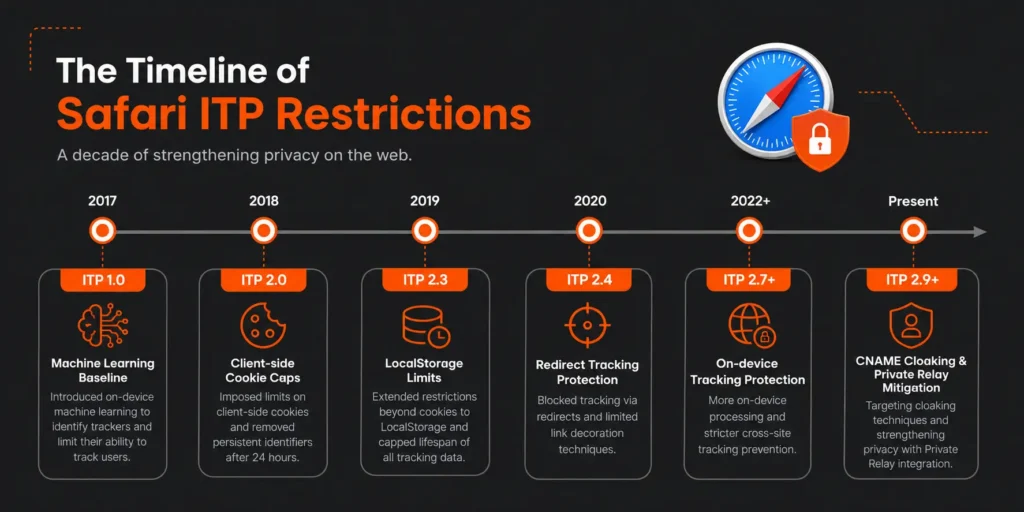
Understanding Safari Intelligent Tracking Prevention: Technical Mechanisms and Business Impact
Safari ITP Evolution and Current State
Apple introduced Intelligent Tracking Prevention in Safari 11 during 2017, establishing WebKit as the first browser engine implementing machine learning-based tracking prevention. ITP has evolved through multiple versions, each introducing stricter privacy protections that progressively eliminate tracking techniques. ITP 2.0 arrived in 2018, introducing the seven-day expiration for all persistent cookies set via JavaScript document.cookie API. ITP 2.1 followed in 2019, limiting first-party cookies to seven days when the top-level domain was classified as having cross-site tracking capability. ITP 2.2 in 2019 reduced the seven-day window to 24 hours for link decoration parameters. ITP 2.3 in 2019 began limiting localStorage and IndexedDB access to seven days without user interaction.
The current ITP implementation in Safari 17 and Safari 18 enforces multiple restrictions simultaneously. Client-side set cookies through JavaScript document.cookie expire after seven days maximum regardless of explicit expiration dates specified. Server-set cookies through HTTP Set-Cookie headers with explicit expiration dates exceeding seven days receive longer lifetimes only when domains meet specific conditions. LocalStorage and IndexedDB data face deletion after seven days of user inactivity on the domain. CNAME cloaking detection identifies attempts to bypass ITP through DNS aliasing of third-party tracking domains. Private Relay obscures IP addresses for iCloud subscribers, preventing geolocation and device fingerprinting.
Safari distinguishes between first-party and third-party contexts based on domain relationships and user interaction history. First-party cookies belong to the domain displayed in the address bar and the user is directly interacting with. Third-party cookies belong to domains embedded within first-party pages through iframes, images, scripts, or other resources. ITP classification algorithms analyze browsing patterns identifying domains appearing across multiple unrelated websites, suggesting tracking behavior. Domains classified as trackers face immediate cookie blocking in third-party contexts and accelerated expiration in first-party contexts.
The business impact varies significantly across website and application types. Marketing websites relying on third-party analytics platforms lose visitor tracking capability as third-party cookies are blocked immediately. E-commerce websites experience shopping cart abandonment increases as seven-day cookie expiration causes cart loss for users not returning within the window. SaaS web applications face authentication timeout complaints as session cookies expire prematurely. Corporate websites with embedded chat widgets, form builders, or content delivery networks encounter functionality degradation as third-party resources lose state persistence.
Cross-Browser Privacy Landscape Comparison
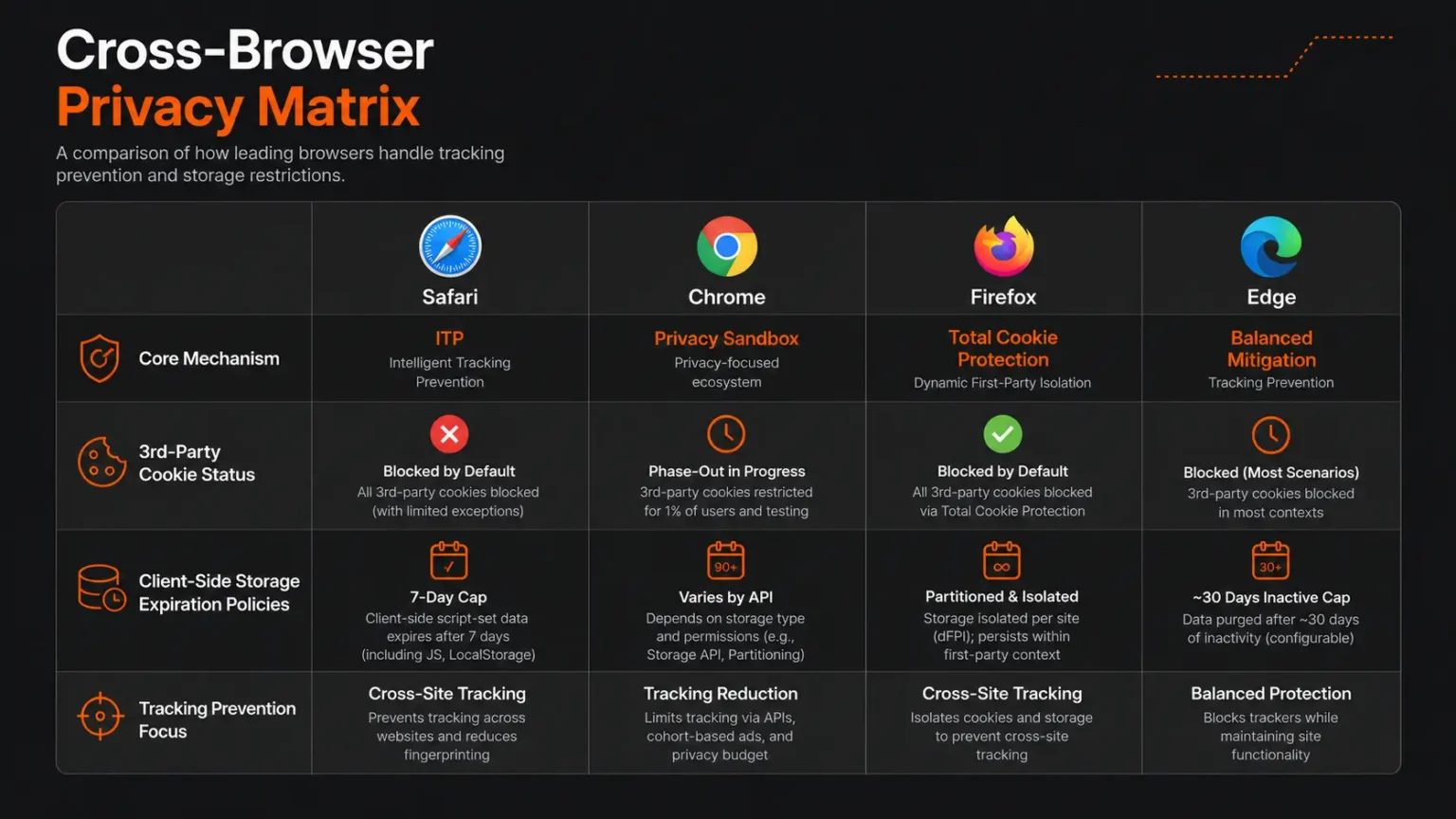
Understanding Safari restrictions requires context within the broader browser privacy landscape. Chrome commands 65.7% global market share as of December 2024, Firefox maintains 3.2%, and Edge holds 5.1%. Each browser implements distinct privacy approaches creating a fragmented landscape requiring tailored technical solutions.
Google Chrome announced third-party cookie deprecation multiple times with implementations repeatedly delayed. The most recent timeline established Q1 2025 for beginning phased deprecation, with complete removal projected for late 2025. Chrome’s Privacy Sandbox initiative provides alternatives to third-party cookies through APIs including Topics for interest-based advertising, Protected Audience for remarketing, Attribution Reporting for conversion measurement, and Private Aggregation for cross-site measurement. Chrome’s approach emphasizes preserving advertising ecosystem functionality while improving privacy, contrasting with Safari’s more aggressive restrictions.
Mozilla Firefox implements Enhanced Tracking Protection as the default privacy mechanism. Firefox distinguishes between Standard and Strict protection modes, with Standard mode blocking known trackers identified through Disconnect’s blocklist while allowing first-party cookies and cross-site cookies for non-tracking purposes. Strict mode blocks all third-party cookies regardless of tracking classification, approaching Safari’s aggressiveness. Firefox Total Cookie Protection introduced in 2021 implements cookie partitioning confining cookies to the website that created them, preventing cross-site tracking even when third-party cookies are technically allowed.
Microsoft Edge, built on Chromium, implements tracking prevention with three levels: Basic, Balanced, and Strict. Balanced mode, the default, blocks trackers from sites the user has not engaged with while allowing trackers from visited sites. Strict mode blocks most trackers across all sites similar to Firefox Strict mode. Edge’s approach aligns closely with Chrome given the shared Chromium foundation, with Microsoft committing to Privacy Sandbox support following Chrome’s timeline.
The fragmentation creates technical challenges for organizations. Solutions working in Chrome may fail in Safari and vice versa. Third-party analytics working in Firefox may break in Safari. Organizations must test across browsers rather than assuming consistent behavior. Safari’s restrictions represent the strictest implementation, making Safari compatibility the most challenging target. Solutions satisfying Safari requirements typically work across other browsers, establishing Safari as the baseline for privacy-compliant development.
Quantifying Safari Impact on Business Operations
Safari privacy restrictions create measurable business impacts across multiple dimensions including analytics accuracy, conversion tracking reliability, session management effectiveness, and user experience quality. Organizations must quantify impacts to justify technical solution investments and measure improvement effectiveness.
Analytics platforms report significant data loss in Safari browsers. Google Analytics studies indicate 13-36% visitor undercounting in Safari compared to other browsers, with variation depending on website characteristics and user behavior patterns. Client-side analytics relying on cookies or localStorage for visitor identification lose tracking when identifiers expire after seven days. Users visiting websites irregularly exceed seven-day windows between visits, appearing as new visitors rather than returning visitors. Behavioral analytics tracking user journeys across multiple sessions fragment as session linkage breaks. Marketing attribution models fail when conversion events cannot connect to originating campaigns due to expired identifiers.
E-commerce conversion rates decline measurably due to Safari restrictions. Shopping cart abandonment rates in Safari exceed other browsers by 8-15% according to e-commerce analytics platforms. Cart persistence mechanisms using client-side storage lose data after seven days, forcing users to rebuild carts. Checkout flows spanning multiple sessions fail when authentication cookies expire, requiring users to log in repeatedly. Saved payment methods stored in localStorage disappear, increasing checkout friction. Product recommendations based on browsing history lose accuracy as historical data expires, reducing cross-sell and upsell effectiveness.
SaaS web application user complaints increase regarding session timeouts and data loss. Session management implementations using JavaScript-set cookies encounter unexpected expiration as seven-day limits override explicit session durations. Users returning to applications after weekends find sessions expired despite “remember me” selections. Multi-tab workflows fail when localStorage isolation prevents state sharing between tabs opened from the same domain. Form data temporarily stored in localStorage disappears after seven days, causing data loss for saved drafts. User preference persistence fails as settings stored client-side expire, frustrating users who repeatedly configure the same preferences.
Corporate website form submissions fail at higher rates in Safari compared to other browsers. Contact forms using third-party form builders like Typeform or JotForm embedded via iframes lose functionality as cross-site cookies and storage get blocked. CAPTCHA implementations relying on third-party services encounter failures as tracking prevention blocks verification mechanisms. Progressive form implementations saving partial progress to localStorage lose data, forcing users to restart lengthy forms. Multi-step forms requiring state persistence between pages fail when cookie-based session tracking expires mid-completion.
Organizations require measurement frameworks quantifying Safari-specific impacts. Web analytics platforms must segment metrics by browser, identifying Safari performance gaps. E-commerce platforms should track conversion funnels by browser, measuring abandonment rate differences. SaaS applications need user support ticket analysis identifying browser-specific complaints. A/B testing frameworks must account for browser differences when measuring treatment effects. Measurement provides baseline quantification for calculating return on investment for technical solution implementations.
Safari Privacy Restrictions: Technical Deep Dive and Root Cause Analysis
Cookie Expiration Mechanics and Classification
Safari Intelligent Tracking Prevention implements complex cookie expiration logic based on cookie setting methods, domain classification, and user interaction patterns. Understanding these mechanics enables developers to architect solutions maximizing cookie persistence within privacy constraints.
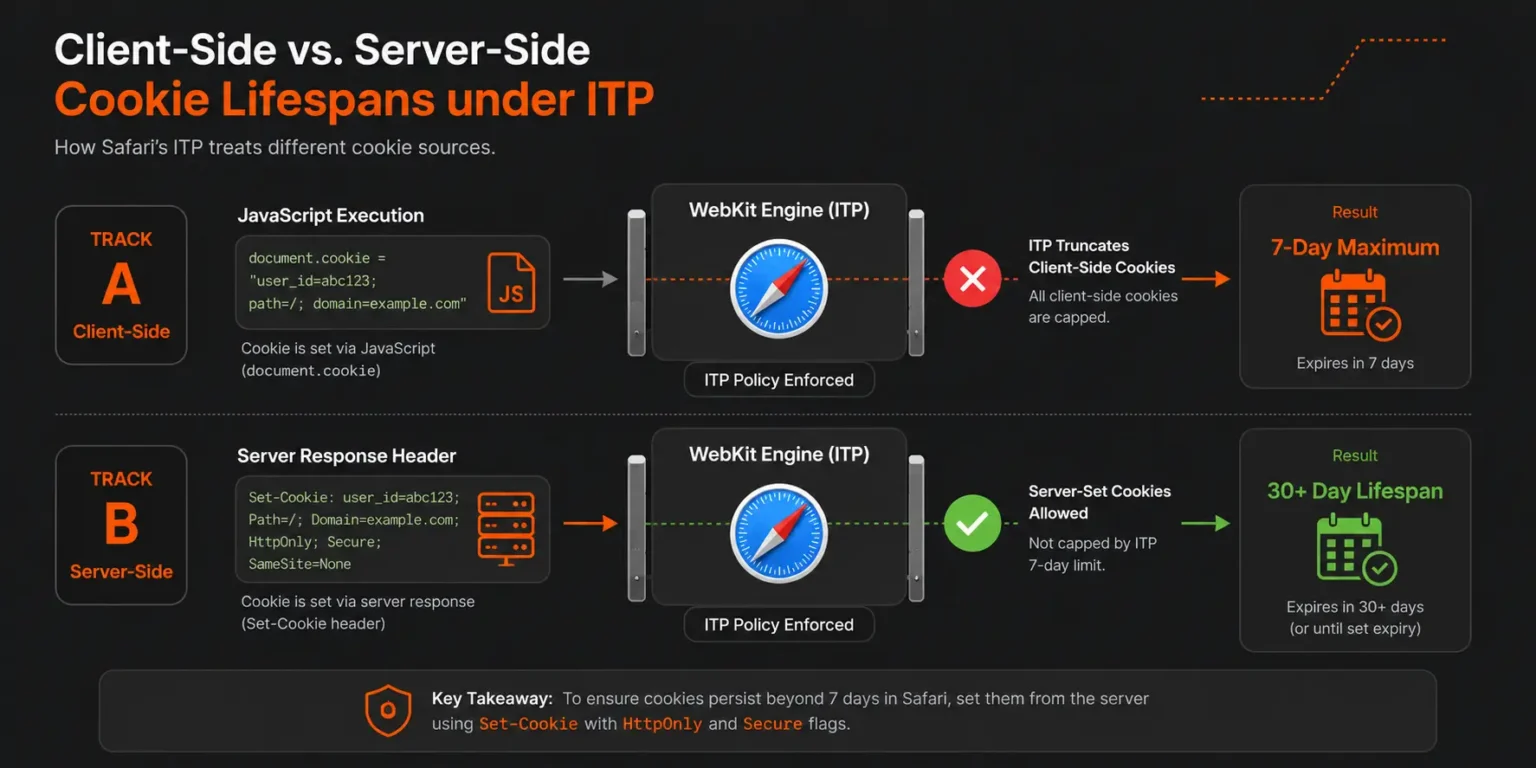
JavaScript-set cookies using document.cookie API face strict seven-day maximum expiration regardless of explicit expiration dates specified in the cookie string. This restriction applies even when developers specify expiration dates years in the future. Safari ignores the explicit expiration and enforces the seven-day cap. The seven-day counter resets when users interact with the website, defined as navigating to pages, clicking links, submitting forms, or otherwise actively engaging. Passive page loads through background tabs or programmatic navigation do not reset the counter.
Server-set cookies using HTTP Set-Cookie headers receive preferential treatment compared to JavaScript-set cookies. When web servers send Set-Cookie headers with explicit Max-Age or Expires attributes, Safari allows expiration dates beyond seven days if the domain meets qualification criteria. Safari evaluates whether the domain has been classified as having cross-site tracking capability based on browsing pattern analysis. Domains not classified as trackers maintain their specified cookie expiration. Domains classified as trackers receive accelerated expiration similar to JavaScript-set cookies.
The qualification criteria for extended cookie expiration remain partially opaque as Apple does not publish explicit classification algorithms. Observed patterns suggest several factors influence classification including domain appearance across unrelated websites within short timeframes, presence of tracking pixels or analytics scripts, participation in advertising networks, cookie setting patterns indicative of third-party tracking, and lack of meaningful user interaction with the domain. Organizations can influence classification by ensuring legitimate first-party relationships with users, avoiding tracking-like behaviors, and implementing proper domain architecture.
Third-party cookies face immediate blocking regardless of expiration dates or setting methods. Third-party context occurs when resources load from domains different than the top-level domain displayed in the address bar. iFrame embeds, image requests, script loads, stylesheet requests, and XMLHttpRequests to different domains all constitute third-party contexts. Safari blocks cookie setting and reading in these contexts completely, breaking functionality depending on cross-site cookies. Many integration patterns relying on third-party cookies fail entirely in Safari, requiring architectural redesign.
SameSite cookie attribute provides developers with partial control over cookie behavior across contexts. SameSite=Strict prevents cookie transmission in any third-party context, including navigation from external sites. SameSite=Lax allows cookie transmission during top-level navigation from external sites but blocks transmission in embedded contexts. SameSite=None explicitly allows transmission in third-party contexts but requires Secure attribute indicating HTTPS-only transmission. Safari respects SameSite attributes but combines them with ITP restrictions, meaning SameSite=None cookies still face blocking when ITP classifies the domain as a tracker.
LocalStorage and SessionStorage Limitations
Web Storage APIs including localStorage and sessionStorage provide client-side data persistence mechanisms that many websites and applications rely upon for functionality. Safari implements restrictions on both storage mechanisms that create unexpected behavior for developers accustomed to other browsers.
LocalStorage in Safari faces automatic deletion after seven days without user interaction. The seven-day counter operates independently from cookie expiration, using the same user interaction definition. Applications storing authentication tokens, user preferences, cached data, or application state in localStorage lose this data when users do not interact with the website for seven days. The deletion occurs without warning or error, causing applications to encounter empty localStorage unexpectedly. Developers must implement defensive code checking for data presence and handling missing data gracefully.
SessionStorage maintains data only for the duration of the page session, consistent across all browsers. However, Safari’s definition of session boundaries differs from other browsers in specific scenarios. Safari creates separate sessionStorage instances for each tab, preventing data sharing between tabs even when opened from the same parent page. Applications implementing multi-tab workflows expecting sessionStorage visibility across tabs fail in Safari. Safari also clears sessionStorage more aggressively during navigation, particularly when users navigate away and return through history traversal.
The storage quota limits in Safari differ from other browsers. Safari allocates approximately 5-10 MB per domain for localStorage and sessionStorage combined, compared to Chrome’s 10 MB per origin and Firefox’s 10 MB per origin. Applications storing large datasets client-side may exceed Safari’s quota, causing write operations to fail with QuotaExceededError exceptions. Developers must implement quota management checking available space before writes and implementing cleanup strategies when quotas approach limits.
IndexedDB provides more robust client-side database capabilities for complex data storage needs. Safari implements IndexedDB with similar seven-day expiration restrictions as localStorage. Data stored in IndexedDB faces automatic deletion after seven days without user interaction. Additionally, Safari’s IndexedDB implementation has historically contained bugs and performance issues compared to other browsers. Applications using IndexedDB as primary data storage must account for Safari’s restrictions and implementation differences.
The Privacy-Preserving Ad Click Attribution API introduced by WebKit provides an alternative mechanism for conversion attribution without relying on cookies or persistent storage. However, this API specifically targets advertising use cases rather than general website or application functionality. Organizations seeking general-purpose persistent storage must architect solutions not relying on client-side storage mechanisms for critical functionality.
CNAME Cloaking Detection and DNS-Based Workarounds
Organizations attempted to bypass ITP restrictions by implementing CNAME cloaking, where analytics or tracking domains are aliased through DNS CNAME records to appear as subdomains of the first-party domain. Safari implemented detection mechanisms identifying and blocking CNAME cloaking attempts.
CNAME cloaking works by creating DNS CNAME records pointing subdomains like analytics.example.com to third-party tracking services like tracking.vendor.com. From the browser’s perspective, requests to analytics.example.com appear first-party because they match the example.com domain. The DNS resolution transparently redirects requests to tracking.vendor.com without browser visibility. This technique allowed third-party services to set first-party cookies and avoid ITP restrictions.
Safari’s CNAME cloaking detection examines response headers, timing patterns, and server characteristics identifying when apparent first-party subdomains actually resolve to third-party services. Heuristics include discrepancies between HTTP response headers typical of third-party services versus first-party infrastructure, network timing patterns inconsistent with geographic proximity, TLS certificate inspection revealing third-party ownership, and behavioral patterns matching known tracking services. When Safari detects CNAME cloaking, it reclassifies the subdomain as third-party, applying full ITP restrictions including immediate cookie blocking.
Organizations using Content Delivery Networks face collateral impact from CNAME cloaking detection. CDN configurations commonly use CNAME records pointing domains like cdn.example.com to CDN provider infrastructure. Safari’s detection heuristics may misclassify legitimate CDN usage as cloaking attempts, blocking cookies or applying restrictions incorrectly. CDN vendors have worked with Apple to establish patterns distinguishing legitimate CDN usage from tracking cloaking, but edge cases persist requiring careful configuration.
The technical solution avoiding CNAME cloaking issues involves implementing true first-party infrastructure rather than aliasing third-party services. Organizations should deploy analytics collection endpoints, authentication services, API gateways, and other critical functionality on infrastructure they directly control using their own domains. Server-side integration with third-party services maintains functionality while preserving first-party classification. This approach requires more technical investment than simple CNAME aliasing but provides Safari compatibility and future-proofing against evolving restrictions.
Private Relay and IP Address Masking
iCloud Private Relay introduces additional complexity for websites and applications relying on IP address visibility for functionality. Private Relay, available to iCloud subscribers, routes Safari traffic through proxy servers masking the originating IP address from destination websites. Organizations see proxy server IP addresses rather than actual user IP addresses, affecting geolocation, rate limiting, fraud detection, and analytics.
Private Relay operates in two hops. The first hop, operated by Apple, receives the user’s request and knows the user’s IP address but cannot see the destination website. The second hop, operated by third-party content delivery networks, receives the proxied request and knows the destination website but cannot see the user’s IP address. This split architecture prevents any single party from correlating user identity with browsing activity.
The geolocation impact affects websites using IP addresses for location-based content, pricing, or access restrictions. Geolocation services querying IP addresses return proxy server locations rather than user locations. Organizations cannot determine user countries, regions, or cities reliably. Content delivery optimization based on geographic proximity becomes less effective. Regulatory compliance requirements restricting content by jurisdiction become difficult to enforce. Organizations must implement alternative location determination methods including HTML5 Geolocation API with explicit user permission, account profile location settings, or location detection during account registration.
Rate limiting and DDoS protection systems relying on IP addresses face challenges when multiple users share proxy IP addresses. Traditional rate limiting counts requests per IP address, blocking IP addresses exceeding thresholds. Private Relay causes multiple legitimate users to share proxy IP addresses, causing innocent users to encounter rate limit blocks when other users sharing the same proxy exceed thresholds. Organizations must implement more sophisticated rate limiting using cookies, account identifiers, or device fingerprinting techniques that maintain effectiveness despite IP address masking.
Fraud detection systems using IP geolocation for risk assessment lose accuracy. Transaction fraud scores typically increase when IP addresses associate with proxies or VPNs due to anonymization correlation with fraudulent activity. Private Relay causes legitimate users to receive elevated fraud scores incorrectly. Organizations must retrain fraud detection models accounting for Private Relay prevalence and implementing alternative risk signals not dependent on IP address characteristics.
Analytics platforms measuring traffic sources and user demographics lose accuracy when IP addresses are masked. Geographic reporting becomes unreliable as proxy locations replace user locations. Audience demographic estimation based on IP address characteristics becomes impossible. Organizations must implement alternative analytics collection methods including server-side analytics with authenticated user data, first-party cookies for session tracking, and survey-based demographic collection with user consent.
Technical Solutions for Safari Compatibility: Architecture and Implementation
Server-Side Cookie Management and Session Handling
Moving session management from client-side JavaScript to server-side HTTP headers represents the most reliable approach for maintaining Safari compatibility. Server-set cookies through Set-Cookie HTTP headers avoid the seven-day JavaScript-set cookie restriction, allowing extended expiration dates for domains not classified as trackers.
Organizations should implement session management exclusively through HTTP-only cookies set via server responses. The Set-Cookie header should specify HttpOnly attribute preventing JavaScript access, Secure attribute requiring HTTPS transmission, SameSite=Lax or SameSite=Strict preventing cross-site cookie transmission, appropriate expiration through Max-Age or Expires attributes, and path and domain attributes scoping cookie visibility appropriately. Example implementation sets session cookies with 30-day expiration through server responses, avoiding client-side cookie manipulation entirely.
Authentication flow design must accommodate server-side cookie management. Organizations should implement authentication through server-rendered pages or API endpoints returning Set-Cookie headers rather than client-side JavaScript setting authentication tokens. Login forms should submit to server endpoints that validate credentials and set session cookies before redirecting. Single-page applications requiring JWT tokens should retrieve tokens from HttpOnly cookies rather than localStorage, using server-side token validation for API requests. Refresh token rotation should occur server-side with new tokens delivered through Set-Cookie headers.
Session extension mechanisms require user interaction to reset the seven-day counter. Organizations can implement heartbeat requests during active usage, sending periodic requests to the server during active sessions to demonstrate user engagement. These requests should trigger Set-Cookie headers resetting cookie expiration. However, background heartbeats without actual user interaction do not reset ITP counters. Session extension must correspond to genuine user activity like page navigation, form submission, or explicit user actions.
Organizations must implement graceful session expiration handling for scenarios when seven-day limits expire despite extended cookie expiration dates. Applications should detect expired sessions through failed authentication checks, redirect users to login pages with clear messaging explaining the timeout, preserve application state through URL parameters or server-side storage allowing state restoration after re-authentication, and implement “remember me” functionality through long-lived cookies combined with security controls like device fingerprinting or notification of new device logins.
Multi-domain session management presents particular challenges under Safari restrictions. Organizations operating multiple domains must implement careful coordination. Single sign-on implementations cannot rely on third-party cookies for session transfer between domains. Organizations should implement OAuth 2.0 or SAML flows for cross-domain authentication, use server-side session federation with centralized authentication services, implement explicit authentication flows when users navigate between domains, or consolidate functionality under single domains where technically feasible. Subdomain isolation for security purposes must account for cookie scope limitations.
First-Party Analytics Implementation and Server-Side Tracking
Analytics tracking requires architectural redesign to maintain Safari compatibility. Organizations should implement server-side tracking rather than relying exclusively on client-side JavaScript beacons. Server-side implementations collect analytics events on web servers processing page requests, avoiding client-side storage restrictions and providing more reliable data collection.
Server-side analytics architectures involve multiple components. Web servers log request details including URLs, user agents, referers, IP addresses, timestamps, and custom event parameters. Log collection pipelines aggregate logs from multiple web servers into centralized data warehouses. Data processing pipelines parse logs, sessionize visits, identify unique users, and generate analytics metrics. Visualization platforms query processed data generating reports, dashboards, and insights. Organizations can implement custom analytics pipelines or use platforms like AWS Cloud Management services for scalable infrastructure.
Hybrid analytics approaches combine server-side and client-side collection maximizing data capture. Server-side tracking captures all page views, providing baseline traffic visibility unaffected by client-side blocking. Client-side JavaScript captures rich interaction events like scroll depth, click events, form interactions, and engagement metrics unavailable server-side. Data from both sources merges during processing using session identifiers correlating client and server events. This approach provides comprehensive analytics while maintaining Safari compatibility for core metrics.
First-party cookie-based user identification replaces third-party analytics cookies. Organizations should implement user ID cookies set through server-side Set-Cookie headers on their own domains. These first-party cookies persist longer than JavaScript-set cookies when domains maintain good standing with ITP classification. User ID generation should use cryptographically secure random values avoiding personally identifiable information. Cookie rotation should occur periodically balancing user tracking persistence with privacy considerations. Server-side analytics pipelines consume these cookies for user identification and sessionization.
Event tracking APIs replace client-side beacon requests to third-party analytics domains. Organizations should implement first-party API endpoints receiving analytics events from client-side JavaScript. These endpoints run on the same domain as the website, avoiding cross-site restrictions. API implementations validate, enrich, and forward events to analytics platforms or data warehouses. Event batching reduces request overhead by collecting multiple events before transmission. Organizations must implement Application Server Monitoring ensuring analytics API reliability.
Conversion attribution without third-party cookies requires alternative approaches. Organizations should implement server-side attribution models using first-party data. URL parameter tracking captures campaign information through UTM parameters or custom schemes. Server-side session storage links campaign parameters to eventual conversions. Multi-touch attribution models distribute conversion credit across touchpoints using first-party session data. Organizations must implement careful deduplication avoiding overcounting when users engage through multiple channels.
Form Handling and Third-Party Service Integration
Form submissions encountering Safari restrictions typically involve third-party form builders, CAPTCHA services, payment processors, or other embedded services requiring cross-site communication. Organizations must redesign integration patterns avoiding third-party cookies and cross-site storage access.
First-party form hosting eliminates cross-site restrictions by implementing forms directly on the organization’s domain. Organizations should build custom forms using server-side rendering or client-side frameworks hosted on their infrastructure rather than embedding third-party form builders. Form submissions post to server-side endpoints on the same domain processing submissions, validating inputs, and integrating with backend systems. Form state persistence uses server-side session storage rather than client-side localStorage. This approach provides complete control over form functionality and eliminates Safari compatibility issues.
CAPTCHA implementations require special handling to maintain functionality. Google reCAPTCHA operates as a third-party service setting cookies for bot detection. Safari blocks these cookies breaking verification. Organizations should implement reCAPTCHA Enterprise with score-based assessment rather than checkbox verification, reducing cookie dependence. Server-side reCAPTCHA verification using the reCAPTCHA API validates challenge responses without client-side dependencies. Alternative CAPTCHA services like hCaptcha provide first-party deployment options where organizations self-host CAPTCHA infrastructure on their own domains. Organizations must balance bot protection with user experience, implementing tiered verification where low-risk submissions proceed without CAPTCHA while high-risk attempts trigger verification.
Payment processing integrations commonly use third-party payment processors requiring cross-site communication for PCI compliance. Organizations cannot process credit cards directly without PCI DSS compliance certification. Solutions include hosted payment pages where users redirect to payment processor domains for transaction completion, returning to merchant domains after completion. Payment processor-hosted forms avoid cross-site restrictions as the entire payment flow occurs on the processor domain. Tokenization services like Stripe Elements provide embeddable payment forms running in iframes but using first-party tokens rather than cookies for session tracking. Organizations should work with payment processors supporting Safari compatibility explicitly, testing payment flows in Safari before production deployment.
Chat widget integration faces similar third-party challenges. Embedded chat widgets from services like Intercom or Drift set third-party cookies for user identification and conversation threading. Safari blocks these cookies causing conversation fragmentation. Organizations should implement first-party chat widget hosting where chat infrastructure runs on their domains. API-based chat services allow custom frontend implementation while leveraging third-party backend services. Organizations maintain session state in first-party cookies or server-side storage, sending session identifiers to chat APIs for conversation correlation. Custom implementations require more development investment but provide Safari compatibility and better customization options.
Content delivery network configurations must avoid CNAME cloaking detection. Organizations should use CDN services properly classified as infrastructure rather than tracking. CDN providers like CloudFlare, Akamai, and Fastly work with Apple ensuring their infrastructure patterns receive proper classification. Organizations must configure CDN domains correctly using appropriate DNS records, TLS certificates, and HTTP header configurations. Testing CDN configurations in Safari verifies functionality before production deployment. Organizations should avoid CDN configurations that mimic tracking patterns, such as setting cookies for non-CDN purposes or collecting analytics unrelated to content delivery.
Application State Management Without Client-Side Storage
Single-page applications and progressive web applications heavily utilize localStorage and sessionStorage for state management. Safari’s seven-day expiration and storage isolation breaks many common patterns. Organizations must implement alternative state management approaches maintaining functionality across browser restrictions.
Server-side session storage replaces client-side state persistence. Organizations should store application state in server-side sessions identified through HttpOnly cookies. State mutations occur through API requests to server endpoints that update session storage and return current state. Client-side code maintains transient state in memory during active sessions but retrieves state from servers when pages load or reload. This approach ensures state persistence beyond seven-day client storage limits. Organizations must implement AWS Cloud Management infrastructure supporting session storage scalability for large user populations.
URL-based state management encodes application state in URL parameters or hash fragments. Organizations can implement state serialization encoding complex state objects into URL parameters. Browser history APIs push new URLs as state changes occur. Page loads parse URL parameters reconstructing application state without client storage dependencies. This approach maintains state across sessions and devices, enabling state sharing through URL copying. However, URL length limits restrict state complexity, and sensitive state should not appear in URLs for security and privacy reasons. URL-based state works well for navigation state, filter selections, and similar user interface configurations.
Server-side rendering techniques eliminate client-side state bootstrapping requirements. Organizations can implement frameworks like Next.js enabling server-side rendering of React applications or Nuxt.js for Vue.js applications. Initial page loads render complete HTML on servers including current state, avoiding blank pages requiring client-side data fetching. Subsequent navigation can use client-side routing for performance while maintaining server-side rendering as fallback. This approach improves performance, search engine optimization, and Safari compatibility simultaneously. Organizations benefit from CI/CD implementation supporting server-side rendering deployment pipelines.
Database-backed state persistence stores state directly in backend databases rather than client storage. Each user account links to state records in databases. Application loads retrieve state through API requests authenticated using server-side session cookies. State mutations write to databases through API endpoints. This approach provides reliable persistence, enables state access across devices, and supports complex state structures exceeding client storage limitations. Organizations must implement efficient database queries avoiding performance bottlenecks from frequent state reads and writes. Caching layers can reduce database load for frequently accessed state.
Progressive enhancement strategies implement core functionality without client storage dependencies, adding enhanced features when storage is available. Organizations should design applications working without localStorage or sessionStorage as baseline, detect storage availability using JavaScript feature detection before attempting to use storage APIs, implement fallback behaviors when storage is unavailable or quota-exceeded errors occur, and provide user messaging when features require storage functionality explaining limitations in Safari. This approach ensures basic functionality across all browsers while taking advantage of capabilities when available.
Multi-tab communication without sessionStorage requires alternative approaches. BroadcastChannel API enables message passing between tabs and windows on the same origin, working in Safari 15.4 and later. Service Workers provide another communication mechanism, registering workers that receive messages from multiple tabs and coordinate responses. WebSocket connections to backend servers enable server-mediated communication, where tabs send messages to servers that broadcast to other connected tabs. Organizations must implement graceful degradation when multi-tab features are unavailable, such as warning users about opening multiple tabs or limiting functionality to single tabs.
Cross-Browser Compatibility Testing and Quality Assurance
Comprehensive Browser Testing Strategy
Safari compatibility requires systematic testing across browser versions, operating systems, and device types. Organizations must implement testing strategies covering the Safari ecosystem comprehensively rather than spot-checking single configurations.
Desktop Safari testing should cover macOS versions and Safari versions in combination. Safari 17 on macOS Sonoma represents current stable releases as of early 2025, but organizations must test Safari 16 on earlier macOS versions supporting significant user populations. Organizations should maintain testing infrastructure with virtual machines or cloud-based browser testing services providing access to multiple macOS and Safari combinations. Automated testing frameworks can execute test suites across configurations, while manual testing verifies user experience quality for critical workflows.
iOS Safari testing requires testing on physical devices spanning iOS versions. Safari on iOS maintains tighter coupling with iOS versions compared to desktop Safari and macOS. iOS 17 and iOS 18 introduce Safari updates independent of macOS Safari. Organizations must test on iPhone models spanning multiple screen sizes, processor generations, and iOS versions. iPad testing covers additional screen sizes and usage patterns. Device farms or cloud testing services provide access to physical devices for organizations unable to maintain extensive device inventories. Organizations should test both mobile-optimized and responsive desktop layouts when applications target iPhone and iPad.
iPadOS Safari introduces additional considerations compared to iOS. iPadOS enables desktop-class browsing with keyboard and mouse support, multitasking features, and larger display support. Websites may receive desktop user agents rather than mobile user agents depending on content and user preferences. Organizations must test both mobile and desktop experiences on iPadOS, ensuring applications adapt appropriately. Desktop-targeted features should work in iPadOS Safari when enabled, while touch-optimized interfaces should function correctly when users interact with touch input.
Browser version coverage should span at least the current major version and one prior major version. Safari 17 and Safari 16 represented minimum coverage as of early 2025. Organizations serving users with older devices may need extended coverage including Safari 15 or earlier versions. Usage analytics should guide version coverage decisions, balancing testing effort against user population sizes on specific versions. Organizations must monitor Safari release cycles and beta versions, testing upcoming versions before public release identifying compatibility issues proactively.
Automated testing integration into CI/CD pipelines ensures consistent browser testing during development. Organizations should configure continuous integration systems executing browser tests automatically when code commits occur. Testing frameworks like Selenium, Playwright, or Cypress support Safari WebDriver enabling automated test execution. Test suites should cover authentication flows, form submissions, critical user workflows, and JavaScript functionality dependent on cookies or storage. Automated screenshot comparison detects visual regressions across browsers. Organizations must maintain test infrastructure reliability ensuring tests produce consistent results.
Manual testing complements automated testing for user experience validation. Automated tests verify functional correctness, but user experience quality requires human judgment. Organizations should establish manual testing protocols covering critical workflows, subjective quality assessment of animations and interactions, performance perception during real-world usage conditions, and edge case scenarios difficult to automate. Manual testing should occur in realistic environments using actual devices and network conditions rather than simulators or emulators when possible.
Feature Detection and Progressive Enhancement
Organizations must implement defensive coding practices accounting for browser feature availability variations. Feature detection determines whether specific APIs are available before attempting to use them, enabling graceful degradation when features are unavailable.
Cookie availability detection verifies whether cookies can be set and read successfully. Organizations should attempt to set test cookies during application initialization, read the test cookies verifying persistence, and implement fallback authentication or session management when cookies are unavailable. Some Safari configurations or browser extensions may block cookies entirely, requiring applications to handle cookie-free operation. Organizations should provide user messaging explaining reduced functionality when cookies are blocked, guiding users through browser configuration if appropriate.
Web Storage availability detection checks whether localStorage and sessionStorage APIs exist and function correctly. Organizations should wrap storage access in try-catch blocks handling quota exceeded errors, test storage write and read operations during initialization, and implement fallback state management when storage is unavailable. Safari’s seven-day expiration means storage may appear available but data disappears unexpectedly. Applications must handle missing data gracefully without assuming persistence.
IndexedDB availability and functionality testing ensures reliable database operations. IndexedDB implementations vary across browsers with different bug characteristics. Organizations should abstract IndexedDB access through wrapper libraries providing consistent interfaces, implement fallback storage mechanisms when IndexedDB is unavailable or malfunctioning, and test IndexedDB operations in Safari specifically rather than assuming cross-browser compatibility based on specification compliance.
Third-party service availability testing detects when cross-site restrictions block embedded services. Organizations should implement timeout-based detection attempting to load third-party resources with timeout fallbacks when loading fails. Error handling for third-party service failures should provide alternative functionality or messaging explaining limitations. Applications should not fail completely when optional third-party features are unavailable, instead degrading gracefully to core functionality.
Progressive enhancement principles guide implementation strategies. Organizations should implement baseline functionality working across all browsers without dependencies on optional features, layer enhanced features detected as available at runtime, and provide equivalent functionality through alternative methods when primary methods are unavailable. This approach ensures applications remain functional in Safari while taking advantage of capabilities in less restrictive browsers.
Polyfills and shims provide missing functionality in older browsers. Organizations should use established polyfill libraries implementing missing APIs rather than custom implementations. Polyfills should load conditionally only when needed, avoiding unnecessary code download for browsers providing native implementations. However, polyfills cannot replicate browser privacy restrictions; organizations cannot polyfill around ITP restrictions, requiring architectural solutions rather than code compatibility layers.
Performance Optimization for Safari
Safari performance characteristics differ from other browsers requiring specific optimization approaches. Organizations must optimize for Safari-specific performance considerations ensuring responsive user experiences.
Safari’s JavaScript engine, JavaScriptCore, exhibits different performance characteristics compared to Chrome’s V8 engine. Code patterns performing well in Chrome may underperform in Safari. Organizations should profile JavaScript performance specifically in Safari using Safari Web Inspector or Instruments on macOS. Performance hotspots identified through profiling inform optimization priorities. Common optimization patterns include reducing DOM manipulation frequency, avoiding layout thrashing through batched reads and writes, optimizing loop performance through appropriate iteration methods, and minimizing closure allocations in performance-critical paths.
Network performance optimization accounts for Safari’s connection management and caching behaviors. Safari implements aggressive caching reducing repeated resource fetching. Organizations should implement appropriate cache headers leveraging Safari’s caching while ensuring content freshness. HTTP/2 and HTTP/3 support in Safari enables request multiplexing improving page load performance. Organizations should ensure web servers support modern HTTP protocols and configure optimally for Safari clients. Resource hints including preconnect, prefetch, and preload optimize speculative loading behaviors, though Safari implements these hints conservatively compared to Chrome.
Image loading and rendering performance in Safari benefits from format selection and optimization. Safari supports WebP image format providing superior compression compared to JPEG and PNG. Organizations should implement WebP with JPEG/PNG fallbacks for older browsers. AVIF support offers even greater compression efficiency and higher image quality than WebP, supported in Safari 16 and later. Organizations should prioritize AVIF for modern Safari versions, cascading to WebP and then JPEG/PNG for legacy support.
Video content delivery requires specific attention to Safari’s codec preferences. While most browsers support VP9, Safari’s hardware acceleration is optimized for HEVC (H.265). delivering HEVC video to Safari clients reduces battery consumption on mobile devices and improves playback smoothness. content delivery logic should detect Safari user agents and serve HEVC manifests (HLS) where possible, while serving VP9/WebM to Chrome and Firefox. Additionally, Safari’s strict autoplay policies require video elements to be muted and contain the playsinline attribute for successful automatic playback on iOS, preventing video blocking that disrupts user experience.
CSS and layout rendering in Safari often deviate from other browser engines, particularly regarding viewport units on mobile devices. The dynamic address bar on iOS causes 100vh calculations to fluctuate or overlap content. Organizations should adopt Dynamic Viewport Units (dvh, lvh, svh) supported in modern Safari versions to ensure consistent layout sizing regardless of UI chrome visibility. For older Safari versions, CSS implementations should use -webkit-fill-available or JavaScript-based height calculations to prevent layout shifting and inaccessible content areas.
Conclusion: Embracing the Privacy-First Web
Overcoming Safari’s privacy restrictions represents a fundamental shift in web architecture rather than a series of temporary patches. The technical challenges imposed by Intelligent Tracking Prevention, storage limitations, and strict privacy defaults compel organizations to move away from fragile client-side dependence toward robust server-side infrastructure.
The solutions detailed in this guide, ranging from server-side session management and first-party analytics pipelines to progressive enhancement and comprehensive device testing, establish a foundation for “Privacy by Design.” While Safari currently presents the strictest environment, other browsers including Chrome and Edge are moving toward similar privacy models. Investments made today to solve Safari compatibility issues effectively future-proof applications against the broader industry trend of third-party cookie deprecation and enhanced user privacy.
Organizations that proactively adapt their enterprise architectures to respect Safari’s constraints will not only recover lost data and revenue but will also deliver superior performance and reliability to the most valuable demographic of mobile and enterprise users. The era of unrestricted client-side tracking has ended; the era of privacy-centric, server-driven web application development has arrived.